Archive for the 'Commercial' Category
Thursday, November 30th, 2006
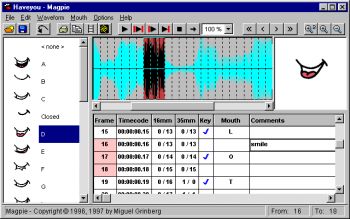 Magpie and Magpie Pro are very specialist software. What they do is allow animators to figure out what mouth shapes to animate when adding visuals to avoice. It’s called lip sync. Actors record voices, and animators hear those words and draw or fashion from clay,the expressions and mouth shapes of the characters. Sounds simple, but it’s really not. Magpie and Magpie Pro are very specialist software. What they do is allow animators to figure out what mouth shapes to animate when adding visuals to avoice. It’s called lip sync. Actors record voices, and animators hear those words and draw or fashion from clay,the expressions and mouth shapes of the characters. Sounds simple, but it’s really not.
Magpie and it’s big brother Magpie Pro make this easy by loading the sound file up and breaking it down into frame sized pieces. Then you can assign a mouth shape to the syllables you hear, frame by frame. Then you can play the sound and watch the mouth. If it matches and looks good, you’re done, if not it’s back to the old drawing board. Magpie makes it simple.
Find all the details and demo download at Third Wish Software.
Posted in Audio, Commercial, Design, Main, Multimedia, Shareware, Utilities, Video | 1 Comment »
Thursday, November 30th, 2006
 Ever get the urge to go back in time, a simpler when everything, including interpersonal communication was more elegant, had a little more style? Why not? They haven’t stopped doing telegrams yet, but it’s only a matter of time. There’s something about a telegram, a certain old world class, which emails still can’t equal with all their sassy speed and efficiency. Ever get the urge to go back in time, a simpler when everything, including interpersonal communication was more elegant, had a little more style? Why not? They haven’t stopped doing telegrams yet, but it’s only a matter of time. There’s something about a telegram, a certain old world class, which emails still can’t equal with all their sassy speed and efficiency.
Retrograms aims to stop all that. Choose from a range of excellent retro looking telegrams and have them shipped to your friends either as e-cards over the Internet, or as real live telegrams delivered through the mail. Okay, so they don’t travel as fast as real telegrams but boy oh boy do they ever look the part.
For all the retro telegram sending fun you can handle, go to Retro Gram.
Posted in Commercial, E-mail, Freeware, Fun, Internet, Main | 1 Comment »
Wednesday, November 29th, 2006
 This is a free open-source MSN Messenger clone called aMSN. If for any reason you want to use MSN messenger but without using the official MSN messenger client, then maybe its time to check this out. This is a free open-source MSN Messenger clone called aMSN. If for any reason you want to use MSN messenger but without using the official MSN messenger client, then maybe its time to check this out.
It does just about everything the official MSN messenger program does, plus some more, such as being able to sign into more than one account at a time. It supports display pictures, custom emoticons, file transfer, even webcam support.
When you read the list of features, you’ll see its virtually identical to the official client in every way, but one potentially useful thing is that you can download plug-ins from the site, as well as this, its also skinnable.
You can check out all the features in full and download it by going here.
Posted in Commercial, Developer, Internet, Main, Open Source, Shareware, Shell and Desktop, Social Software, Utilities, Windows | No Comments »
Wednesday, November 29th, 2006
 Sticky note paper is a popular way of taking down reminders, shopping lists, to-do lists, etc. Some people even ‘borrow’ some from work and use them for posting notes on the fridge freezer. The bright yellow pad enables us to quickly see a reminder note. Sticky note paper is a popular way of taking down reminders, shopping lists, to-do lists, etc. Some people even ‘borrow’ some from work and use them for posting notes on the fridge freezer. The bright yellow pad enables us to quickly see a reminder note.
Hott Notes is a free tool that enables you to write and place sticky-type notes on your desktop (ok, not the actual top of your desk, but on your screen,that thing you’re looking at now). You can use these notes in the usual manner – reminders, lists and more. The notes can be displayed in various translucent colors, so that you can use one color for reminders, another for business notes and one for home-related reminders.
You can even draw or write freehand on them!
Unlike the ‘borrowed’ from work sticky note paper, Hott Notes really is free and you can get it here with more info and here’s some screenshots.
Posted in Business, Commercial, Developer, Freeware, Information Management, Main, Open Source, Shell and Desktop, Text, Utilities, Windows | 2 Comments »
Tuesday, November 28th, 2006
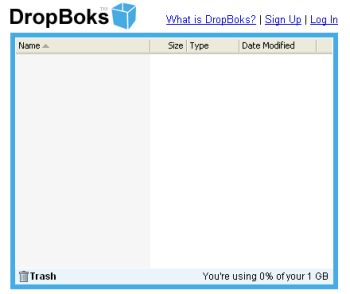 You need a place where you can upload and download files without any additional features like at Box.net? Well, try DropBoks. You need a place where you can upload and download files without any additional features like at Box.net? Well, try DropBoks.
It is a free storage solution where you can store up to 1GB of information. The only catch here is that you can’t upload (and download) big file at once (for example big music archive or a whole DivX movie or something else) – there’s a limit only 50MB at time.
It’s very simple to use (navigate) – sign up, then browse to the files you wish to upload and… in general that’s all. Selected files will be uploaded to a special folder from where users can download those files. When you don’t need some file anymore simply drag and drop it onto the trash icon.
Ps: One more thing. Remember I’ve told you that this service was free? Well, it’s so but guys who are running that site just ask for a $1 fee so there won’t be any ads.
Just try it for yourself. I’ve got a feeling you’ll love it.
Posted in Business, Commercial, Developer, Freeware, Information Management, Internet, Main, Open Source, Social Software, Utilities, Web services | No Comments »
Tuesday, November 28th, 2006
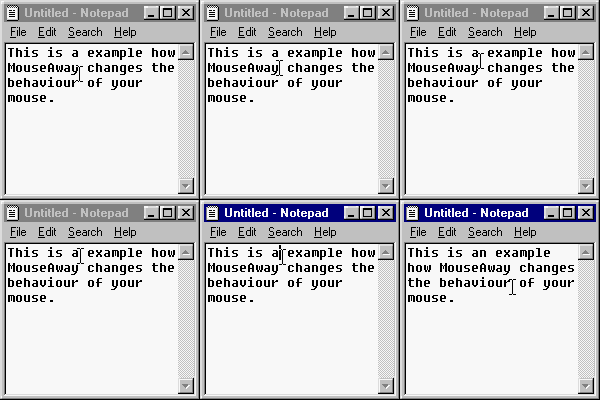 MouseAway is a simple and very small program that you may find useful. It simply moves your mouse cursor out of the way if you’re typing, so that you don’t have to manually move it yourself each time. MouseAway is a simple and very small program that you may find useful. It simply moves your mouse cursor out of the way if you’re typing, so that you don’t have to manually move it yourself each time.
It’s a pretty basic program that only does exactly as it says. The upside to it being so small and basic means it takes up very little memory. So if this is an minor annoyance for you, having to move the mouse cursor out of the way every time you type, then maybe it’s worth trying out!
(If its a major one, you really need to chill out a little!)
It’s freeware and you can download it from the homepage right here!
Posted in Commercial, Freeware, Main, Social Software, Text, Utilities | 1 Comment »
Tuesday, November 28th, 2006
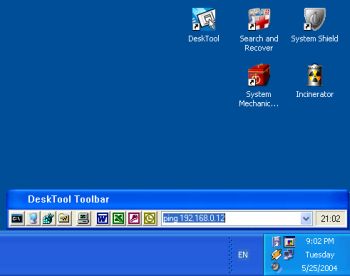 DeskTool is a desktop toolbar designed to give you easy access to frequently used applications by displaying an organized row of buttons from which to choose. DeskTool is tightly integrated into the desktop shell of Windows 9x and Windows NT/2000/XP. DeskTool is a desktop toolbar designed to give you easy access to frequently used applications by displaying an organized row of buttons from which to choose. DeskTool is tightly integrated into the desktop shell of Windows 9x and Windows NT/2000/XP.
It supports Drag and Drop for adding, deleting and moving buttons around on the toolbar. The really cool thing about it is that you can “dock” it to any one of the 4 edges of your screen (remember the Windows 95 taskbar?), or leave it free floating on the desktop. You can also make the toolbar “auto-hide” when docked to an edge, just as you can with the taskbar.
The fact that DeskTool can be made to stay on top of other windows makes it readily accessible.
A new updated version was released this month featuring these changes:
- Added support for multi-monitor configurations
- Added workaround when DeskTool appears out of the screen
- Changed location of the configuration file
- Improved installation
One downside to this shareware is that there are freeware that does similar things though not having the same feautures as DeskTool. Desktool goes for $15? Is it worth it? You’ll be the judge of that!
But since it really does what it is supposed to do very well, you might want to try it out! At least you can use the trial version freely to know if it’s worth it.
Check it out!
Posted in Business, Commercial, Developer, Information Management, Main, Shareware, Shell and Desktop, Utilities | 1 Comment »
Tuesday, November 28th, 2006
 Looking for an all-in-one package that can help you deal with the common daily problems you encounter on your PC? 12Ghosts might just be the thing for you. Looking for an all-in-one package that can help you deal with the common daily problems you encounter on your PC? 12Ghosts might just be the thing for you.
12Ghosts is a package that contains various utilities that accelerate and facilitate your working with your computer. If you need help with securing your important documents, automating daily tasks and so much more, 12Ghosts is right for you. Everything from an automatic saving device for documents to a shut down control tower is available, as well as Windows shell enhancements for easier and faster usage of Windows itself.
Recently a new updated version, 12Ghosts 8.10 was released. Some of the latest changes in this version include:
- ShutDown: New! Super fast shut down! This will just exit Windows and turn off the computer (or restart). Nothing is saved, though. Windows is NOT properly shut down. Use in emergency situations only
- Backup: The destination folder now is allowed to be below the source folder. It is excluded from backup automatically. For example, if you backup “C:\” to “C:\12-Backup” everything is backed up, except of course “C:\12-Backup” itself
- Wash: New! Suppress programs from START menu! Frequently used programs are added to the start menu automatically (XP/Vista). Protect your privacy and prevent certain programs from ever appearing there again
- Shredder is now checking if clean up of “delete_me…XX.del” files is required at startup of 12-Shredder. This may be necessary if Wipe Disk was interrupted before it could complete a Remove Old Names pass
- Tower: New color scheme with light background
Want to check it out? CLICK HERE!
Posted in Business, Commercial, Developer, Information Management, Internet, Main, Multimedia, Programming, Security, Shareware, Shell and Desktop, Utilities, Windows | 4 Comments »
Tuesday, November 28th, 2006
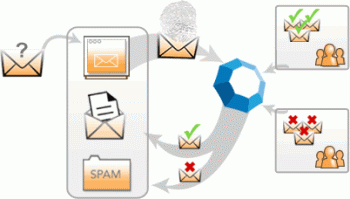 Cloudmark is an add-on for Microsoft Outlook and Outlook Express to prevent spam and also prevent and report phishing attacks. It can also block email viruses before they can do any potential damage. Cloudmark is an add-on for Microsoft Outlook and Outlook Express to prevent spam and also prevent and report phishing attacks. It can also block email viruses before they can do any potential damage.
To give it it’s full name, Cloudmark Desktop (formerly known as Cloudmark Safetybar) installs directly inside Outlook and Outlook Express, filters through your mail as it downloads, and moves suspected junk into a folder for you to review it later. The filtering mechanism is based on the Cloudmark service, the largest community-based platform used to stop the plague of junk email and email fraud, and it doesn’t require you to create any filters or rules. You can however create a white list, to make sure certain contacts will never be filtered, and also re-classify selected messages.
This is how it works. When a user clicks the ‘Block Spam’ or ‘Block Phish’ buttons, Cloudmark compares this feedback with feedback from other users. If other users in the network also consider the message to be spam or fraud, then similar messages are automatically blocked in the future, for all users in the network.
Likewise, if a user drags a message out of the Spam folder or clicks the ‘Unblock button’, Cloudmark compares this feedback with that of other users. If they agree, the message is unblocked throughout the Cloudmark network.
Well worth checking out if you’ve had it with too much spam. You can check out more info and a free trial by going here.
Posted in Business, Commercial, E-mail, Internet, Main, Security, Shareware, Windows | No Comments »
Tuesday, November 28th, 2006
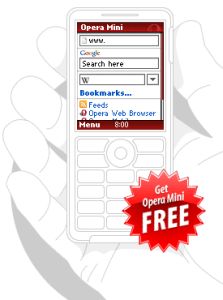 This week Opera Software has launched Opera Mini 3.0, the latest version of its mobile browser. Opera Mini is available for almost any mobile phone and optimized to reduce the size of data transferred to the phone, which makes browsing fast and cheaper for users that pay per kilobyte transferred. This week Opera Software has launched Opera Mini 3.0, the latest version of its mobile browser. Opera Mini is available for almost any mobile phone and optimized to reduce the size of data transferred to the phone, which makes browsing fast and cheaper for users that pay per kilobyte transferred.
Opera Mini can now allow users to launch their phone cameras through their browser to instantly publish photos to their e-mail, forum or blog. The integrated RSS feed reader keeps preferred news and content one click away in the browser. Users get the information they want sent directly to their phones.
Main features of Opera Mini:
- User-friendly access to all Web pages from a mobile phone
- Server-side data compression creates faster browsing and lower bills for services charged per kilobyte
- Download images, MP3s, etc. directly to the phone
- Style Opera Mini to your own taste by selecting from several new and bold skins to suit your mood
- Use Opera Mini’s advanced search functionality by selecting additional search engines for your start page
New with version 3.0:
- RSS feeds – Get all RSS news on your phone (now you can subscribe to your favorite RSS news feeds and every time you connect with Opera Mini all updates are just one click away. Sort the articles by feed source or by date)
- Photo blogging (share a picture from anywhere, anytime with your phone using Opera Mini’s photo sharing feature. Upload your photo to a blog or forum, or as an e-mail attachment)
- Content folding (the content folding feature shrinks lengthy menus to save your scrolling thumb. You can easily inspect the block of hidden content by hitting the [+] button next to it)
- Secure connection – safe and sound (secure connections will now let you safely use secured sites, such as your e-mail, bank site, online stores, with no exposure of your personal details)
- Even faster loading (all subsequent requests to a server within a session are now quicker. Opera Mini keeps an open connection between server and client reducing overhead TCP set-up times)
Just go to the Operamini site and download. You won’t regret it!
Posted in Browsers, Business, Commercial, Developer, Freeware, Internet, Main, Multimedia, News, OS Updates | 3 Comments »
|
|
|





