Archive for the 'Developer' Category
Wednesday, January 10th, 2007
 ArtRage is a really cool art program that is almost as good as the real thing, but without the expense or mess! You can “paint” very impressive paintings on your computer. ArtRage is a really cool art program that is almost as good as the real thing, but without the expense or mess! You can “paint” very impressive paintings on your computer.
There is obviously a lot of added benefits, if you make a mistake you can easily undo or change it, unlike the real world.
You can create any style of painting or drawing that you can imagine, from cartoons to oil paintings. There’s lots of different things to use such as crayons, pencils ,oils, chalk, markers etc. Paints smear and blend just like the real world and things can be adjusted in many ways. The interface is very easy to use, simple and tidy.
They say a picture is worth a thousand words, so rather than me just describe what’s possible with this program, check out some of the examples people have created here at the official ArtRage forum (plus i dont feel like typing a thousand words!)
Check out the ArtRage site for more details, the free edition is free (surprise surprise) but the full edition is only $19.95, surprisingly good value in my opinion!
Posted in Business, Commercial, Design, Developer, Freeware, Internet, Main, Multimedia, Shareware, Windows | No Comments »
Wednesday, January 10th, 2007
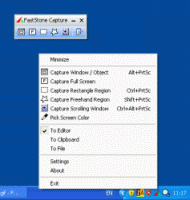 Here is a powerful and really cool utility for you. It’s called FastStone Capture. This is a powerful, flexible and intuitive screen capture utility. Here is a powerful and really cool utility for you. It’s called FastStone Capture. This is a powerful, flexible and intuitive screen capture utility.
I really enjoy the fact that it allows you to capture anything on the screen including windows, objects, full screen, rectangle regions, freehand-selected regions and scrolling windows/web-pages. FastStone Capture’s innovative features such as floating Capture Panel, hotkeys, resizing, cropping, text annotation, printing, emailing etc makes it a really useful tool to have.
The latest version FastStone Capture 5.1 has these changes:
- Added “Make Background Transparent” under Edit menu
- Added options in the Settings to show/hide “Screen Magnifier” and “Screen Color Picker” on Capture Panel
- Added “Bring to Front”/”Set to Back” to the right-click menu in Draw tool
- Changed hotkey for Draw tool from T to D
CLICK HERE to learn more and get a download.
Posted in Business, Commercial, Design, Developer, Main, Multimedia, Shareware, Utilities, Windows | 2 Comments »
Wednesday, January 10th, 2007
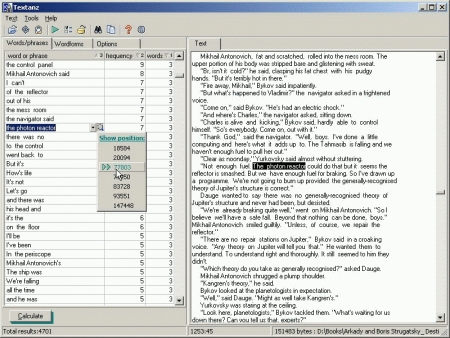
Are you in need of a software that can analyze text loaded from any source? If yes, this software is for you. It is called Textanz.
Textanz analyzes the text loaded from any source, and calculates frequencies of words, phrases or word forms. This information allows you to detect excessive use of words and constructions in text. Such a stylistic control is important, almost as much as the already-standard spell checking function.
The major change in the recent version, Textanz 2.3, which is becoming popular these days is the introduction of Charts – graphic presentation of frequency calculations.
Want to check it out? CLICK HERE!
Posted in Business, Developer, Information Management, Main, Shareware, Text, Windows | No Comments »
Tuesday, January 9th, 2007
 Belarc Advisor is a free little program thats sole purpose is to generate a detailed report of the hardware and software on your computer. Belarc Advisor is a free little program thats sole purpose is to generate a detailed report of the hardware and software on your computer.
This can become very useful information if you are upgrading hardware and need to know detailed information such as types of hardware such as memory chips or other installed components.
You simply run it and it generates a html page in your browser with detailed information about your computer’s hardware and your installed software.
The information includes Local Drive Volumes, memory Modules, printer information, Installed Licenses, Installed software, Multimedia information and a lot more. The report can be save for later or re-generated as needed.
It’s free for non-commercial use and you can get it here.
Posted in Business, Developer, Freeware, Information Management, Main, Utilities, Windows | No Comments »
Tuesday, January 9th, 2007
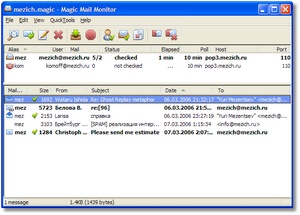 In case DynAdvance Notifier is not really your thing or you just need a free email notifier, here is one for you. It is called Magic Mail Monitor (MMM). In case DynAdvance Notifier is not really your thing or you just need a free email notifier, here is one for you. It is called Magic Mail Monitor (MMM).
Magic Mail Monitor (MMM) is a free POP3 mail monitor with multiple accounts support. It sits silently in your system tray, and notifies you about new messages in your mailboxes. This gives you an opportunity to preview messages so you can delete unwanted mail and by so doing avoid spam and viruses.
MMM is a good easy to use freeware that helps you stay in touch with multiple email accounts easily. To help you fight spam, save time and traffic, MMM also offers configurable filters, friends list, partial loading and other easy to use tools.
Latest Changes in the recent version includes:
- Multiline titletip for long subjects
- Optional sorting by mail-check time
- Matched line from filter file shown in msg properties
- Fixed problem with starting hidden from maximized state
Want to check it out? It’s Free! Click here
Posted in Business, Commercial, Developer, E-mail, Freeware, Internet, Main, Windows | No Comments »
Monday, January 8th, 2007
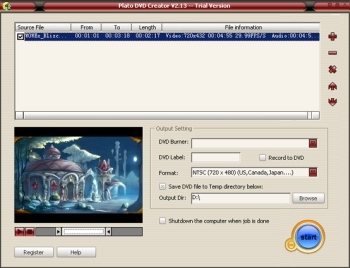 With Plato DVD Creator you can create DVD , from AVI, DivX , MPEG, WMV , MOV video with ease. With Plato DVD Creator you can create DVD , from AVI, DivX , MPEG, WMV , MOV video with ease.
It is really easy to use you don’t even need a strong experience with multimedia tools to use it. You just add source video file , set beginning and end position of source file , and the output setting panel is so easy to use that you could finish creating your own DVD without any multimedia knowledge base.
One really nice thing about this software is its automatically shutdown function. Normally when you add several large video files to convert , it takes a long time , but with Plato DVD Creator, you just go to sleep , its automatically shutdown function could help you shutdown your computer after all task done making it so convenient to create DVDs easily.
Go check it out, CLICK HERE!
Posted in Business, Commercial, Developer, Main, Movies, Shareware, Video, Windows | 1 Comment »
Monday, January 8th, 2007
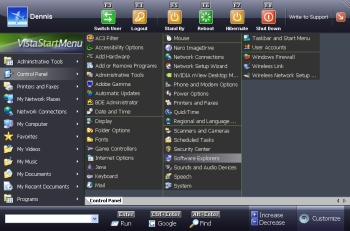 If you’ve found the Start Menu on your Windows inconvenient and you are in the search for a viable alternative, you need to check out Vista Start Menu. If you’ve found the Start Menu on your Windows inconvenient and you are in the search for a viable alternative, you need to check out Vista Start Menu.
Vista Start Menu gives quick and easy access to your system’s applications. It is easy and convenient to use. With an improved interface and quick access to information, you can start working with pleasure using the new version of Vista Start Menu. It’s interface takes into account how the brain processes visual information and turns the start menu into a simple and effective tool.
Don’t be misled by the name Vista, it’s not only compatible with Windows Vista; Vista Start Menu is also compatible with Windows NT, 2000, 2003 and XP.
Changes in the latest version, Vista Start Menu 2.1 include:
- The performance rate has considerably increased due to splitting into threads
- The program has a new icon
- Sorting is now available (leave in places, sort by name, sort by name and type)
- Now you can specify the main program in each folder manually and use the entire power of the «single-click launch» feature
- Update check feature. Now you can learn about the releases of new version by just clicking the logo of Vista Start Menu
Want to check it out? CLICK HERE!
Posted in Business, Commercial, Design, Developer, Information Management, Main, Shareware, Utilities, Windows | 12 Comments »
Saturday, January 6th, 2007
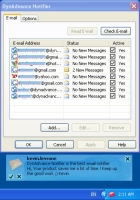 if you have a hard time keeping track of your mail because you have different email accounts, then you are going to love this. Here is a nice email notifier for you. DynAdvance Notifier. It is a program that notifies you when you have new Email on a variety of account types, including Gmail, Hotmail, MSN, Yahoo! Mail, POP3 or IMAP mail. if you have a hard time keeping track of your mail because you have different email accounts, then you are going to love this. Here is a nice email notifier for you. DynAdvance Notifier. It is a program that notifies you when you have new Email on a variety of account types, including Gmail, Hotmail, MSN, Yahoo! Mail, POP3 or IMAP mail.
DynAdvance Notifier simply sits in your system tray and opens a pop-up window whenever you receive new e-mail. I’m sure you’ll appreciate the fact that it shows you a preview of the new message and automatically logs you in to your webmail account, or automatically launches your favorite email client.
With this software you don’t have to log into your email account very day to know whether you have new mail or not. DynAdvance Notifier makes keeping track of your email quick and easy.
The current version has these changes incorporated in the software:
- Complete Windows Vista support
- New Hotmail (Windows Live) fixed support
- Other small improvement
CLICK HERE for more info
Posted in Business, Commercial, Developer, E-mail, Information Management, Internet, Main, Shareware, Utilities, Windows | 1 Comment »
Saturday, January 6th, 2007
 CMS stands for content management system, a popular way to run a website. By setting up and using a CMS system as your website you can easily run a pretty interactive site. It allows you to have forums, download areas, news, reviews, and much more if you add block and modules. CMS stands for content management system, a popular way to run a website. By setting up and using a CMS system as your website you can easily run a pretty interactive site. It allows you to have forums, download areas, news, reviews, and much more if you add block and modules.
This site i’m reviewing allows you to test out many different kinds of CMS software without having to go the long way of installing them on your webspace and trying them out. It has them all installed already and has a username and password for each demo so you can mess around and experiment with them all you want!
It resets every 2 hours, more than enough time for you to know if a particular CMS is suitable for you or not. You can do all this right over at the website right here!
A very useful site for anyone into this kind of thing and of course, being Open Source, they are all free! Just be prepared to have a lot of free time if you decide to use one, because setting them up just how you want them can take some time!
Posted in Business, Commercial, Developer, Internet, Main, Open Source, Shareware, Social Software, Web services | No Comments »
Saturday, January 6th, 2007
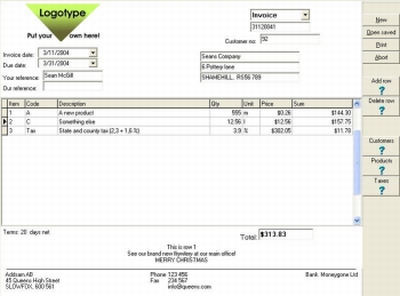
In need of cool professional invoices? Why don’t you create your own? With AB Invoicing you can create professional invoices with your own logotype without any limits in time or quantity. You can even extend the program with low cost modules for customer database, products database, invoice archive and so on. The nice thing about this software is that you get to extend with what you need, when you need it and pay only for that.
What I really appreciate about this software is that you get to try it out for free for 30 days at no cost to you and enjoy creating as many invoices as you can.
CLICK HERE for more info and trial download.
Posted in Business, Commercial, Developer, Information Management, Main, Shareware, Social Software, Text, Windows | 1 Comment »
|
|
|