Archive for the 'Developer' Category
Thursday, January 4th, 2007
 In case you’ve not yet found the right software for your DVD making needs yet, here is one software you need to check out, DVDBuilder Pro. In case you’ve not yet found the right software for your DVD making needs yet, here is one software you need to check out, DVDBuilder Pro.
DVDBuilder is designed to convert your mpeg file to DVD. You can use this software to create DVD from your digital video recorder, Webcam, or downloaded file. DVDBuilder is a powerful, splendid and simple to use application.
Tagged as a total solution for you to create your DVD, DVDBuilder Pro includes iMpeg converter, IphotoDVD , DVDBuilder. With DVDBuilder Pro you can create, Share and Preserve your memories on DVD.
The cool thing about DVDBuilder Pro is that it has all the tools you need to be your own movie producer. What I love about this great software is that it doesn’t matter whether you are new to disc authoring or an advanced user, creating movie or photo slideshow DVDs is an easy experience.
If you are ready to try it out, CLICK HERE!
Posted in Business, Commercial, Developer, Main, Movies, Multimedia, Shareware, Video | No Comments »
Wednesday, January 3rd, 2007
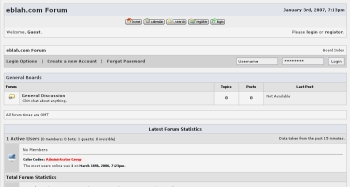 If you run a forum or you are planning to start forum boards, this software might come in handy. E-Blah is a forum system that features passworded boards, click tracking, extensive thread moderation, a full admin center, clean posting format, themes, user message blocks, attachments, message search and more. If you run a forum or you are planning to start forum boards, this software might come in handy. E-Blah is a forum system that features passworded boards, click tracking, extensive thread moderation, a full admin center, clean posting format, themes, user message blocks, attachments, message search and more.
A new version, E-Blah 10.2 has just been released for the new year. This release is a major release, with enhanced security features along with much needed cosmetic changes. The new version now requires administrator verification i.e. a pass code has to be entered for any administrator function.
The really cool thing about E-Blah is that it’s FREE! Yeah, it’s a free, open source software. Go check it out and get your own download.
Check it out: http://www.eblah.com/
Posted in Business, Developer, Freeware, Fun, Information Management, Internet, Main, Open Source, Programming, Social Software | 5 Comments »
Wednesday, January 3rd, 2007
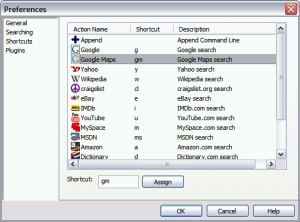 When you have a lot of applications on your system it can really be a tough task accessing them. Guillotine is a lightweight Windows utility that allows you to quickly and naturally access items you commonly (and uncommonly) use like programs, bookmarks, contacts, and web searches. When you have a lot of applications on your system it can really be a tough task accessing them. Guillotine is a lightweight Windows utility that allows you to quickly and naturally access items you commonly (and uncommonly) use like programs, bookmarks, contacts, and web searches.
With Guillotine you find things quickly and easily. The idea is to find things quickly just by typing a few keys, selecting your item, and having a nice time. It’s much more intuitive and easier than hunting down those items as you normally would. But the truth is it will take some time getting used to it as old habits die hard. But once you do, you’ll see how much more intuitive, easier and quicker it is to your normal workflow.
The latest version of Guillotine, 1.2.0.0, has this recent changes:
- Fixed Opera plugin looking in opera profile folder
- You can now use relative paths in the FileSystem plugin
- You can now use the following psuedo-environment variables in the FileSystem plugin, which will expand to their corresponding paths on your system: %START_MENU%, %START_MENU_ALL%, %MY_DOCUMENTS%, %DESKTOP%, %DESKTOP_ALL%, %RECENT%, and %QUICK_LAUNCH%
- FileSystem extensions now upgraded to full file filters (i.e. can now use wildcards like: *.exe and *work*.doc)
CLICK HERE for download and more info. Oh! Did I fail to mention? IT’S FREE!
Posted in Browsers, Business, Developer, Freeware, Information Management, Internet, Main, Utilities, Windows | No Comments »
Wednesday, January 3rd, 2007
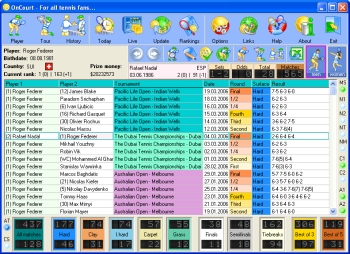 If you are a tennis fan you are going to love this game. OnCourt is a program for tennis fans. The beautiful thing about this program is that it gives you access to statistical information about any tennis player, tennis tournament, and a history of matches of any two players. I love the fact that it contains databases of both men and women tennis and they can be updated daily via Internet. If you are a tennis fan you are going to love this game. OnCourt is a program for tennis fans. The beautiful thing about this program is that it gives you access to statistical information about any tennis player, tennis tournament, and a history of matches of any two players. I love the fact that it contains databases of both men and women tennis and they can be updated daily via Internet.
If you are still not sure this program will meet your “tennis love needs”, check out the functions. The main functions are:
- Obtaining statistical data on any tennis player, the history of his games on courts with various surfaces, at the tournaments of various levels, his current position in the ranking list, the win and loss percentage in tie-breakers, finals, semi-finals, three and five-set matches, the players specialization, his ascendant and current biorhythms and lots of other information
- Obtaining information on the results of any tennis tournament either as a table or as a tournament draw
- The possibility of exporting the data into Microsoft Excel keeping the original colors which allows the data to be saved in a file, converted into some other format or printed out or be e-mailed
- Daily on-line database updates make sure that you are always well informed with the results of the latest matches played and the important data for the analysis of the forthcoming matches.
Etc.
Want to try it out? CLICK HERE!
Posted in Developer, Fun, Games, Information Management, Internet, Main | 3 Comments »
Sunday, December 31st, 2006
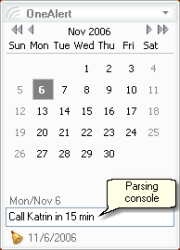 OneAlert is a lightweight and powerful reminder system with a simple calendar. It comes from the same people who make “MyLife Organized” which i recently reviewed. This is one of those really simple programs that’s also really powerful and useful. You simple type in a reminder and time to be reminded. OneAlert is a lightweight and powerful reminder system with a simple calendar. It comes from the same people who make “MyLife Organized” which i recently reviewed. This is one of those really simple programs that’s also really powerful and useful. You simple type in a reminder and time to be reminded.
There are different alerts can be set for a reminder (like play a sound, run application or send e-mail). You can also set reoccurring reminders, for example, the same day and time each week.
You can mark an individual day or number of days with specific color. OneAlert can help you to count the number of selected days and show how many days left to your vacation 🙂
Here is the fast three-step scenario of adding new reminder to OneAlert:
- While working in any application press OneAlert hotkey (Win+Down by default)
- Type in OneAlert parsing console: “Call Katrin in 15 min” and press Ctrl+Enter
- Press OneAlert hotkey again to return to application you worked with.
If you want to customize your reminder then just press Enter instead of Ctrl+Enter in step 2 and add additional parameters for your reminder (note, recurrence, different alert actions like send e-mail or run an application).
You can download this program free, with a reminder limit of a 10 a day (not bad really) or unlimited reminders if you have already bought “mylife Organized”.
Posted in Commercial, Developer, Information Management, Main, Shareware, Utilities | 2 Comments »
Sunday, December 31st, 2006
 MyLife Organized is a lightweight yet powerful tool for organizing your life. Basic use of MLO involves creating tasks, which can be organized as projects, tasks, and subtasks, with due dates, estimated effort levels, and locations. As you enter your goals, projects, and activities, a “to-do” list is created with a list of exactly what needs to be done, where, and when. Some advanced features include exporting to various formats (Microsoft Excel, XML, CSV, and others), saving automatically, and syncing with Microsoft Outlook.You can download a 45-day trial version of the Professional Edition or you can download a free “lite” version which can be used as a simple task/subtask list. MyLife Organized is a lightweight yet powerful tool for organizing your life. Basic use of MLO involves creating tasks, which can be organized as projects, tasks, and subtasks, with due dates, estimated effort levels, and locations. As you enter your goals, projects, and activities, a “to-do” list is created with a list of exactly what needs to be done, where, and when. Some advanced features include exporting to various formats (Microsoft Excel, XML, CSV, and others), saving automatically, and syncing with Microsoft Outlook.You can download a 45-day trial version of the Professional Edition or you can download a free “lite” version which can be used as a simple task/subtask list.
My Life Organized takes your deadlines, recurring appointments, disjointed thoughts about things you’d quite like to do, life goals, etc, and gives you back a series of sequential tasks which really does seem to reflect your most important goals as well as your most urgent ones. The interface is clean and simple, not overloaded.
Definitely worth checking out for anyone who likes to be organised and more productive with their days. A nice thing I like about both the free and pro versions is that they’re both designed to be run from a USB thumb drive. You can view a comparison of both versions here. and the download page is right here.
Posted in Business, Commercial, Developer, Information Management, Internet, Main, Programming, Security, Shareware, Utilities | 2 Comments »
Sunday, December 31st, 2006
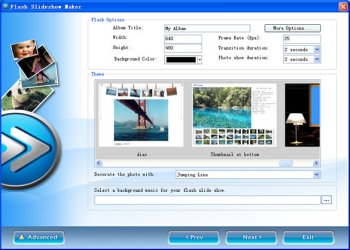 Anysoft Flash SlideShow Maker is a tool to create a simple but attractive Flash slideshow from your photos that you can upload to your website to share with your friends and family. Anysoft Flash SlideShow Maker is a tool to create a simple but attractive Flash slideshow from your photos that you can upload to your website to share with your friends and family.
It has several different slideshow themes to choose from, as well as background music and optional effects like dropping leaves, snowflakes and more.
It’s freeware, but to remove the “Produced by Flash Slideshow Maker” screen that gets added at the end of slideshow, you’ll have to order the pro version.
It’s a pretty cool program that’s easy to use , you just select the template you wanna use and the transition effects etc and which pictures to add, that’s all there really is to it!
So if you want to make a simple flash slideshow for your website or blog, with or without background music, this gets the job done easily with pretty good looking results, unless you’re a bad photographer of course!
You can download it free here.
Posted in Design, Developer, Main, Multimedia, Social Software, Utilities, Windows | 5 Comments »
Sunday, December 31st, 2006
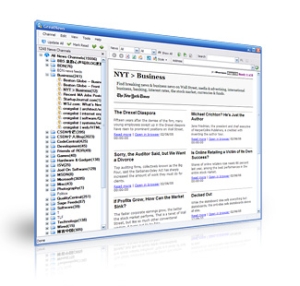 There’s a lot of RSS reader programs around. Here’s one that caught my attention. It’s called GreatNews and has an impressive array of features. GreatNews is optimized for the fast and efficient reading of all your favorite web feeds. You can choose from various different view styles, including a newspaper view, that one allows you to read a group of feeds arranged in newspaper-style page layout without the hassle of having to click through individual feed items. There’s a lot of RSS reader programs around. Here’s one that caught my attention. It’s called GreatNews and has an impressive array of features. GreatNews is optimized for the fast and efficient reading of all your favorite web feeds. You can choose from various different view styles, including a newspaper view, that one allows you to read a group of feeds arranged in newspaper-style page layout without the hassle of having to click through individual feed items.
It also supports custom labels, email and blog integration as well as custom keyword alerts (news watches) so you can automatically find articles of interest to you and have them available in a special category. Other features include import/export feeds from/to OPML and XML files, the automatic cleanup of old items, browser integration with popup blocking and more.
GreatNews is a small, fast and very efficient RSS reader – it doesn’t require any installation either, so just unzip and run.
This is one good RSS reader worth grabbing while it’s still freeware and you can do that right here.
Posted in Browsers, Commercial, Developer, Freeware, Information Management, Internet, Main, News, Social Software, Text | No Comments »
Saturday, December 30th, 2006
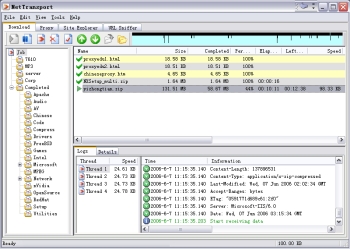 Here is a powerful download tool for you. It is very useful and efficient in downloading files from Internet servers. It is called Net Transport. Here is a powerful download tool for you. It is very useful and efficient in downloading files from Internet servers. It is called Net Transport.
Net Transport now supports HTTP, HTTPS, FTP, MMS (Microsoft Media Services), and RTSP (Real-Time Streaming Protocol) – five protocols used to transfer data.
Its main features include:
- Simple but powerful “File Manager” to categorize and manage downloaded files more efficiently
- Simple multi-user management. You can maintain several databases by logging on Windows with different username
- You can use the inbuilt “Site Explorer” to list the directory structure of the remote server, and easily select the desired files. FTP is the most powerful item in NetXfer
- FTP reuse mechanism allows you to use one connection to get different files from the same site. If you like, you can use accessory FTP client tool called “FTP Transport (FtpXfer)”
- The “Multiple Proxies mode” allows you to assign every working thread a different proxy to break certain site restrictions, like only one connection per IP.
And so much more.
One great thing about it is that it works well with all Windows OS and though it’s a shareware you can check out the trial download for a while before buying the full version, it has a 90 day timeout.
Want to check it out? CLICK HERE!
Posted in Business, Commercial, Developer, Download Managers, Internet, Main, Shareware, Utilities | 2 Comments »
Friday, December 29th, 2006
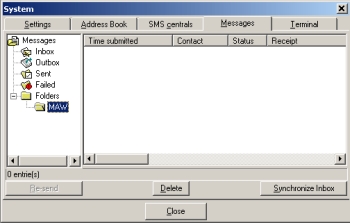 In need of something to help you handle your text messages with ease? Well I have a recommendation for you. It’s SMS-it. In need of something to help you handle your text messages with ease? Well I have a recommendation for you. It’s SMS-it.
SMS-it allows you to send a short message to a mobile phone using your computer. It supports Picture messages: Caller Group Graphic, Operator Logo, Ringtones, and FlashSMS.
It is so easy to send messages with SMS-it. Messages can be sent in different ways:
- Through a modem, using a dial-up SMS center
- Through the internet, using an account with an internet SMS center
- Through a mobile phone attached to the computer (IE attached to the IR port).
One thing worthy of note though is that sending Picture messages, Caller Group Graphics, Operator Logos and Ringtones only work for Nokia phones. Most new phones can however now receive FlashSMS.
Want to give it a shot? CHECK IT OUT HERE!
Posted in Developer, Information Management, Internet, Main, Mobile, Shareware, Social Software | 1 Comment »
|
|
|




