Archive for the 'Developer' Category
Friday, December 15th, 2006
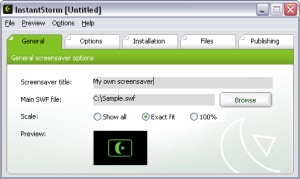 InstantStorm is a free program for creating professional Flash screensavers. InstantStorm is a free program for creating professional Flash screensavers.
How it works is, it allows you to use any SWF (Flash) file as a screensaver. This could be more useful than it sounds, for a variety of reasons. You could create a customized screensaver consisting of your friends or families pictures and distribute it to them, or you could make a screensaver for your company or product.
InstantStorm includes advanced features such as allowing you to fully customize your screensaver’s about box, installer and uninstaller including all texts. it’s 100% free with no nag screens or other annoying stuff. You can download it at the homepage here.
Posted in Commercial, Design, Developer, Fun, Main, Multimedia, Shareware, Shell and Desktop, Utilities | No Comments »
Friday, December 15th, 2006
 MB Free Tarot Dictionary is exactly that, a cross referenced dictionary of Tarot terms. But it’s a little more than that too. You get the meanings of different spreads, the layouts you do with the cards, plus you get information about decks, individual cards, and symbolism and other meanings. MB Free Tarot Dictionary is exactly that, a cross referenced dictionary of Tarot terms. But it’s a little more than that too. You get the meanings of different spreads, the layouts you do with the cards, plus you get information about decks, individual cards, and symbolism and other meanings.
It’s all very clearly explained, but I suspect you have to have an interest in Tarot to begin with or not much of it will make sense. This is not a beginners tool, although as a supplement to other tools like a really good book on the subject,it will be very helpful.
It’s more of a glossary that a reference guide, but will be of use to experts and intermediate users alike. Get it from the author’s web site.
Posted in Developer, Freeware, Fun, Information Management, Main, Social Software | 2 Comments »
Friday, December 15th, 2006
 Okay, so you may not think that having a beautiful picture of the moon on your desktop is a good thing. And yeah the fact that it just happens to be the exact phase of the moon at the time may not sway you. But it is kind of cool. And what if you are a Wiccan or something like that? It could be essential that you know stuff like this. Okay, so you may not think that having a beautiful picture of the moon on your desktop is a good thing. And yeah the fact that it just happens to be the exact phase of the moon at the time may not sway you. But it is kind of cool. And what if you are a Wiccan or something like that? It could be essential that you know stuff like this.
The program is basically one of those that changes the computer’s desktop based on the clock. Except in this case, the calender days are tied into some kind of moon calendar and puts the right slice of the moon on your screen. I think they call those things sidereal calendars, but I may be wrong. In any case, the pictures are really nicely done, and according to my daughter’s moon phase wallchart the slices are pretty accurate.
Cosmic.
Get the moon phase wallpaper program from the author’s web site.
Posted in Design, Developer, Freeware, Internet, Main, Shell and Desktop, Themes | No Comments »
Friday, December 15th, 2006
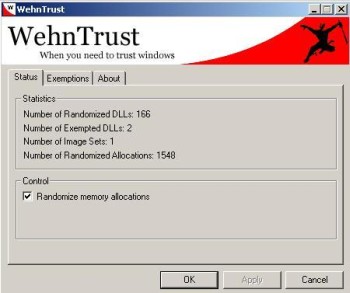 WehnTrust is a Host-based Intrusion Prevention System (HIPS) that provides secure buffer overflow exploitation countermeasures. It helps protect Windows-based computers against worms and malware that spread through software vulnerabilities. WehnTrust is a Host-based Intrusion Prevention System (HIPS) that provides secure buffer overflow exploitation countermeasures. It helps protect Windows-based computers against worms and malware that spread through software vulnerabilities.
In simpler terms, it’s added protection for your computer against mailicious software being used against it, such as hacking attempts. Once WehnTrust is installed, all applications on the computer are automatically protected against nearly all forms of vulnerability exploitation. It isn’t a replacement for antivirus and antispyware products. It’s meant to be used in along with antivirus and antispyware products to help protect a computer from all of the various ways in which it could be compromised.
It’s a useful layer of protection for those concerned about the security of there computer. But the downside is it doesn’t really offer much feedback if it should actually manage to prevent something.
It’s available in a pay-for ‘Commercial’ version and a ‘Home user’ version which is free. You can get more information by reading the faq and download it from here.
Posted in Developer, Freeware, Internet, Main, Security, Shareware, Windows | No Comments »
Friday, December 15th, 2006
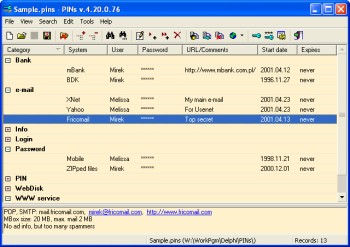 If you’re like most people who spend much time online, pretty soon you’ll find yourself with a lot of usernames and passwords for various emails, forums, social network sites etc online. This leads to it being very hard to remember them all. If you’re like most people who spend much time online, pretty soon you’ll find yourself with a lot of usernames and passwords for various emails, forums, social network sites etc online. This leads to it being very hard to remember them all.
Some people choose to just use the same password for various sites, but this is very insecure to do. If someone were to find out your password, then they’d have access to everything! But its too hard to remember different passwords for everything right? Thats where PINs comes in handy. It’s a freeware password manager that does all the remembering for you.
It uses a secure 448 bit Blowfish algorithm to ensure the data isn’t crackable. Also the password used for securing access to stored data is not saved anywhere. The cool thing I like about this particular password manager is that it doesn’t require any installation. This means that it can be run from a USB drive or even a floppy disk. So you can easily have access to all your passwords from any computer. Even if you should happen to lose it, your passwords are securely encrypted and can’t be accessed without the master password.
It has a lot of useful features such as unlimited number of entries and data files, a powerful random password generator, expired passwords tracking, and more…
Go check it out at the homepage here for more details and to download it, it’s freeware! : )
Posted in Developer, Freeware, Information Management, Main, Security, Utilities, Windows | 2 Comments »
Friday, December 15th, 2006
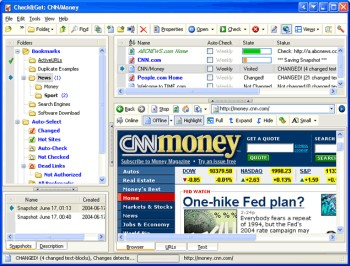 Need an easier way to check the latest updates on your favorite websites? This software does just that and much more in a quick and easy way. Need an easier way to check the latest updates on your favorite websites? This software does just that and much more in a quick and easy way.
Check&Get is a handy and powerful bookmark manager and web monitoring program that lets you check your favorite Internet pages and detect if their content has changed or has become unavailable. Not only that, it can notify you of changes or web-server downtime by bookmark highlighting, by pop-up message, by playing a sound file or by sending you e-mail message with the updated web page. And what really makes this software a delight is that it can even download the updated file from the Internet and save it to the specified folder on your hard disk. So you can browse it offline.
A new updated version of Check&Get has just been released version 3.1.0.440. The latest changes in the new updated version:
- Compatibility with Internet Explorer 7 added
- Additional Proxy settings added
- Usage of memory and performance optimized
Want to try it out? Click HERE!
Posted in Commercial, Developer, Information Management, Internet, Main, Shareware, Social Software, Windows | No Comments »
Friday, December 15th, 2006
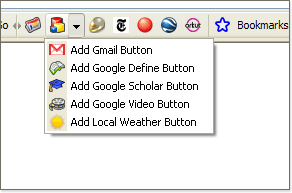 Google have officially announced the beta version of the Firefox Toolbar 3. Google have officially announced the beta version of the Firefox Toolbar 3.
The newest additions in Toolbar 3 include accessing bookmarks from any computer, adding custom buttons, and sharing web pages (using Blogger, Gmail or SMS). Also now there’s a feature that allows you to view Documents and Spreadsheets right in the browser window. When you come across a document of any kind (.doc, .rtf, .odt, .sxw, .xls, .ods, or .csv) you don’t have to download ’em to find out what’s they are about. All you have to do is just simply setup the Toolbar 3 Beta to open those files automatically in your browser window.
You can check it out right here.
Posted in Browsers, Developer, Freeware, Internet, Mac Stuff, Main, Text, Utilities, Web services | No Comments »
Thursday, December 14th, 2006
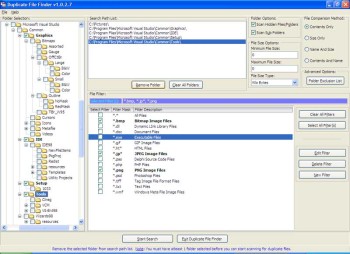 Last week, I told you about CloneSpy, a software that spies out clones [duplicates] of files in your PC and helps you get rid of them. If for any reason you are not satisfied with that or you can’t afford to buy the full version now, you can try out this freeware that does a similar thing, Duplicate File Finder. Last week, I told you about CloneSpy, a software that spies out clones [duplicates] of files in your PC and helps you get rid of them. If for any reason you are not satisfied with that or you can’t afford to buy the full version now, you can try out this freeware that does a similar thing, Duplicate File Finder.
Duplicate File Finder allows you to remove duplicate files from your computer. It allows you to search for duplicate files on your local PC and over the network. And you can preview graphic files before removing them.
Go get rid of the duplicate files in your system that is robbing you of precious space. Try Duplicate File Finder.
Get your free download and more info HERE!
Posted in Business, Developer, Freeware, Main, Utilities, Windows | No Comments »
Thursday, December 14th, 2006
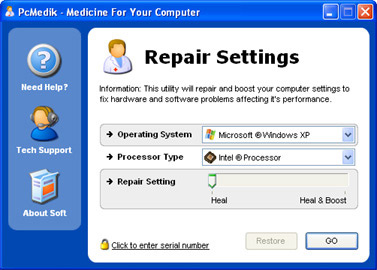 We are all interested in getting the best out of our PC. That’s why we try different software to help improve the performance of our system. And that’s why I think you need to give this product a try. We are all interested in getting the best out of our PC. That’s why we try different software to help improve the performance of our system. And that’s why I think you need to give this product a try.
PCMedik enhances PC performance, increasing overall speed and squeezing out every last bit of performance your computer is capable of. But that’s not all it also locates and repairs problems with software and hardware incompatibilities which lead to computer performance issues.
PCMedik’s cool features include:
- Makes direct changes to system registry and system files to enhance memory, screen drawing, animations, refresh rates, CPU threading speeds and security
- Automatically adjusts settings and changes made based on computer specifications, complete fault tolerance system implemented
- Easy and intuitive user interface which performs all setting changes immediately
etc.
If your system is far from fulfilling it’s potential then you need to try it out!
CLICK HERE TO TRY IT!
Posted in Business, Commercial, Developer, Main, Programming, Security, Social Software, Utilities, Windows | No Comments »
Thursday, December 14th, 2006
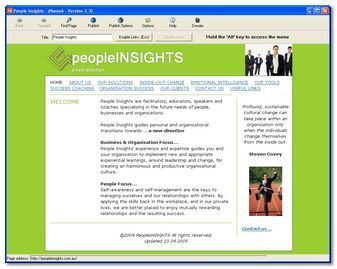 Most people at one stage or another decide to try their hand at making their own website. These usually end up looking incredibly amateurish with maybe just a couple of pictures, some text, and some links. But to have a decent page usually involves wrangling with some html code and that’s when things can get complicated. Most people at one stage or another decide to try their hand at making their own website. These usually end up looking incredibly amateurish with maybe just a couple of pictures, some text, and some links. But to have a decent page usually involves wrangling with some html code and that’s when things can get complicated.
But there’s a simpler way! Namu6 Is a freeware WYSIWYG ( what you see is what you get) webpage creator that gets the job of building a website done incredibly easily.
It’s fully compliant to the W3C (The World Wide Web Consortium, the organization that’s responsible for agreeing on technical web specifications) HTML 4.01 specification. This means that your website is fully compatible with all web browsers that are HTML 4.01 compliant. That’s the majority of the main ones people use these days.
If you can type, use a web browser, and click buttons, then you’re qualified to use Namu6! It’s very simple to use as its a visual editor, meaning “what you see is what you get”, there’s no confusing html to deal with. It even comes with some prebuilt themes to get you started and give your website that professional touch.
It includes built in previewing so you can see exactly how your site is going to look to the outside world. It even includes one click publishing, for uploading your website to your webspace, with simple instructions on how to do this.
I recommend checking this out to anyone who’s always wanted to make a website but who was put off by the technicality of it all. You can grab it for free right here!
Posted in Business, Commercial, Developer, Information Management, Internet, Main, Shareware, Windows | No Comments »
|
|
|




