Archive for the 'Internet' Category
Saturday, December 23rd, 2006
Tibia is a free online RPG (Role Playing Game). You can join guilds, kill monsters, cast spells, make friends and enemies, and generally have a fun time. Ok, I’ve seen better graphics, but at least it’ll run well on low end systems. Some people like the old “Super Nintendo” type graphics anyway.
Gameplay in Tibia is simple, you start out on Rookguard, you go around, kill stuff, etc. Left click to move, right click to use (or bring up a menu with the new controls), pretty basic stuff. Talking is achieved by just typing, there’s no windows you have to select, just type your sentence then press enter. Skills are achieved by doing the particular action.
You want shielding? Equip a shield and get hit. Like swords? Equip one and watch your sword skill grow as you kill more monsters. It’s very simplistic, so you get the idea. This game would appeal most to fans of old school games that were similar to this, except this is online and you can interact with other nerds! : )
You can find out more info at the homepage here.
Posted in Fun, Games, Internet, Main, Shareware, Web services | 3 Comments »
Saturday, December 23rd, 2006
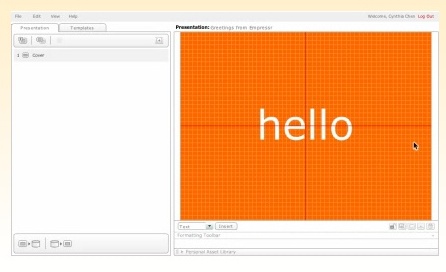
 Empressr is a web application which lets you create Flash-based presentations online. So that the only thing you need is your web browser to create rich media presentations. You can also share the presentations with anyone and access them online at anytime. You can sign up for free and you can create up to five presentations at the moment, although they say this will increase in future versions. Empressr is a web application which lets you create Flash-based presentations online. So that the only thing you need is your web browser to create rich media presentations. You can also share the presentations with anyone and access them online at anytime. You can sign up for free and you can create up to five presentations at the moment, although they say this will increase in future versions.
The limits to what kind of thing you can upload are as follows:
- Images-Jpeg .JPG 100 KB
- For Flash-Macromedia Flash .SWF 100 KB
- For Video-Macromedia Flash video .FLV 10 MB
At the moment, presentations can’t be exported to other formats such as PowerPoint, although they plan to include this in future versions.
You simply email your presentation to whoever you want to show it to, they don’t even have to be registered to view it. You can check it out and try an online demo of it at the homepage here.
Posted in Developer, Freeware, Internet, Main, Open Source, Utilities, Web services | No Comments »
Thursday, December 21st, 2006
 If you are someone who uses Geographic Information System (GIS) files then this might interest you. ArcExplorer lets you display and otherwise probe a variety of standard geographical data sources. As a stand-alone desktop application, you can look at ESRI shapefiles, ArcInfo files, various sorts of image files, even Spatial Database Engine layers, and a bit more. If you are someone who uses Geographic Information System (GIS) files then this might interest you. ArcExplorer lets you display and otherwise probe a variety of standard geographical data sources. As a stand-alone desktop application, you can look at ESRI shapefiles, ArcInfo files, various sorts of image files, even Spatial Database Engine layers, and a bit more.
You can pan and zoom through map layers and interact with all the attribute information. You can also colour up map features based on data in the files, and present the data in a variety of other ways too. The really cool part is of course as the software is free you can re-distribute the ArcExplorer software and your data to your users, who can then install ArcExplorer on their machines and view your data as easily and effectively as you did.
There are editions of the software for Java (which basically offers cross-platform support for Windows, UNIX, and Linux), a Java Edition for Education (primarily for the Macintosh OS X platform, but also Windows) and then there’s ArcExplorer Web which you can use directly from your Web browser.
Follow this link to download ArcExplorer for free.
Posted in Business, Commercial, Freeware, Information Management, Internet, Linux, Mac Stuff, Main, Multimedia, Video, Windows | No Comments »
Thursday, December 21st, 2006
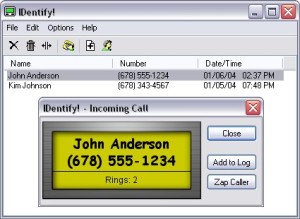 Here is a really useful tool. IDentify! is a cool software that allows you verify a caller’s identity before answering. Get rid of those pesky telemarketers or anyone you don’t want to communicate with easily. Here is a really useful tool. IDentify! is a cool software that allows you verify a caller’s identity before answering. Get rid of those pesky telemarketers or anyone you don’t want to communicate with easily.
With this cool software and a Caller ID capable modem, you can have a Caller ID box built right into your computer, but with many features that regular Caller ID boxes don’t have.
Some of its great features include:
- Announce callers using any SAPI compliant text-to-speech engine.
- Automatically answer certain calls, including Blocked and “Out of Area” calls, play a pre-recorded message to the caller, and then hang up.
- “Do Not Disturb” feature that only allows important callers to get through.
- An E-mail Notification feature can send a message after receiving a call to any e-mail account
Click HERE for trial download and more info.
Posted in Business, Developer, Internet, Main, Shareware, Voice, Windows | No Comments »
Thursday, December 21st, 2006
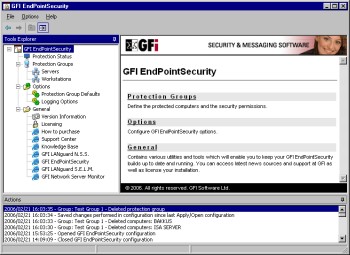 GFI EndPointSecurity allows you to control entry and exit of data via portable storage devices, by doing this software allows you to prevent users from taking confidential data or introducing viruses and Trojans to your network. GFI EndPointSecurity allows you to control entry and exit of data via portable storage devices, by doing this software allows you to prevent users from taking confidential data or introducing viruses and Trojans to your network.
What I love about GFI EndPointSecurity is the device control solution which allows administrators to actively manage user access to all sorts of devices like Media players, including iPod, Creative Zen and others, USB sticks, CompactFlash, memory cards, CDs, floppies & other storage devices, PDAs, Blackberries, mobile phones and similar communication devices Network cards, laptops and other network connections. You can define which users can use removable media centrally from Active Directory – simply by making them a member of pre-defined groups.
This is a real nice software to guarantee security and actively manage user access on your network. It sure costs a handful but it’s really a very useful tool. It’s really the end point of your security needs.
A trial will convince you, Check it out Here!
Posted in Developer, Internet, Main, Security, Shareware, Utilities, Windows | 1 Comment »
Thursday, December 21st, 2006
 SupervisionCam is software for turning your PC into a video surveillance system. It can compare images from a video camera or from a local or Internet image file, at intervals chosen by you, and starts optional activities when it detects a movement. It can save the images as BMP or JPG files, play a sound, send a message or mail, start a program or create a HTML page and upload this page including the images to a LAN or internet (FTP) server with optional dial-up support. SupervisionCam is software for turning your PC into a video surveillance system. It can compare images from a video camera or from a local or Internet image file, at intervals chosen by you, and starts optional activities when it detects a movement. It can save the images as BMP or JPG files, play a sound, send a message or mail, start a program or create a HTML page and upload this page including the images to a LAN or internet (FTP) server with optional dial-up support.
SupervisionCam can also capture images in a defined time interval, so you can use it as a webCam as well! It offers lots of features – Fast viewer, support for more cameras, surveillance scheduler, static or dynamic motion detection threshold configuration, auto update over internet and a lot more.
This is pretty feature packed program that would suit someone wanting to have a cheap but reliable surveillance camera set up for example. You can download a trial from the homepage here and find the full list of features, but you’ll have to register to get the full version, unless the watermark doesn’t matter to you too much.
Posted in Developer, Information Management, Internet, Main, Photo, Shareware, Social Software, Video | No Comments »
Wednesday, December 20th, 2006
 Okay I haven’t tried Zone Alarm for a while and it’s much improved since I saw it last. I didn’t used to like it very much because it used to subject me to many alarms which were just normal functions of programs I was using. In case you don’t know what it is, it is an easy-to-use firewall software which blocks hackers and other unknown threats from barging into your computer and breaking the place up. Okay I haven’t tried Zone Alarm for a while and it’s much improved since I saw it last. I didn’t used to like it very much because it used to subject me to many alarms which were just normal functions of programs I was using. In case you don’t know what it is, it is an easy-to-use firewall software which blocks hackers and other unknown threats from barging into your computer and breaking the place up.
The program identifies hackers and blocks access attempts, giving you an alert and letting you know what’s under attack and from where. The software automatically makes your computer invisible to anyone on the Internet. Better or worse than the built in Firewall software in Windows? Hmm, can’t really tell you, but it is easier to see what is going on. XP firewall just sits there telling you it’s working, but it never tells you at what.
Go to the web space and get your copy.
Posted in Developer, Freeware, Internet, Main, Utilities | 1 Comment »
Wednesday, December 20th, 2006
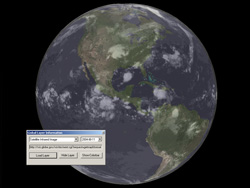 I just had the chance to install and play with Nasa World Wind. It proves to be quite an alternative to the famous Google Earth in some ways. This is a program that will allow you to zoom in on any place you want on Earth, but also Venus, Mars, Jupiter…even the Moon. I just had the chance to install and play with Nasa World Wind. It proves to be quite an alternative to the famous Google Earth in some ways. This is a program that will allow you to zoom in on any place you want on Earth, but also Venus, Mars, Jupiter…even the Moon.
You can select from various types of satellite map images, this would be very useful for anyone who’s into geology, geography etc. But you can also do much more, such as downloading live weather maps, which would be interesting for anyone into meteorology. It uses Shuttle Radar Topography Mission elevation data and high resolution LandSat imagery. Yes…this is a little more technical than Google Earth!
It has a similiar interface as Google Earth in some ways, such as being able to click and drag to spin the globe to the desired position. You can zoom in and out with the mousewheel,or by double clicking. You can select the map type you’d like to see from a menu on the top. Hint: The landsat one is the one to choose if you wanna zoom in on photo’s of streets, etc.
On many levels, World Wind is good for scientific, educational and research purposes. For driving directions, local information, exploring and other recreational activities, Google Earth might be a better options, as this program might be a little too scientific for most people.
You can check out much more info and download it completely free from the NASA site here.
Posted in Developer, Freeware, Fun, Information Management, Internet, Main, Social Software | 1 Comment »
Wednesday, December 20th, 2006
 I miss BASIC. I used to code all the time when all computers had BASIC built in, now I hardly ever even think about it let alone write a line of code. But recently I’ve been getting the urge and I just noticed that the Visual Studio series has Express versions, like Visual Basic. I miss BASIC. I used to code all the time when all computers had BASIC built in, now I hardly ever even think about it let alone write a line of code. But recently I’ve been getting the urge and I just noticed that the Visual Studio series has Express versions, like Visual Basic.
You can easily design great-looking applications using the simple drag-and-drop interface designer. ANd using themes you can make apps that have that XP look. To help you debug your code, there is Code colorization, syntax checking, and what it calls “IntelliSense” which provides an kind of interactive suggestions and code snippets, I think. That’s not something I’ve tried yet. But AutoCorrect is very cool. It’s like the spell checker in Word and can suggest corrections apparently for over 230 common programming mistakes.
To learn more about getting back into code, go see Visual Basic Express on the Microsoft web.
Posted in Developer, Internet, Main, Programming, Windows | No Comments »
Wednesday, December 20th, 2006
 Most people I know these days use Firefox. It’s a fast, secure tabbed browser that isn’t made by Microsoft, so scores big with all my PC and Mac friends. But Opera has been around longer and has some cool features too. I’m currently road testing the new version to see if I’ll migrate, and not sure at the moment. Most people I know these days use Firefox. It’s a fast, secure tabbed browser that isn’t made by Microsoft, so scores big with all my PC and Mac friends. But Opera has been around longer and has some cool features too. I’m currently road testing the new version to see if I’ll migrate, and not sure at the moment.
It has advanced fraud protection which protects you against sites that try to steal your personal information. It speaks BitTorrent so you can (cough) download files. You can add your favorite search engines to it easily and quickly, although most people I know only use the one, maybe two. There’s a bunch of other features like widgets, content and pop-up blockers. It’s all very good. Good enough to win me away from Firefox? Hmm, the jury is still out on that one.
For more info and a download go to the Opera Web.
Posted in Browsers, Business, Developer, Freeware, Information Management, Internet, Main, Open Source, Social Software | No Comments »
|
|
|