Archive for the 'Internet' Category
Monday, December 18th, 2006
Everybody’s heard of shareware and freeware, right? What about donationware or postcardware? There are lots of different kinds of wares out there. What we’re talking about here is the agreement or understanding about the use of the software between the developer or publisher and the purchaser or user of the software. There may be some confusion, though, as to what each of these terms exactly means.
The concept of freeware is easy to understand. This usually means that the software is yours to use however you wish, free of charge. Sometimes certain types of uses are restricted, however. Some developers or publishers will allow the software to be used for free for personal use only, and not for commercial use or for making a profit. Other times, they may require that the software not be used for any government or military purpose. It depends on the personal values and beliefs of the creators of the software.
Shareware is pretty straightforward, too. The developer or publisher is sharing this software with you so that you may try it out to see if you’d like to purchase it. Sometimes shareware isn’t fully functional software (some call it ‘crippleware’), in order to persuade you to buy the full version. This was pretty common at one time and still is common with gaming software, but lately lots of shareware is offered as fully functional so that users can get a better idea of all of the features. Developers also may limit the length of time that the software will be fully functional or that it will work at all. This type of software is often called a demo. The demo software may become locked after a certain trial period and then can only become functional again after a registration code is purchased and entered into the program.
So, what about donationware or postcardware? These types of software aren’t seen quite as often, but are most similar to freeware. Essentially, they are free, but the developer usually asks that if you like the software or find it useful you make a donation so that development costs can be recapped and/or that further development can take place. Often, a small number of donors out of a larger user community can keep development alive. Postcardware, on the other hand, is just a request from the developer that you send them a postcard to let them know you like their software. It’s more of a feel-good gesture than anything else, but a small price to pay for the privilege of using good software.
There are other types of wares that can be found on the Internet, but most will fall under the types outlined above. The bottom line is that the developer or publisher can decide however they would like the software to be used, but it’s up to the users to honor that request.
Posted in Freeware, Internet, Main, Shareware | 1 Comment »
Monday, December 18th, 2006
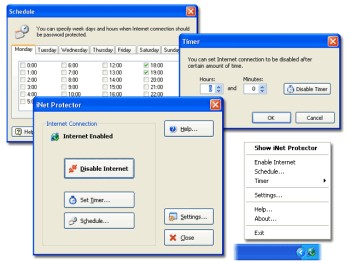 If you are a parent who wants to monitor and limit the time your children spend online or you are an employer concerned about the amount of time your employees spend online not doing the company’s work, then you might want to check out this software. It is called iNet Protector. If you are a parent who wants to monitor and limit the time your children spend online or you are an employer concerned about the amount of time your employees spend online not doing the company’s work, then you might want to check out this software. It is called iNet Protector.
iNet Protector helps to restrict access to the Web and password protect Internet connection. It allows you to enable and disable Internet connection any time. In order to enable Internet access, user defined password must be entered. The fact that there is some sort of flexibility, I mean you can schedule time periods when Internet connection should be disabled or enabled, makes this software useful.
A new updated version of this shareware was released a couple of days ago with the latest change being that the installer has been worked on to perform better.
Want to check it out? CLICK HERE!
Posted in Design, Developer, Internet, Main, Security, Shareware, Social Software, Utilities, Windows | 1 Comment »
Sunday, December 17th, 2006
 Blender is an open source, cross platform suite of tools for 3D creation. It’s a 3D image and animation creation program that is very impressive for something that’s free. Just check out some of the example pictures and videos! It’s very capable of making the kind of 3D graphics and animations that are very popular nowadays in cartoons, advertising, etc. No doubt there’s even more powerful programs than this, but they come at a high price! Blender is an open source, cross platform suite of tools for 3D creation. It’s a 3D image and animation creation program that is very impressive for something that’s free. Just check out some of the example pictures and videos! It’s very capable of making the kind of 3D graphics and animations that are very popular nowadays in cartoons, advertising, etc. No doubt there’s even more powerful programs than this, but they come at a high price!
It takes a while to figure out, so this isn’t something you can learn overnight, but no doubt if you have the patience to stick with it, the results can be really impressive. So for anyone into this kinda thing, on a low budget or a no budget. This is definitely worth checking out and very powerful for something that doesn’t cost a penny!
Lots more info and the free download here.
Posted in Business, Design, Developer, Freeware, Fun, Internet, Main, Multimedia, Open Source, Themes | 1 Comment »
Friday, December 15th, 2006
 Okay, so you may not think that having a beautiful picture of the moon on your desktop is a good thing. And yeah the fact that it just happens to be the exact phase of the moon at the time may not sway you. But it is kind of cool. And what if you are a Wiccan or something like that? It could be essential that you know stuff like this. Okay, so you may not think that having a beautiful picture of the moon on your desktop is a good thing. And yeah the fact that it just happens to be the exact phase of the moon at the time may not sway you. But it is kind of cool. And what if you are a Wiccan or something like that? It could be essential that you know stuff like this.
The program is basically one of those that changes the computer’s desktop based on the clock. Except in this case, the calender days are tied into some kind of moon calendar and puts the right slice of the moon on your screen. I think they call those things sidereal calendars, but I may be wrong. In any case, the pictures are really nicely done, and according to my daughter’s moon phase wallchart the slices are pretty accurate.
Cosmic.
Get the moon phase wallpaper program from the author’s web site.
Posted in Design, Developer, Freeware, Internet, Main, Shell and Desktop, Themes | No Comments »
Friday, December 15th, 2006
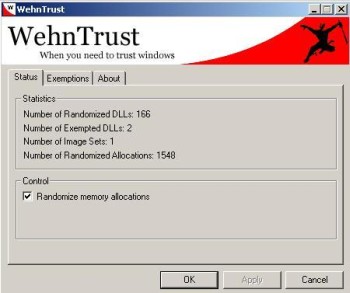 WehnTrust is a Host-based Intrusion Prevention System (HIPS) that provides secure buffer overflow exploitation countermeasures. It helps protect Windows-based computers against worms and malware that spread through software vulnerabilities. WehnTrust is a Host-based Intrusion Prevention System (HIPS) that provides secure buffer overflow exploitation countermeasures. It helps protect Windows-based computers against worms and malware that spread through software vulnerabilities.
In simpler terms, it’s added protection for your computer against mailicious software being used against it, such as hacking attempts. Once WehnTrust is installed, all applications on the computer are automatically protected against nearly all forms of vulnerability exploitation. It isn’t a replacement for antivirus and antispyware products. It’s meant to be used in along with antivirus and antispyware products to help protect a computer from all of the various ways in which it could be compromised.
It’s a useful layer of protection for those concerned about the security of there computer. But the downside is it doesn’t really offer much feedback if it should actually manage to prevent something.
It’s available in a pay-for ‘Commercial’ version and a ‘Home user’ version which is free. You can get more information by reading the faq and download it from here.
Posted in Developer, Freeware, Internet, Main, Security, Shareware, Windows | No Comments »
Friday, December 15th, 2006
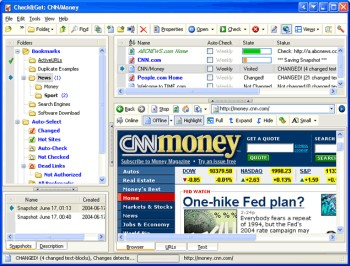 Need an easier way to check the latest updates on your favorite websites? This software does just that and much more in a quick and easy way. Need an easier way to check the latest updates on your favorite websites? This software does just that and much more in a quick and easy way.
Check&Get is a handy and powerful bookmark manager and web monitoring program that lets you check your favorite Internet pages and detect if their content has changed or has become unavailable. Not only that, it can notify you of changes or web-server downtime by bookmark highlighting, by pop-up message, by playing a sound file or by sending you e-mail message with the updated web page. And what really makes this software a delight is that it can even download the updated file from the Internet and save it to the specified folder on your hard disk. So you can browse it offline.
A new updated version of Check&Get has just been released version 3.1.0.440. The latest changes in the new updated version:
- Compatibility with Internet Explorer 7 added
- Additional Proxy settings added
- Usage of memory and performance optimized
Want to try it out? Click HERE!
Posted in Commercial, Developer, Information Management, Internet, Main, Shareware, Social Software, Windows | No Comments »
Friday, December 15th, 2006
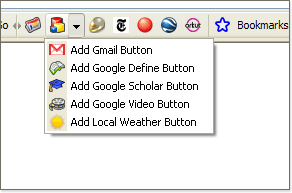 Google have officially announced the beta version of the Firefox Toolbar 3. Google have officially announced the beta version of the Firefox Toolbar 3.
The newest additions in Toolbar 3 include accessing bookmarks from any computer, adding custom buttons, and sharing web pages (using Blogger, Gmail or SMS). Also now there’s a feature that allows you to view Documents and Spreadsheets right in the browser window. When you come across a document of any kind (.doc, .rtf, .odt, .sxw, .xls, .ods, or .csv) you don’t have to download ’em to find out what’s they are about. All you have to do is just simply setup the Toolbar 3 Beta to open those files automatically in your browser window.
You can check it out right here.
Posted in Browsers, Developer, Freeware, Internet, Mac Stuff, Main, Text, Utilities, Web services | No Comments »
Thursday, December 14th, 2006
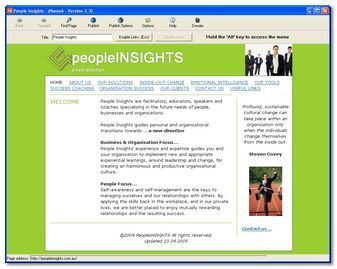 Most people at one stage or another decide to try their hand at making their own website. These usually end up looking incredibly amateurish with maybe just a couple of pictures, some text, and some links. But to have a decent page usually involves wrangling with some html code and that’s when things can get complicated. Most people at one stage or another decide to try their hand at making their own website. These usually end up looking incredibly amateurish with maybe just a couple of pictures, some text, and some links. But to have a decent page usually involves wrangling with some html code and that’s when things can get complicated.
But there’s a simpler way! Namu6 Is a freeware WYSIWYG ( what you see is what you get) webpage creator that gets the job of building a website done incredibly easily.
It’s fully compliant to the W3C (The World Wide Web Consortium, the organization that’s responsible for agreeing on technical web specifications) HTML 4.01 specification. This means that your website is fully compatible with all web browsers that are HTML 4.01 compliant. That’s the majority of the main ones people use these days.
If you can type, use a web browser, and click buttons, then you’re qualified to use Namu6! It’s very simple to use as its a visual editor, meaning “what you see is what you get”, there’s no confusing html to deal with. It even comes with some prebuilt themes to get you started and give your website that professional touch.
It includes built in previewing so you can see exactly how your site is going to look to the outside world. It even includes one click publishing, for uploading your website to your webspace, with simple instructions on how to do this.
I recommend checking this out to anyone who’s always wanted to make a website but who was put off by the technicality of it all. You can grab it for free right here!
Posted in Business, Commercial, Developer, Information Management, Internet, Main, Shareware, Windows | No Comments »
Thursday, December 14th, 2006
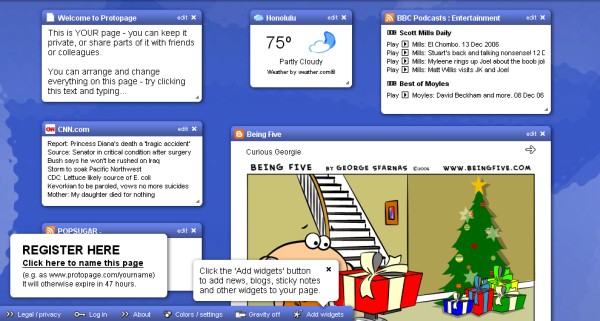
Protopage is just one of the online applications developed using Ajax.
Ajax and Web 2.0 are the new buzz words in the Internet world these days.
Ajax, shorthand for Asynchronous JavaScript and XML, is a web development technique for creating interactive web applications… This is meant to increase the webpages interactivity, speed, and usability. There are some really practical projects going on using Ajax techniques to create online applications and this is just one.
What that translates to, is the existance of more and more web-based interactive tools, some of which are reviewed in this blog.But back to what protopage is all about. It allows you to create your own custom dynamic webpage full of fresh content, your own pictures, notes, links, RSS newsfeeds, etc. All of which can be moved around on the page and resized as you see fit. It’s fun and extremely easy. What makes it even better is that you can access this page (pages actually) from any computer and everything is exactly how you left it. You can even create public pages with stuff you want other’s to see while protecting pages that you don’t want people to see.
It’s very time saving to have all your bookmarks, newsfeeds,weather, notes, widgets etc easily available on one highly customizable and easy to use page or pages. That’s one of the best things i like about it when compared to other similar services, you never run out of space because you can use more than one page.
You can check it out here to get your own free page!
Posted in Design, Freeware, Fun, Internet, Main, Open Source, Social Software, Web services | No Comments »
Thursday, December 14th, 2006
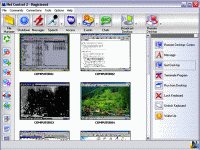 Here is a remote control, administration and monitoring software for you. It doesn’t matter what your needs are, Net Control 2 is useful for classroom, office and home local networks. Here is a remote control, administration and monitoring software for you. It doesn’t matter what your needs are, Net Control 2 is useful for classroom, office and home local networks.
Net control 2 gives you the ability to control computers remotely, manage files, send messages and monitor user computers. Are you in need of a software for several computers? Net Control helps you to easily control several computers simultaneously.
What you will enjoy in Net Control 2 includes:
- Broadcast Desktop feature allows to share instructor’s Desktop with all users in the network
- Remote power management (restart, turn on and off, wake-up computers remotely)
- Ability to run and terminate programs remotely
- Send text, graphic and sound messages
- Remote Desktop features (control user computer remotely, using keyboard and mouse)
- File management (allows to perform file operations on several computers simultaneously).
and so much more
Try it Out! CLICK HERE!
Posted in Business, Commercial, Developer, Internet, Main, Security, Utilities, Windows | No Comments »
|
|
|