Archive for the 'Main' Category
Wednesday, August 29th, 2007
 If you want a simple and fast way to share a file with a friend or friends, you might wanna checkout YouSwap.com. The site layout is foolproof to use with a neat and tidy design that’s easy on the eyes. You can also choose more than one file at once, you can do this simply by holding down the control key as you’re selecting multiple files, and it allows you to send up to 1 GB. If you want a simple and fast way to share a file with a friend or friends, you might wanna checkout YouSwap.com. The site layout is foolproof to use with a neat and tidy design that’s easy on the eyes. You can also choose more than one file at once, you can do this simply by holding down the control key as you’re selecting multiple files, and it allows you to send up to 1 GB.
Upon uploading, you’re taken to a screen where you can copy the link to the file and share it with your friends, this page also tells you how many times the file has been downloaded.When uploading, you’re also given the option to enter your friend’s email address, this will then send them a link they can download the file from, additional optional choices are to include your email address and a message to your friend.
This site is pretty basic but does as it says, although some more details such as the length of time the file remains shared may have been useful to include. Check it our for yourself here.
Posted in Internet, Main, Social Software, Web services | 1 Comment »
Tuesday, August 28th, 2007
 With the recent boom of the internet, one thing that has become a whole lot popular is the concept of online chat. However, the concept of online chat has really evolved from what it used to be. Chat used to be IRC and rooms on different internet sites with little more functionality than being able to type in something and then have that something appear in the chat room. And while a lot of people enjoyed that and in the case of IRC still enjoy it, many others thirsted for more. With the recent boom of the internet, one thing that has become a whole lot popular is the concept of online chat. However, the concept of online chat has really evolved from what it used to be. Chat used to be IRC and rooms on different internet sites with little more functionality than being able to type in something and then have that something appear in the chat room. And while a lot of people enjoyed that and in the case of IRC still enjoy it, many others thirsted for more.
Well, MSN got things started and with MSN’s live chat feature allowing for the first time a lot of great video chatting features, what people eventually saw was that there was demand for such a thing. And this is the demand that ooVoo fills with its presence.
One of the best things about this program is that it can actually support up to six users at the exact same time. In addition to that, you can also send video files back and forth between ooVoo users and even send such files to people that don’t have the software installed! It is simply an amazing piece of software and because of its free status, it is one that people have really embraced.
More information can be found at http://www.oovoo.com/
Posted in Freeware, Internet, Main, Multimedia, Social Software, Video, Web services, Windows | No Comments »
Friday, August 24th, 2007
 The boom of the internet has been good in a lot of different ways, but it has also been bad in a lot of different ways. One of the most infamous aspects of the internet boom has been the development and subsequent dispersal of spyware, viruses and malware through internet channels and many people have had really bad things happen to their computers as a result of build-up of these specific types of programs. The boom of the internet has been good in a lot of different ways, but it has also been bad in a lot of different ways. One of the most infamous aspects of the internet boom has been the development and subsequent dispersal of spyware, viruses and malware through internet channels and many people have had really bad things happen to their computers as a result of build-up of these specific types of programs.
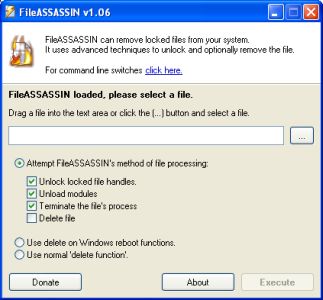
One of the worst types of programs is malware, simply because it is so difficult to remove. Well, the difficulty to remove malware files from your internet without expensive software to do so is now gone because of the introduction to the market of the FileASSASSIN software.
What FileASSASSIN does is it uses the most advanced techniques available to get deep down into the modules of the malware. It then goes ahead and closes any handles in the malware from a remote source as well as terminating processes that you as a user would not be able to terminate yourself. Without any remote handles or harmful processes, removing the malware becomes a piece of cake.
More information about FileASSASSIN 1.06 can be found directly at http://www.malwarebytes.org/fileassassin.php
Posted in Developer, Information Management, Internet, Main, Security, Shareware, Windows | No Comments »
Friday, August 24th, 2007
 One of the most interesting aspects of the recent internet boom is the emergence of a number of different interactive websites. Collectively referred to as web 2.0, many of these websites require input and active effort from the people that are members of the sites and indeed it is that interactive element that really drives the interest that so many people have in websites like this. One of the most interesting aspects of the recent internet boom is the emergence of a number of different interactive websites. Collectively referred to as web 2.0, many of these websites require input and active effort from the people that are members of the sites and indeed it is that interactive element that really drives the interest that so many people have in websites like this.
At the core of the web 2.0 revolution is the concept of social networking. The social networking websites have really changed the way that people look at the internet nowadays and many people will tell you right off the bat that this is for the better. But what if you could have a piece of software that acted like a social website no matter what you were doing on the internet? Wouldn’t that be absolutely fantastic?
Well, take a look at the RatePoint Toolbar! It is a toolbar that allows you to actually rate every single website that you come across. Then, based on the ratings that you give, you are then connected to websites that the software thinks you will enjoy specifically because of the ratings that you give off. It is a very cool and nifty way of doing business and it can actually help you come across some very amazing websites that you would never have been able to find under different circumstances.
There is actually a version of the Toolbar available for internet explorer users as well and if you are interested in learning more you can head on over to the software’s homepage at http://web.ratepoint.com/tools
Posted in Browsers, FireFox, Freeware, Information Management, Internet, Main, Social Software, Web 2.0, Windows | No Comments »
Wednesday, August 22nd, 2007
There are a lot of ways to manipulate the information that passes on your computer screen and indeed one of the ways that information can be manipulated is through the use of hotkeys. People that love to use their keyboard know exactly what hotkeys are, but for people that don’t a hotkey is simply some combination of keys that you use in order to make a specific command happen.
For example, if you are typing in Microsoft Word and you want to save your file, you can use the hotkey combination of CTRL + S in order to activate the save command option.
One thing that a lot of people that use hotkeys don’t realize is that hotkeys for many programs can actually be configured. So, if you want to change the CTRL + S for some reason, you actually can. However, some types of hotkey combinations are absolutely not allowed by certain programs and if you tend to use a lot of hotkeys, this can sometimes become quite a drag.
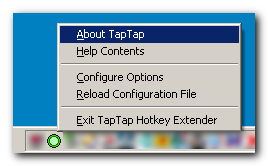
However, with the TapTap Hotkey Extender, you can circumvent the problem by using the program to simulate different hotkeys. In other words, you can use the forbidden hotkey combination by using this program to make the program think that it is a different combination. It’s like anonymous web surfing, but applied to the concept of hotkeys.
More information can be found at http://www.donationcoder.com/Software/Mouser/TapTap/
Posted in Browsers, Developer, Main, Shareware, Shell and Desktop, Utilities, Windows | No Comments »
Wednesday, August 22nd, 2007
 Chemistry is a very important part of the education of a number of students both at the high school and university levels in today’s world and of course the center of everything chemistry is the Periodic Table of the Elements. One of the biggest educational struggles in today’s world has been coming up with a Periodic Table study guide that is easy to use, yet comprehensive enough to contain all of the useful information that children are going to need to know in today’s world. Chemistry is a very important part of the education of a number of students both at the high school and university levels in today’s world and of course the center of everything chemistry is the Periodic Table of the Elements. One of the biggest educational struggles in today’s world has been coming up with a Periodic Table study guide that is easy to use, yet comprehensive enough to contain all of the useful information that children are going to need to know in today’s world.
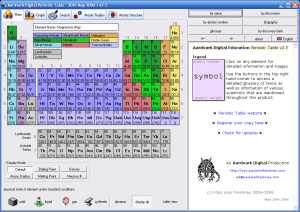
Well, the Periodic Table Standard 3.2 shows that when you decide to bring software into the mix, the sky is truly the limit! This is perhaps the most comprehensive study guide for the Periodic Table ever created, yet at the same time it is a study guide that is extremely easy to use. Clicking on any of the elements will bring up typical information about it like name, symbol, atomic number, atomic weight and all of those other frequently accessed characteristics. In addition to that, you will also get information on the history of the element, the production of it, where it occurs in nature as well as information on alternative names. To cap things off, beautiful real life pictures of each element are also available. It is truly the study aid to end all study aids because of how effective it is.
More information can be found at http://freshney.org/education/pt/
Posted in Design, Developer, Information Management, Main, Shareware, Shell and Desktop, Windows | No Comments »
Tuesday, August 21st, 2007
 If you’ve ever used Windows before and you’ve had your computer for more than a couple of years, then chances are that you’ve gone through multiple versions of both Microsoft Windows and Microsoft Office. People that have done this know that it can sometimes be a real pain integrating everything together simply because of how annoying Windows can be at times. Office is of course made by the same parent company and sometimes making things backwards compatible tends to slip the minds of the developers at Microsoft, so you end up with some nasty surprises when you are trying to upgrade. If you’ve ever used Windows before and you’ve had your computer for more than a couple of years, then chances are that you’ve gone through multiple versions of both Microsoft Windows and Microsoft Office. People that have done this know that it can sometimes be a real pain integrating everything together simply because of how annoying Windows can be at times. Office is of course made by the same parent company and sometimes making things backwards compatible tends to slip the minds of the developers at Microsoft, so you end up with some nasty surprises when you are trying to upgrade.
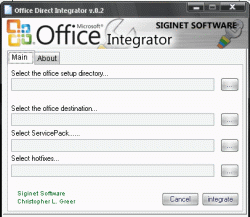
Programs like the Office Integrator 0.6 by Siginet Software are able to help you deal with at least some of these problems. It is a program designed to be able to slipstream all of the different Service Packs as well as the Hotfixes needed for the particular version of Microsoft office that you might have. It does this primarily through the use of an online database and it queries this database in order to determine whether your updates are slipstreamed and fix them if they aren’t. It is a very handy piece of software to have around and since it also happens to be free, it really is a catch!
More information about the Office Integrator can be found on their website sat http://siginetsoftware.com/ or on their forums at http://siginetsoftware.com/forum/
Posted in Business, Commercial, Developer, Freeware, Internet, Main, Office, Text, Windows | No Comments »
Tuesday, August 21st, 2007
 One of the things that has been good for society as a whole in terms of the internet has been the ease and availability of information. If people want the information that’s out there, then all they have to do is click their mouse a few times in order to bring that information up to the screen. One of the things that has been good for society as a whole in terms of the internet has been the ease and availability of information. If people want the information that’s out there, then all they have to do is click their mouse a few times in order to bring that information up to the screen.
One of the most popular sources of information is what is known as the Incident Page Network. It is basically a network that allows people to get the latest scoop on incidents reported to the police, the fire and the rescue services. Following the IPN allows people to know at a moment’s notice if something is wrong in their area and more than one person has commented favourably on how great it was to have a network that allowed them to get the latest scoop on any of the latest incidents.
With personal security becoming a big issue in today’s world, it seems like the time is absolutely perfect for the IPN Toolbar. This is a toolbar that you install into your browser just like you would any other toolbar. The difference is that it gives you the latest IPN news at a moment’s notice in real time, meaning that you don’t have to physically navigate to the website in order to get it yourself. It is a very useful tool and like many of the best things in life, it also happens to be free.
More information can be found at http://www.incidentpage.net/toolbar
Posted in Browsers, Developer, Information Management, Internet, Main, RSS, Utilities, Windows | No Comments »
Tuesday, August 21st, 2007
 The Quick Time Player is one of the most popular if not the most popular player around. Not only does it have the ability to be universally adaptable and play file formats all the way from the typically seen .mov to the lesser known .3gp, but it also has a number of really neat abilities not only to manipulate files you already have, but also to connect to remote databases and download new files just like Windows Media Player. The Quick Time Player is one of the most popular if not the most popular player around. Not only does it have the ability to be universally adaptable and play file formats all the way from the typically seen .mov to the lesser known .3gp, but it also has a number of really neat abilities not only to manipulate files you already have, but also to connect to remote databases and download new files just like Windows Media Player.
The one major drawback of the Quick Time Player is that the installation for the player itself is amazingly large. In other words, not only is the download going to be a while coming, but in addition to that the installation will be resource intensive.
One way to avoid this situation is to use the Quick Time Alternative. The QT7 Lite 1.81 is the latest in a long time of Quick Time Programs that were intended to have the same great features as Quick Time, but without the resource intensive aspect of the program itself. You can play all of the supported Quick Time formats and in addition to that also play embedded content in different pages you might encounter online. However, the computer resources needed are greatly reduced, allowing you to use your precious resources for other tasks.
For more information, check out the homepage at http://www.codecguide.com/about_qt.htm
Posted in Business, Commercial, Developer, Internet, Main, Movies, Multimedia, Music, Windows | No Comments »
Monday, August 20th, 2007
 When it comes right down to it, executable files are a bit different from the other file formats you typically come across. Those are the files labelled with a .exe extension and are the ones that you click on to launch most of the different programs. Executable files are also important in that they help installation programs launch in a method that is easy and user friendly for most people, because having to manually decode and install a program yourself can be a real pain; especially if you aren’t really computer savvy. When it comes right down to it, executable files are a bit different from the other file formats you typically come across. Those are the files labelled with a .exe extension and are the ones that you click on to launch most of the different programs. Executable files are also important in that they help installation programs launch in a method that is easy and user friendly for most people, because having to manually decode and install a program yourself can be a real pain; especially if you aren’t really computer savvy.
One of the big problems with .exe files right from the start however has been the fact that it is difficult to pack them without either sacrificing the compression ratio or alternatively the quality of the .exe file. Decompression speed has also been a concern in the past and when a program such as UPX (Ultimate Packer for eXecutables) comes along that is able to deal with all three, you know that it is a rate program indeed.
UPX is free and portable and has the ability to achieve amazing compression ratio results for a wide range of different executable formats. It is an oldie but goodie in terms of the packing software market and now that it is free you can get your hands on this incredibly powerful tool quite easily.
More information is available at http://upx.sourceforge.net/
Posted in Archive, Freeware, Main, Utilities | No Comments »
|
|
|




