Archive for the 'Main' Category
Friday, November 24th, 2006
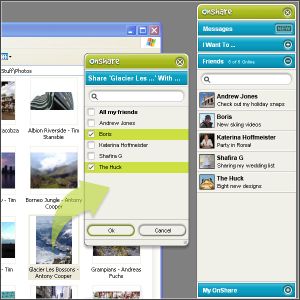 Just found a new way to share files and chat with friends in complete privacy. All thanks to this software, Onshare. Just found a new way to share files and chat with friends in complete privacy. All thanks to this software, Onshare.
OnShare is a free way to share files and chat with your friends in complete privacy. It’s a simple download that directly networks computers together. The fact that you get to control exactly what your friends can see and get their hands on really makes this useful tool. You only share files with people you invite so you know they’re from a trusted source and the files you share stay exactly where they are on your computer.
One cool feature that this software has is that its pioneering technology lets you reach into your friends’ computers, grab whatever you want and use it just as if it were on your own computer. And, if you have more than one computer, you can easily share between them wherever they are in the world.
The security of your files and chat is guaranteed as the file sharing and messaging is encrypted at 2048 bit, so secure that no one can intercept your chats and files. It is even said that the security model was conceived and developed by ex–military scientists. [I don’t know how true that is]
In case you are wondering how this works, your friends appear as drives on your computer, meaning you can access their shared files directly from within Windows. View, drag, drop, copy and paste just like you’re used to.
Click here to find out more and download it.
Posted in Internet, Main, Multimedia, Open Source, Shareware, Utilities | 2 Comments »
Friday, November 24th, 2006
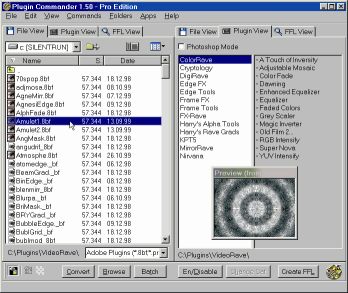 If you’ve had problems using plug-ins, tubes or other add-ons in a graphics, video or animation application then you might find this software, which I recently came across, very useful. It’s called Plugin Commander. If you’ve had problems using plug-ins, tubes or other add-ons in a graphics, video or animation application then you might find this software, which I recently came across, very useful. It’s called Plugin Commander.
Plugin Commander is a tool for dealing with various image formats, plugins and effect types from various graphics applications. It allows you to manage and preview your plugin, tube and add-on collection quickly and easily. You can deactivate the plug-ins you rarely need and define how your favorite effects will appear in the host application.
There are two editions of this useful software, the commercial Pro Edition and the Light Edition, which is freeware. The light edition being freeware has limited features but to enjoy a fully-featured version, it’s best you go for the Pro Edition.
CHECK IT OUT!
Posted in Audio, Browsers, Business, Commercial, Design, Developer, Information Management, Internet, Main, Multimedia, OS Updates, Photo, Security, Shareware, Shell and Desktop, Utilities, Video, Windows | No Comments »
Friday, November 24th, 2006
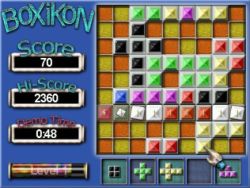 Having always been a fan of one of the most ageless games in the world, TETRIS; I was itching to see if anyone could come up with a Tetris – styled game that would be totally different. BoXiKon did that for me. Having always been a fan of one of the most ageless games in the world, TETRIS; I was itching to see if anyone could come up with a Tetris – styled game that would be totally different. BoXiKon did that for me.
BoXiKoN is a logic based puzzle game of strategy and forward thinking. The game obviously belongs to the Tetris family of shape games, but it really is quite different. There is a large emphasis on planning, organization and selection and less on arcade style quick reactions.
There is also a version for available for Mac users.
More info and download!
Posted in Fun, Games, Mac Stuff, Main, Shareware, Windows | No Comments »
Friday, November 24th, 2006
 Backgammon is a great game that has been around for a very long time, long before computers were even dreamed about. But you can now enjoy this game in a new way on your PC. Enter Backgammon 3D! Backgammon is a great game that has been around for a very long time, long before computers were even dreamed about. But you can now enjoy this game in a new way on your PC. Enter Backgammon 3D!
Backgammon 3D (or 3D Backgammon as it’s commonly known) is a 3D visualization of a classical board game – Backgammon. Now you can play with your computer not only on a flat screen, but also enjoy 3D operations – rotating the board, looking at the board from the side of your opponent, and other cool features.
One useful thing about the board rotation feature is that it helps you to see the game from different perspectives and this makes the game more interesting; you’ll definitely enjoy the game better this way.
CHECK IT OUT!
Posted in Fun, Games, Main, Shareware | No Comments »
Thursday, November 23rd, 2006
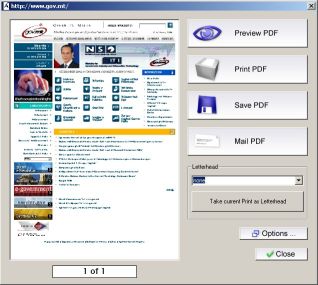 PDF is the ideal electronic package to contain everything from spreadsheets, presentations, and brochures, to photographs, rich graphics, and more. So it is necessary to have a good software that can help you create PDF files with ease. PDF is the ideal electronic package to contain everything from spreadsheets, presentations, and brochures, to photographs, rich graphics, and more. So it is necessary to have a good software that can help you create PDF files with ease.
Aloaha PDF Suite is the perfect tool to create your PDF Documents. One click is enough. Just print your document to any of your printers and it will convert the print job to a PDF Document, which you can save, email or publish to an exchange public folder. Of course you can opt for 40 or 128 encryption and digitally sign the PDF automatically.
The great thing about this software is that PDF Signer and PDF Editor are included in the Aloaha PDF Suite Pro package – no extra license costs!
Though this package is great, it is not a freeware, to get the full version you will have to come up with nothing less than $49. In case you are thinking, there are other free software like PDFCreator that does the same thing. Let me point this out to you: PDFCreator doesn’t support encrypting documents with smartcard/certificates; hardly will you find a free generator that does that. If all you want is a cheap and easy way to send a CV to someone, PDFCreator or OpenOffice will do the job but if you want a secure method to distribute and control sensitive or important documents, this suite does the job a lot cheaper than Acrobat.
Ready to try it out! CLICK HERE to learn more about its features and download the commercial demo.
NOTE:
- The evaluation version is fully functional and works without any serial key. The only limitation is a watermark in the left upper corner of every PDF Page
- It works well with Windows 2003/NT/XP. NT4 Users should read the NT4 FAQ before installing Aloaha
- All monitored printer have to remain on status paused!
- Some features such as the digital signature API, the signature hotfolder “tosign” and the XP/2003 FAX Connector require an evaluation key. You have to contact the publisher if you need to evaluate one of these features.
CHECK OUT THE TRIALVERSION!
Posted in Business, Commercial, Developer, Information Management, Main, Shareware, Text, Utilities | 2 Comments »
Thursday, November 23rd, 2006
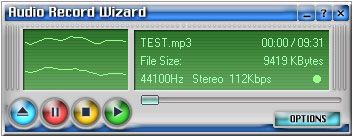 Get it on tape! Well, the modern digital version! Here’s a useful program that can record almost all sound from your sound card with good quality. It can also record from the microphone, line-in, and just about any programs such as your media player of choice. Get it on tape! Well, the modern digital version! Here’s a useful program that can record almost all sound from your sound card with good quality. It can also record from the microphone, line-in, and just about any programs such as your media player of choice.
For example you might wanna record an internet radio show. You can easily do that with this, and what’s more, it can record straight to mp3 format,saving you valuable disc space! To get an even small file size, mp3 modes are fully configurable.
Additional features include voice activation, file length limitation (so that it can’t make overly huge files) and schedule (how about recording your favorite internet radio show while you’re asleep or at work?) and it can even stop recording automatically.
Sounds like it could be the perfect solution for almost any situation where you might wanna record and save audio from your computer? You can download a demo (limited to recording 3 minutes) and more find out more info right here.
Posted in Audio, Commercial, Developer, Main, Multimedia, Shareware | No Comments »
Thursday, November 23rd, 2006
 If you work in web design or graphics either professionally or personally, you’re probably used to dealing with fonts a lot from time to time. Well now things just got a whole lot easier thanks to The Font Thing! If you work in web design or graphics either professionally or personally, you’re probably used to dealing with fonts a lot from time to time. Well now things just got a whole lot easier thanks to The Font Thing!
You can type in a word and it’ll show you that word in all your different fonts. Also shows you that word in other fonts that you don’t have installed yet, and gives you the option to install them. It allows you to fully browse installed and even uninstalled fonts and view sample text in any color you want,so you can easily choose the ideal one you’ve been searching for from your collection. Also you can install or uninstall any number of fonts at once.
As a totally free program, you can’t go wrong in taking this for a test drive if you work with fonts a lot!
Check out the homepage here for the full list of features and to download it.
Posted in Design, Freeware, Main, Shell and Desktop, Utilities | No Comments »
Thursday, November 23rd, 2006
 Celestia is an amazing little program for anyone who’s into astronomy, star-gazing or just curious about the universe. Its a simulation of the entire universe! Sounds impressive huh? Well, for a freeware program it is! It includes beautifully rendered planets, moons, asteroids, comets, and some smaller orbital bodies such as ‘MIR’ and the International Space Station. Celestia is an amazing little program for anyone who’s into astronomy, star-gazing or just curious about the universe. Its a simulation of the entire universe! Sounds impressive huh? Well, for a freeware program it is! It includes beautifully rendered planets, moons, asteroids, comets, and some smaller orbital bodies such as ‘MIR’ and the International Space Station.
In addition to all this, you can also download add-ons from the website of more stuff, including some fictional stuff for all you science fiction nerds! Celestia is not limited to our solar system; you can visit other stars, or even travel outside the galaxy. The controls take a little getting used to, but to fully appreciate just some of Celestia’s full capabilities, run it and press D to view a demo.
Warp on over to here to download it.
Posted in Fun, Information Management, Main, Shareware, Shell and Desktop | No Comments »
Wednesday, November 22nd, 2006
 YamiPod is a freeware standalone iPod manager which allows you to manage the content of your iPod without the need to have iTunes installed. It needs no installation and can be run directly from your iPod. So,for example, it doesn’t matter if it is not your computer where you want to run it, you still can! YamiPod is a freeware standalone iPod manager which allows you to manage the content of your iPod without the need to have iTunes installed. It needs no installation and can be run directly from your iPod. So,for example, it doesn’t matter if it is not your computer where you want to run it, you still can!
It comes with many useful features such as iPod ‘notes’ editing features, exporting your song list to HTML, management for duplicate files, the ability to locate lost music files, AAC file support and of course PC to iPod synchronization! It can automatically download the latest version and includes a built in music player.
This is a worthwhile alternative to the official iPod client which many people think is bloated and overrated. Personally i think iPods are overrated anyway as mp3 players existed long before they claimed the market, but if you have an iPod, this alternative is definitely worth checking out!
It’s freeware and you can get more info and download it from here.
Posted in Audio, Freeware, Information Management, Linux, Mac Stuff, Main, Windows | No Comments »
Wednesday, November 22nd, 2006
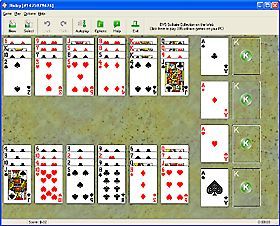 If you are a Solitaire fan like I am you are going to love this. Ever heard of 1st Free Solitaire? It is a free collection of 7 popular solitaire card games. It contains the following popular solitaire variations: Bisley, Carpet, Flower Garden, FreeCell, Klondike, Nestor, Yukon. If you are a Solitaire fan like I am you are going to love this. Ever heard of 1st Free Solitaire? It is a free collection of 7 popular solitaire card games. It contains the following popular solitaire variations: Bisley, Carpet, Flower Garden, FreeCell, Klondike, Nestor, Yukon.
With a complete customizable interface, you can choose from lots of backgrounds and card backs, and even use .bmp or .jpg image files to create your own backgrounds and card backs.
With great features like “Show Next Move” command, one move undo, selectable backgrounds, automatic card moving, restart feature, shuffle selection, sound, and more you can be sure there will never be a dull moment with this game.
If you love Solitaire, this game is for you. But if you’ve never really gotten a hang on it you may not like 1st Free Solitaire, or of what use is 7 variations of the same game if you don’t appreciate how the game is played.
Solitaire fans, say goodbye to boredom, download this great game. Not a solitaire fan yet? Maybe this will convert you. Try it! It’s free and compatible with all Windows OS!
Posted in Freeware, Fun, Games, Main | 1 Comment »
|
|
|




