Archive for the 'Shareware' Category
Thursday, July 26th, 2007
 SmartRoster is software for fully automating scheduling for churches, but can also be used for volunteer groups, or small businesses. SmartRoster is software for fully automating scheduling for churches, but can also be used for volunteer groups, or small businesses.
Here’s how it works, you first define the events and roles, then add people and put how and when they want to participate by nominating their events, roles, availability/non-availability, and work preferences. You then set the period you wish to schedule and click the AutoFill button to create the schedule.
It then goes through several different schedules and automatically picks the best one, balancing the workload as evenly as possible, while respecting work preferences. You can schedule either fully manually or, using the drag-and-drop interface, completely automatically, or a combination of both. It has a number of features to make sure everyone get their schedule, such as per-person reports,and automated email reminders.
It also has a ton of features and functions, so if this sounds of use to you or your organisation, check it out here for more info.
Posted in Business, Developer, Information Management, Main, Shareware, Time Managment, Windows | No Comments »
Wednesday, July 25th, 2007
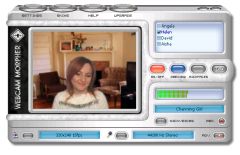 There are so many different ways for people to chat nowadays and one way that is really starting to pick up steam is video conferencing. Whether it is being done for business reasons or for pure personal reasons, there might be times when editing what is being sent out to the other people in the video conversation would be prudent. For businesses, it might be someone accidentally divulging something and for personal chat it might be something embarrassing action wise such as a burp or a cough. Either way, people will want to edit that annoying stuff out and now with AV Webcam Morpher 1.0 you can do exactly that. There are so many different ways for people to chat nowadays and one way that is really starting to pick up steam is video conferencing. Whether it is being done for business reasons or for pure personal reasons, there might be times when editing what is being sent out to the other people in the video conversation would be prudent. For businesses, it might be someone accidentally divulging something and for personal chat it might be something embarrassing action wise such as a burp or a cough. Either way, people will want to edit that annoying stuff out and now with AV Webcam Morpher 1.0 you can do exactly that.
There are so many different ways for a person to use the AV Webcam Morpher that it is really crazy! Not only can you change the tone of your voice to make yourself sound like someone completely different than who you are, but at the same time you can also use hundreds of different video effects in order for people to get things across that are closer to what they want to portray. With all of the neat effects that people have been able to come up with for the AV Webcam Morpher, it is no doubt whatsoever that it is definitely the real deal.
More info can be found at http://www.audio4fun.com/
Posted in Design, Developer, Fun, Internet, Main, Multimedia, Photo, Shareware, Windows | 1 Comment »
Wednesday, July 25th, 2007
 So you’ve just recorded your oh so interesting or hilarious video clip. Next thing to do is share it with the world right? So you’ve just recorded your oh so interesting or hilarious video clip. Next thing to do is share it with the world right?
It takes a lot of time and patience to go around to multiple video sites such as Google Video, YouTube etc. to submit your video. Wouldn’t it be nice if there was some way to do them all at the one time?
Well if you have “Video Clip Submitter” thats exactly what you can do. It’s available in three different versions, express, silver, and gold, the only real difference being the amount of sites it submits to. So if you’re a keen maker and uploader of videos, this may save you a lot of time!
Check it out here.
Posted in Commercial, Developer, Freeware, Internet, Main, Shareware, Video, Windows | 4 Comments »
Tuesday, July 24th, 2007
 BS Player is yet another media player, but its one that’s worth checking out. Maybe you don’t like the standard media players such as Windows media player? (You wouldn’t be alone!) How about using this skinnable, highly functional media player that has some useful features. BS Player is yet another media player, but its one that’s worth checking out. Maybe you don’t like the standard media players such as Windows media player? (You wouldn’t be alone!) How about using this skinnable, highly functional media player that has some useful features.
BS Player plays LOTS of types of video and audio files (check out the homepage below for the full list), it also has some advanced features like TV output settings, aspect ratio adjustment, Multilingual interface, subtitles (all types), media library, skins, hotkeys, etc.
60 million users worldwide and its availability in 90 languages says a lot of people like this player, so go see or yourself. (One negative thing to say though, adware in the free version!)
Click here for more info and more details of its features.
Posted in Audio, Developer, Freeware, Internet, Main, Movies, Multimedia, Shareware, Video, Windows | No Comments »
Monday, July 23rd, 2007
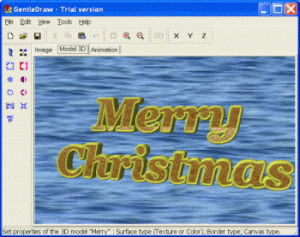 Gentledraw is software that will make the creation of 3D model fun for the user. The functions are quite easy to use even by a person who only basic knowledge about computers. It enables the user to create simple drawing images, animations and 3D images. The software starts with a ‘Quick Start’ dialog box that gives an idea about how to use the software and what does it do. Essentially the Quick Start as a good learning guide when it comes to creating 3D images. Gentledraw is software that will make the creation of 3D model fun for the user. The functions are quite easy to use even by a person who only basic knowledge about computers. It enables the user to create simple drawing images, animations and 3D images. The software starts with a ‘Quick Start’ dialog box that gives an idea about how to use the software and what does it do. Essentially the Quick Start as a good learning guide when it comes to creating 3D images.
Easy in downloading this software also gets installed in fewer seconds. Images can be formed with the toolbar shown on the left side having pencil, eraser, brush, etc. The images can be transformed to 3D images instantaneously. The controls allows for easy navigation ease of selecting stored images. The best part involves the ease with which the 3D images can be turned to animations. Simple image diagrams have just two colours black and white. When they are converted into 3D or animation the colour can be readily adjusted according to the choice. The options like ‘Canvas color’ along with ‘Model surface color’ and ‘Border color’ options on the toolbar effectively serve the purpose. The Border dialog’s ‘enable border’ and ‘border editor’ features help to bring changes in the structure of the image. The texture can be adjusted and the canvas image can be set. X Y Z level are available for neatly adjusting size, scalability, and to turn the image as desired.
For creating animations, the color of canvas and background can be changed as per the animation scheme. The place and size can be changed and the image can be rotated as well through the Route dialog options on the toolbar. The timing and size of the animation can also be set. The software does a very decent job of what set itself for doing and has practical utility.
(More Info and Download)
Posted in Animation, Design, Developer, Fun, Games, Shareware, Themes, Windows | 1 Comment »
Monday, July 23rd, 2007
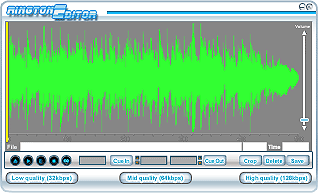 If you are looking for creating great ring tones for your cell phones; look no further than RingtonEditor. This small piece of software achieves what most users look forward to while creating customised ring tones. Though the software lacks bells and whistles; it does effectively create various kinds of ring tones. If you are looking for creating great ring tones for your cell phones; look no further than RingtonEditor. This small piece of software achieves what most users look forward to while creating customised ring tones. Though the software lacks bells and whistles; it does effectively create various kinds of ring tones.
Installation of RingtonEditor is smooth and navigation is quite easy. To start with it gives you basically three qualities of ring tones to create. The software has a very basic interface though the editor has a very appealing look. Creating a ring tone is quite simple. Just select a music file using the file option and then use mouse cursor to choose to choose the part of the file which you wish to use as ring tone. The graphical editor is pretty neat and you can select sections to great detail. With a line bars showing the exact selection, very accurate segments can be selected. Next the loop function allows you make the section play in loop thus allowing you to create your favourite ring tone. Next choose the quality in which you want the ring tone to be created from the options present. Starting with low quality ring tones (32 kbps) through medium quality (64kbps) to high quality (126kbps) options are available. Once you have chosen the option, the corresponding file size is displayed in the editor. The editor takes the default low quality option by default. The output created can be saved in different formats like wav, midi etc.
The software does have drawbacks. It lacks many controls which ideally software like this should include as standard features. Also there is no help section and even some controls are not labelled which may cause difficulty for a basic user. In a nutshell the software is likely to find many takers for it simplicity while some may desire more improvements in it.
(More Info and Download)
Posted in Commercial, Developer, Multimedia, Music, Shareware, Windows | 2 Comments »
Monday, July 23rd, 2007
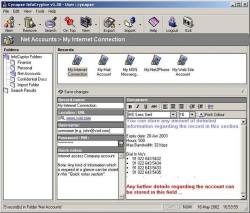 There are always times in life when we need to have some of our important information stored. Whether you are talking about the school notes that you want to use for the test, the work notes that are top secret or the phone number of that girl you just got at the bar last night (wink), you need a place to store information that you want not only to be kept safe, but also to be kept secret. InfoCryptor refers to itself as being a multi-user secure information storage application and upon taking a closer look at what it actually has the ability to do, this turns out to be exactly the case at hand. There are always times in life when we need to have some of our important information stored. Whether you are talking about the school notes that you want to use for the test, the work notes that are top secret or the phone number of that girl you just got at the bar last night (wink), you need a place to store information that you want not only to be kept safe, but also to be kept secret. InfoCryptor refers to itself as being a multi-user secure information storage application and upon taking a closer look at what it actually has the ability to do, this turns out to be exactly the case at hand.
Whether you are looking to store text documents, notes, passwords, e-mails, security codes, diagnostics or anything else, you will find a way to store it with ease with InfoCryptor. The interface is very easy to use so that you don’t have to spend hours accessing the information that you want to keep safe. More impressive than anything else perhaps is how amazing the software itself actually is. InfoCryptor can be your friend and your assistant all bundled up in one and this ultimately is why it has become so popular amongst so many different people.
More info can be found at http://www.cynapse.co.in/infocryptor/index.php
In the latest updated version recently released, Cynapse InfoCryptor 1.50.1203, the Major change is the fixed component update URL.
Posted in Business, Commercial, Developer, Information Management, Internet, Main, Security, Shareware | No Comments »
Friday, July 20th, 2007
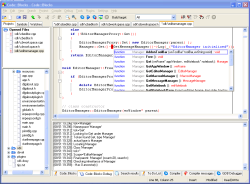 One of the most important things in today’s world has to be without a doubt the idea of programming. It’s all around us in today’s world and object oriented programming in particular has definitely become a very useful skill to have. Of all of the different object oriented languages around, C++ is perhaps the most used one. Along with its sister languages of C# and C (the original one of the series), it has been a great help to a lot of programmers to build the software of their dreams. One of the most important things in today’s world has to be without a doubt the idea of programming. It’s all around us in today’s world and object oriented programming in particular has definitely become a very useful skill to have. Of all of the different object oriented languages around, C++ is perhaps the most used one. Along with its sister languages of C# and C (the original one of the series), it has been a great help to a lot of programmers to build the software of their dreams.
Few things in the realm of computer science are more satisfying than putting the finishing touches on a piece of programming and with the Code::Blocks Studio you can have that satisfaction again and again in a way that is much easier than what those old time program compilers would have you do.
Gone are the days of looking at the blue screen with the yellow text; gone are the days where you had no functionality whatsoever! This program allows you to write and compile your C++ software in a method that provides you exceptional functionality in a package that is exceptionally user friendly. Programmers sometimes fear user friendliness because they fear it cuts back on functionality; but this software is the exception to that rule.
Give it a try and you’ll see why! More information can be found at http://www.codeblocks.org/
Posted in Developer, Internet, Linux, Main, Open Source, Programming, Shareware | 1 Comment »
Tuesday, July 17th, 2007
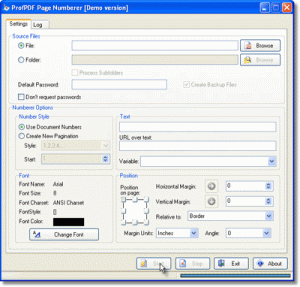 The Sybrex SpeedPDF numberer is a useful utility for people who do not have the Adobe Acrobat writer software. In case you want to insert a new pagination scheme in your document or want to make batch numbers while getting your PDF documents printed then this software can come in handy. Also if you wish to send some document over to a colleague, you can use this tool to place certain taglines in the PDF document. The Sybrex SpeedPDF numberer is a useful utility for people who do not have the Adobe Acrobat writer software. In case you want to insert a new pagination scheme in your document or want to make batch numbers while getting your PDF documents printed then this software can come in handy. Also if you wish to send some document over to a colleague, you can use this tool to place certain taglines in the PDF document.
The software has an easy installation process and a neat interface. It works easily on all contemporary versions of Windows. It has facility for giving passwords and also creating backup files. The font options are suitable for any normal use. You can choose your preferred font size along with font color. A number of pagination styles are available. Depending upon your requirement you can choose the pagination style from the drop down list. There is a graphical control to set position on the page through margin units. You can select the horizontal as well as vertical margins and even the angles. Once you select the options and press on start button, the pagination process starts. Small PDF documents are instantly paginated. It works effortlessly on even large PDF documents with equal ease. You can also inset URL links on the pages if you so desire. The software also maintains a log of all documents that it has paginated including the destination drive.
On the downside the software is quite basic to hold the imagination of any professional user. Since it does not give any tangible text editing options, the software falls short of expectations of many users. It also lacks any help instructions that may be required by novice users. It is recommended in case you do not have Adobe Acrobat writer software and are frequent user of PDF documents.
(More Info and Download)
Posted in Business, Design, Developer, Multimedia, Shareware, Utilities, Windows | No Comments »
Tuesday, July 17th, 2007
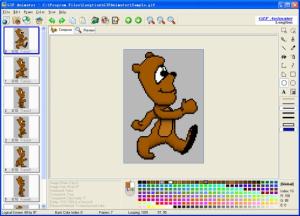 If you are a web designer looking for creating those stunning animated images for your website then you should definitely try out the Longtion Gif Animator. Loaded with interesting features this piece of creative software allows you create seamless animations for your website with effortless ease. It provides support for multiple file types and achieves a high degree of compression while creating the images; thus reducing files sizes and making your web pages load faster. If you are a web designer looking for creating those stunning animated images for your website then you should definitely try out the Longtion Gif Animator. Loaded with interesting features this piece of creative software allows you create seamless animations for your website with effortless ease. It provides support for multiple file types and achieves a high degree of compression while creating the images; thus reducing files sizes and making your web pages load faster.
The software is a breeze to install and the navigation menu is quite neat. The software has an attractive look and feel. With easy controls even an average user can create professional looking animations. You can make Slide Show style Gifs or even Text Style Gifs. One just needs to click on the New Gif tab and then select the frame sizes. Next just use the Add frame options to add all the pictures that you wish to put into different frames. In few moments your basic animated Gif file is ready. Now for getting the professional touch, the software has tabs like Frame property and competent image editing tools. You can easily set the frame properties including transparency options. It also has the options for placing time intervals between two successive frames used in the animation. Next with image editing tools you can crop images, draw lines and make host of other changes as required. The tool has decent features that are required for creating good Gif animations. It also comes in handy for novice users who may want to use it for creating animations for their profile homepages.
The software comes with a Help section which though lacks details. Also the software itself could do well with more animation styles and effects. Overall the software is worth a try if wish to quickly create Gif animations.
(More Info and Download)
Posted in Animation, Design, Developer, Fun, Internet, Photo, Shareware, Windows | No Comments »
|
|
|




