Archive for the 'Shareware' Category
Monday, February 19th, 2007
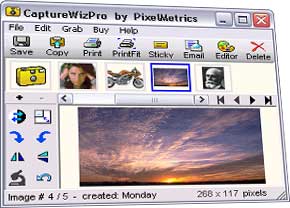 Sometimes you need to capture a screen. The easy way of course is PrintScreen, but sometimes that is bamboozled by software taking over the keyboard map. An easy way to capture those hard to get images, especially scrolling pages, and even audio and video is CaptureWizPro. Sometimes you need to capture a screen. The easy way of course is PrintScreen, but sometimes that is bamboozled by software taking over the keyboard map. An easy way to capture those hard to get images, especially scrolling pages, and even audio and video is CaptureWizPro.
The new Windows Vista compatible version has a pop-up capture toolbar with easy to use tools, easy to see visible over any screen, and simple three step capture process thats easy to follow. You also have additional utilities like sticky notes, a thumbnail viewer and programmable hot keys.
Go here to get it and find out more. And here you can find out some useful tips.
Posted in Design, Developer, Main, Photo, Shareware, Shell and Desktop, Utilities, Windows | No Comments »
Monday, February 19th, 2007
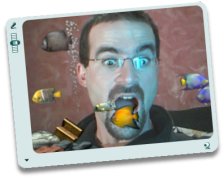 Here is a cool software to improve and generally add fun to your chatting experience. It’s called CamTrack. Here is a cool software to improve and generally add fun to your chatting experience. It’s called CamTrack.
CamTrack is a unique webcam software. What’s unique about it? It enhances the way people video chat. With CamTrack you can amuse your friends with funny animations and webcam emoticon; keep your face centered automatically with automatic Face Tracking; use text overlays by writing directly on the webcam video; improve the quality of your webcam picture with noise reduction or share pictures with your friends through your webcam.
It’s really a cool way to video chat. It’s a shareware, go check out the trial version first and see if it’s worth it, I’m guessing you will really love this cool and fun software.
CLICK HERE for more info and trial download.
Or
Visit http://www.digitalpeers.com/
Posted in Chat, Developer, Internet, Main, Shareware, Social Software, Video, Windows | 1 Comment »
Monday, February 19th, 2007
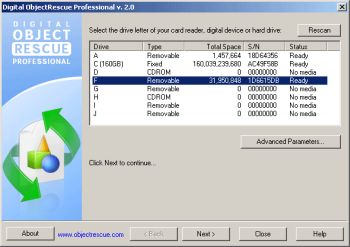 If you’ve ever lost precious data to deleted or corrupt files you’ll know the value of a good recovery or rescue software. ObjectRescue Pro recovers lost data from different or should I say diverse multimedia devices, from digital cameras, audio recorders, MP3 & WMA players to PC, PDAs and mobile phones. If you’ve ever lost precious data to deleted or corrupt files you’ll know the value of a good recovery or rescue software. ObjectRescue Pro recovers lost data from different or should I say diverse multimedia devices, from digital cameras, audio recorders, MP3 & WMA players to PC, PDAs and mobile phones.
You will really enjoy using this cool tool as it supports recovery from Hard Drives, Compact Flash cards (type I/II), IBM Microdrives, SmartMedia cards, MultiMedia cards, Secure Digital cards and Memory Sticks, and any other storage device with the addition of wide range file format support: DOC, XLS, ZIP, RAR, JPEG, AVI, MOV, MP3, WMA, WAV, etc.
The latest version which was released towards the end of last month, ObjectRescue Pro 4.4.1 has these latest changes:
- Vista support implemented (administrative rights request added)
- Added dialog if program is started without administrator privileges
Save yourself a headache and go get this software, it really is very useful.
CLICK HERE or visit http://objectrescue.com/products/objectrescuepro/ to check it out.
Posted in Business, Developer, Information Management, Main, Mobile, Multimedia, Shareware, Utilities, Windows | 2 Comments »
Friday, February 16th, 2007
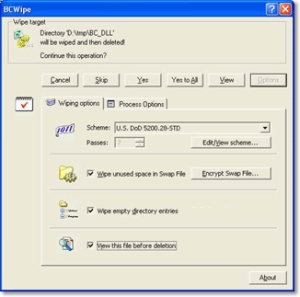 Performing just standard deletion of files doesn’t mean those files actually leave your hard drive. But with BCWipe, you can be sure of a total and secure file deletion. Performing just standard deletion of files doesn’t mean those files actually leave your hard drive. But with BCWipe, you can be sure of a total and secure file deletion.
BCWipe is designed to securely delete files from your hard drive. The truth is standard file deletion still leaves the contents of the so called deleted file on your disk. Unless it has been overwritten by files subsequently saved, it can be recovered using standard disk utilities.
‘Wiping’ is a term used to describe the process of shredding the contents of a file or disk space. It is impossible to restore any data that has been properly wiped. That’s exactly what BCWipe does. Working quickly and integrated with Windows Shell, BCWipe shreds data in files so that they can not be recovered by any means.
The latest version, which has just been recently released, BCWipe 3.10 has a major change of being worked on for Vista Support.
CLICK HERE for more info.
Posted in Developer, Information Management, Main, Security, Shareware, Utilities, Windows | No Comments »
Thursday, February 15th, 2007
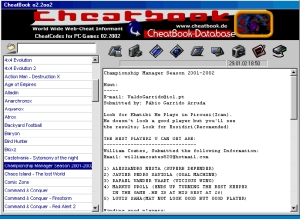 If you really love games then you need this to complete your gaming experience. What am I talking about? CheatBook, of course! If you really love games then you need this to complete your gaming experience. What am I talking about? CheatBook, of course!
CheatBook is cheat-code tracker with hints for several popular PC Action and Adventure Games. Basically, the CheatBook Issues focuses on newer releases. CheatBook comes out in monthly editions and it provides very useful info [especially cheats] on latest games.
If you need help with those latest cool games that have been giving a tough time, why not check out the monthly issues of CheatBook. CheatBook February 2007 is already out. Go and check it out!
CLICK HERE for more info.
Posted in Commercial, Developer, Fun, Games, Main, Shareware, Themes, Windows | No Comments »
Thursday, February 15th, 2007
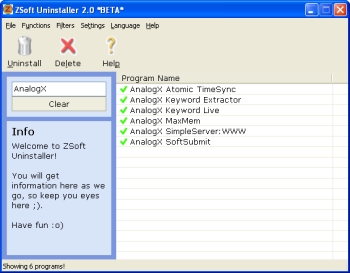 Here is an uninstaller that takes its job of uninstalling quite very seriously. Here is an uninstaller that takes its job of uninstalling quite very seriously.
ZSoft Uninstaller is an easy to use software that helps you handle your uninstalling with relative ease. With this software, finding and uninstalling a program is really very easy, as easy as clicking a button.
ZSoft is a better alternative to the conventional windows add and/remove application because it analyzes an installation so that it can be completely uninstalled, shows more information than available though add/remove; Automatically finds entries from programs that are most likely already uninstalled, among other things. So this software should really come in handy.
The latest version, ZSoft Uninstaller 2.3.4, which was just released yesterday, 14 February 2007, has these latest changes:
- Now the ignore list also works with the “HCU” part of the registry
- Updated Portuguese translation, thanks to Rui Morais
- Updated Dutch translation, thanks to computerNERDie
- New translation: Spanish, thanks to Valentín Sanz
- New translation: Valencian, thanks to Vicente Adam
- “Delete” button removed from toolbar (still available in right-click menu)
- The “Analyzed Programs” tab has been updated – it is now searchable
- New tab: Hidden Programs where the programs you have hidden is showed for easy uninstall etc. even though it has been hidden. The list is searchable
Etc.
Want to check it out? IT’S FREE! CLICK HERE [or visit http://www.zsoft.dk/index/software_details/4]
Posted in Business, Commercial, Developer, Main, Programming, Shareware, Utilities, Windows | No Comments »
Wednesday, February 14th, 2007
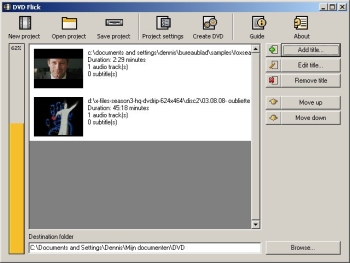 Here is a good open source for you to make DVDs. It’s called DVD Flick. Here is a good open source for you to make DVDs. It’s called DVD Flick.
DVD Flick is a simple tool but don’t mistake it’s simplicity for lack of functionality; it’s a very powerful DVD Authoring tool. With DVD Flick you can take several video files stored on your computer and turn them into a DVD, this DVD will play back on your DVD player, MediaCenter or Home Cinema Set without any hassles.
Like I said earlier it’s Open Source; this means not only is it free for download the program’s source code is also free for modification. That’s not all several external programs are used by DVD Flick to do “the magic” [“the magic” includes encoding and combining of video material]. All of these programs are free, some are also Open Source.
The latest version, DVD Flick 1.2.1.2, which was just released only yesterday, has these changes:
- Added: Custom video bitrate option
- Added: Option to manually set a subtitle’s framerate, so that it will get converted to the movie’s framerate
- Added: Warning to prevent graphical subtitle files from being loaded
- Added: Drag and drop support for video sources, audio tracks and subtitle files to titles
- Added: Minimize to tray button in the progress dialog
- Added: Option to save a subtitle’s settings as default
- Added: Options for more audio encoding control
- Fixed: Subtitle desyncing
- Changed: Rewrote DVD recorder detection. It should detect all SCSI3-capable recorder drives now
- Changed: Tweaked video encoding options a bit more
CLICK HERE for more info and download.
Posted in Developer, Main, Movies, Multimedia, Shareware, Utilities, Windows | No Comments »
Wednesday, February 14th, 2007
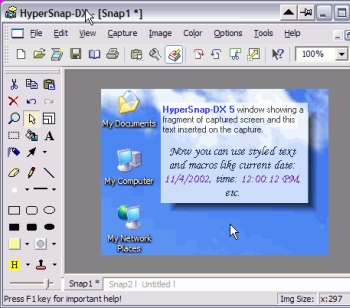 If you’ve been looking for a fast and convenient way to take screen captures from your Windows screen and you’ve not found one yet, you should try using HyperSnap-DX. If you’ve been looking for a fast and convenient way to take screen captures from your Windows screen and you’ve not found one yet, you should try using HyperSnap-DX.
HyperSnap-DX is a screen capture and image editing tool for Windows. What makes this program very useful is the fact that it doesn’t only take screen captures from standard desktop programs; it goes all the way to capture otherwise difficult stuff like DirectX, Direct3D, 3Dfx Voodoo, and Glide mode games easily. It can also capture frames from many software DVD players and other video playing software.
The latest version, HyperSnap-DX 6.13.02 has some very useful features, that makes it better than the previous versions. Some of the top features include:
- New in ver. 6 TextSnap™ feature to capture editable text from almost anywhere on the screen, when running under Windows 2000, XP or newer. Starting from ver. 6.10 can also capture tab-delimited data for easy paste into MS Excel.
- New & powerful image capture, editing, annotation and manipulation tools.
- Snags also those difficult-to-grab screens from DirectX™ and Glide™ games.
- Image stamps, frames, drop shadow, free-hand capture, FTP server uploads, more!
- Automatic color substitution!
- Non-rectangular window capture!
- Button Capture – perfect for professional technical writers who need to snap and document dozens of buttons!
- Fully customizable user interface. Rearrange menus and toolbars any way you want, assign any keyboard shortcuts you like, tear off menus to create instant toolbars, even control HyperSnap with voice commands!
You should check it out. CLICK HERE for more info and trial download.
Posted in Design, Developer, Photo, Shareware, Utilities, Windows | 2 Comments »
Wednesday, February 14th, 2007
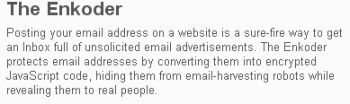 If you have an email address (and who doesn’t these days?), sooner or later you might end up entering it in a guestbook or forum, or even having it on your own website so that people can contact you. The problem with this is that programs spammers set loose on the Internet called spambots, will find your email address sooner or later and this will lead to you receiving spam emails. If you have an email address (and who doesn’t these days?), sooner or later you might end up entering it in a guestbook or forum, or even having it on your own website so that people can contact you. The problem with this is that programs spammers set loose on the Internet called spambots, will find your email address sooner or later and this will lead to you receiving spam emails.
Enter the Enkoder! This is a small online tool (or downloadable if you are a Mac user) which converts your email address into special code that those pesky spambots can’t read as being an email address.
The spambots won’t detect your email address, so will completely ignore it. Meanwhile your email address still appears the same as before, but won’t end up in the hands of the spammers. Check it out.
Posted in Business, Commercial, Developer, E-mail, Internet, Mac Stuff, Main, Shareware, Utilities, Windows | No Comments »
Tuesday, February 13th, 2007
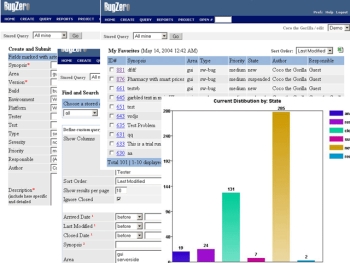 If you need a program that will help track software bugs, you need to check out Bugzero. If you need a program that will help track software bugs, you need to check out Bugzero.
Bugzero is a Web-based bug tracking tool but that is not just what it is used for it’s also a defect tracking, issue tracking, and change management system used in a distributed team environment to track software bugs, hardware defects, test cases, or any other issues.
But there is more to Bugzero than all that; it can also be used equally well as a helpdesk customer support, trouble ticketing, or email management system to collect and manage customer feedbacks, incidents, requests, and issues.
The new version, Bugzero 4.5.2 which just hit the market yesterday has these latest Changes:
- A new virus scan feature was added
- A few minor bugs were fixed
- A project can now be reloaded from database without restarting the application
The only thing you may have an issue with is the price. It looks expensive, but is it really expensive? It’s all a matter what you want to use it for, check out the trial version first and if it is what you need, it will be a worthwhile investment.
CLICK HERE for more info and trial download.
Posted in Business, Commercial, Design, Developer, Information Management, Main, Shareware, Utilities, Web services, Windows | No Comments »
|
|
|




