Archive for the 'Windows' Category
Thursday, September 6th, 2007

jv16 powertools is an all in one program containing various tools and utilities for your computer. It contains a registry cleaner, file wiper, duplicate file finder and lots more.
The main reason I was trying it out was because the registry cleaner seems to be different from any I’ve ever tried in the past. Apparently it has “Stateful registry cleaning” which is different from most registry cleaners and you can read more on that on this page here.
The numerous other utilities may be useful at times but the interface can be a little confusing, so i wouldn’t recommend this software for those who aren’t too knowledgeable about the inner workings of their pc. But if you’re computer savvy and looking for an all in one solution to some common computer tasks,it’s definitely worth checking out, as long as you know what you’re doing.
Click here for the homepage with the full list of features and detailed info on each one.
Posted in Backup, Design, Files and Folders, Information Management, Main, Programming, Shareware, Shell and Desktop, Utilities, Windows | No Comments »
Wednesday, September 5th, 2007
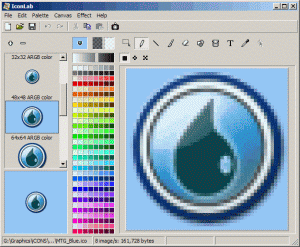 Icons are one of the staple items of today’s world. It has even gotten to the point where to the left of the URL in most modern browsers, you can actually see an icon that represents the website you are visiting. It is really quite remarkable if you think about it, since icons were nowhere to be found just a few years ago. However, web design of any serious nature requires the need for icon creation and that of course requires the need of specialized software specifically designed to handle the editing difficulties of smaller icons. Icons are one of the staple items of today’s world. It has even gotten to the point where to the left of the URL in most modern browsers, you can actually see an icon that represents the website you are visiting. It is really quite remarkable if you think about it, since icons were nowhere to be found just a few years ago. However, web design of any serious nature requires the need for icon creation and that of course requires the need of specialized software specifically designed to handle the editing difficulties of smaller icons.
Enter the IconLab 1.0. Often described as being one of the most powerful free icon editors out there, it is actually a small program when all is said and done. The size belies the strength in this case however as it allows you to change icons in many different ways and supports formats up to 32-bit. You can even change the file types of different icons and of course in addition to that you can edit them in any way that you deem necessary. All of the typical drawing effects are available.
More info available right here.
Posted in Animation, Design, Main, Photo, Shareware, Utilities, Windows | No Comments »
Wednesday, September 5th, 2007
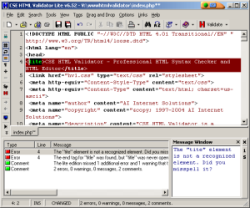 When you take a look at all of the different coding languages used in internet development today, you can see that there are quite a few indeed. If you ever want to be good at web development, it goes beyond learning HTML nowadays. You need to know XML, XHTML, CSS, SQL, PHP, ASP and a number of other programming languages. With new languages emerging all the time you are going to find it becoming harder and harder to keep knowledge of all of the tags from all of the languages in your head at once. When you take a look at all of the different coding languages used in internet development today, you can see that there are quite a few indeed. If you ever want to be good at web development, it goes beyond learning HTML nowadays. You need to know XML, XHTML, CSS, SQL, PHP, ASP and a number of other programming languages. With new languages emerging all the time you are going to find it becoming harder and harder to keep knowledge of all of the tags from all of the languages in your head at once.
Therefore, software is necessary. Even if you don’t want to work in a web development program like Dreamweaver or FrontPage, you should still use software to check your code. Programming different parts of code for hours on end is going to make anyone make the odd mistake here and there, so you want to be absolutely sure that anything you take a look at also gets looked at by an impartial set of eyes. The CSE HTML Validator Lite 8.0130 is something that you definitely something you want to look at because it is exactly that; an impartial pair of eyes. It will tell you how good your code is and whether or not there are any mistakes present. It will also show you the line numbers of those mistakes and that information alone is priceless in allowing you to design your dream website.
More information can be found at http://www.htmlvalidator.com/
Posted in Design, Developer, Main, Programming, Shareware, Shell and Desktop, Windows | No Comments »
Tuesday, September 4th, 2007
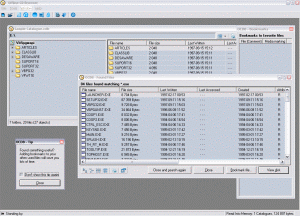 When you think about it, part of making software for the computer should be in making tasks that people almost don’t even think about when they do them easier. In other words, if you can take an everyday task that a person has to do and find a way for them to make that task easier, then you have really accomplished a great feat in your software design career. When you think about it, part of making software for the computer should be in making tasks that people almost don’t even think about when they do them easier. In other words, if you can take an everyday task that a person has to do and find a way for them to make that task easier, then you have really accomplished a great feat in your software design career.
Take the example of file browsing. If you’re like most computer savvy users, what you are going to find is that you have a number of different CDs with a lot of data on each CD. Every CD that you’ve made that contains files from Microsoft office, programs, software and games are all going to be CDs that you might need to browse at some point to find a specific file. If you’ve got hundreds of CDs to look at, this can become a real problem in terms of loading and unloading a CD each time you want to look at its contents.
If you have the Offline CD Browser however, what you can do is make copies of your CDs and save images of their file contents within the program itself. Then, when you need to find a file, you can look through all of your CDs in moments because of the file structures having been saved on the hard drive. You can’t activate any of the files, but searching through them is a breeze.
More information can be found at http://www.anderssoftware.com/ocdb/
Posted in Browsers, Design, Developer, Freeware, Information Management, Main, Programming, Security, Windows | 1 Comment »
Tuesday, September 4th, 2007
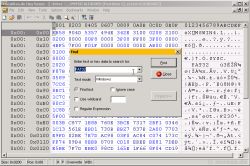 Tiny Hexer has been one of the most popular free hex editors because of all of the functionality that it has. When you are using Tiny Hexer, you can do almost anything you’d like to a binary file. You can edit multiple files in .mdi format to your heart’s content with the software as well as use it to take a look at sectors of any data medium that you can think of (hard drive, disk drives and many others). You can even use the Tiny Hexer to change information regarding the virtual memory of processes activated on your system. Tiny Hexer has been one of the most popular free hex editors because of all of the functionality that it has. When you are using Tiny Hexer, you can do almost anything you’d like to a binary file. You can edit multiple files in .mdi format to your heart’s content with the software as well as use it to take a look at sectors of any data medium that you can think of (hard drive, disk drives and many others). You can even use the Tiny Hexer to change information regarding the virtual memory of processes activated on your system.
In addition to all of that great functionality, Tiny Hexer as a piece of software was also something that was scriptable as well as something that could be used to view plugin data structures in browsers. However, there are a number of people that use the Tiny Hexer software that don’t need any of the functionality provided by either the scripting or the plugin options and therefore these people can benefit from the use of the Tiny Hexer Medium Edition software. It has all of the editing abilities that users of the original Tiny Hexer will expect, but without any of the scripting or plugin support for a leaner piece of software.
More information available at http://www.mirkes.de/en/freeware/tinyhex.php
Posted in Developer, Main, Programming, Shareware, Shell and Desktop, Windows | No Comments »
Tuesday, September 4th, 2007
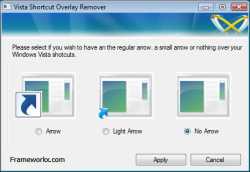 If you’ve been using any version of Windows, then you will probably be familiar with the mechanism that Microsoft uses to distinguish true icon pieces from icon pieces that have been placed where they are as shortcuts to other icon pieces located elsewhere throughout the user’s hard drive. The mechanism for signifying the difference between a true icon and a shortcut is a small arrow that is put on overlay to the icon itself. This arrow is easily distinguishable and is used by Windows users to figure out which of their icons are shortcuts and which are not. If you’ve been using any version of Windows, then you will probably be familiar with the mechanism that Microsoft uses to distinguish true icon pieces from icon pieces that have been placed where they are as shortcuts to other icon pieces located elsewhere throughout the user’s hard drive. The mechanism for signifying the difference between a true icon and a shortcut is a small arrow that is put on overlay to the icon itself. This arrow is easily distinguishable and is used by Windows users to figure out which of their icons are shortcuts and which are not.
Of course, some users might want to remove this arrow for aesthetic purposes, simply because some people don’t like the look of it. While that’s been fine up until now, one of the vexing things about Windows Vista (one among many) is that there is no mechanism in place to actually remove that arrow. And because of the design scheme of Windows Vista, the arrow can actually be more annoying than in previous versions; especially to people that want it gone.
Well, if you want your arrows gone with minimal fuss, then take a look at the Vista Shortcut Overlay Remover 1.3. It is a program that allows you to either leave the shortcut arrows as they are, dull their effect and lighten their colour, or alternatively remove them altogether. It is a nifty little program to add to your hard drive and of course it is completely free to use.
More information available at http://www.frameworkx.com/frameworkx/content.aspx?ch=60&id=531
Posted in Design, Developer, Freeware, Information Management, Main, Programming, Security, Utilities, Windows | No Comments »
Tuesday, September 4th, 2007
 CSS is an acronym that stands for Cascading Style Sheet. It is one of the newer methods of coding available to web developers, but at the same time one that can save a lot of hassle in the sense of allowing you to make changes in one document that serve to affect the rest of your website. CSS has been a revolution because of its time saving properties and now that the use of it is widespread, what you are going to find is that the people interested in CSS are also the people that have come up with ways to make CSS integration and development even faster. CSS is an acronym that stands for Cascading Style Sheet. It is one of the newer methods of coding available to web developers, but at the same time one that can save a lot of hassle in the sense of allowing you to make changes in one document that serve to affect the rest of your website. CSS has been a revolution because of its time saving properties and now that the use of it is widespread, what you are going to find is that the people interested in CSS are also the people that have come up with ways to make CSS integration and development even faster.
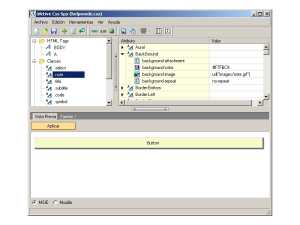
Meet the CSS Spy; an editor that allows you to take a look at and edit any CSS code you might already have. The innovative aspect to this handy little program is that you can actually view the changes that you make and their effects in real time in both internet explorer and firefox should you wish to do so. You can edit any sample you want with the CSS in this manner and of course it is compliant with all of the standards set out by the world wide web consortium; also known as the W3C. This can save you a lot of time because it means that you don’t have to continually save your file, upload it and then refresh your browser to view changes you might have made.
More information can be found at http://www.puntoequis.com.ar/aktive/default.aspx?SC=SOFT&ID=CSSSPY
Posted in Business, Commercial, Design, Developer, Information Management, Internet, Main, Programming, Shareware, Windows | No Comments »
Monday, September 3rd, 2007
 Like most people, your computer probably has various programs you’ve installed on it over time. In my case, that’s quite a few indeed! If you are anything like how I am, You’ll know that it can become quite a time consuming task in itself just keeping all of these updated to the latest versions. Like most people, your computer probably has various programs you’ve installed on it over time. In my case, that’s quite a few indeed! If you are anything like how I am, You’ll know that it can become quite a time consuming task in itself just keeping all of these updated to the latest versions.
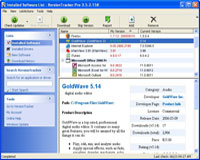
Wouldn’t it be great if there was a program to instantly scan your computer and come back with a list of all your installed programs..and drivers!… listing the version you have on your computer and the current version available? Now wouldnt it be even greater if it had a link to download the latest versions in just a couple of clicks?
Well in short, thats exactly what VersionTracker Pro does. This seems to work pretty good for programs, but be wary with drivers as it doesn’t always show correct recommendations, at least not on my system anyway. You can download the one use trial at the website.
Check out the site for more details and prepare to save yourself a lot of time when updating your stuff in future!
Posted in Developer, Information Management, Main, Programming, Security, Shareware, Utilities, Windows | 3 Comments »
Friday, August 31st, 2007
 If you’ve had issues with duplicate files in the past, taking up precious hard disk space, then Duplicate File Detector should come in handy in putting a stop to that. Duplicate File Detector is a powerful tool to search for file duplicates on your computer. The good thing about it is that it can find duplicates of any file: text, binary, music, video or images. If you’ve had issues with duplicate files in the past, taking up precious hard disk space, then Duplicate File Detector should come in handy in putting a stop to that. Duplicate File Detector is a powerful tool to search for file duplicates on your computer. The good thing about it is that it can find duplicates of any file: text, binary, music, video or images.
Criteria like filename, file size, or file content. For multimedia files (MP3, OGG/Vorbis, WMA), can be used to search for duplicates. The only problem I have with this software is that it is shareware, coughing up $29 for something would have been a great success as a freeware is something I can’t shake off.
But you check it out yourself, who knows it may be just what you need. The trial version is free, go to http://www.al-soft.com/dfd/duplicate-file-finder.shtml to get it.
Posted in Developer, Information Management, Main, Multimedia, Utilities, Windows | No Comments »
Friday, August 31st, 2007
 kruptos 2 is a powerful freeware application that enables you to encrypt your sensitive data. It uses 128 bit blowfish encryption to encrypt your files or folders which then can only be accessed with the correct password, so that only you can have access to them. You can even select to disguise the newly encrypted files name for further privacy. kruptos 2 is a powerful freeware application that enables you to encrypt your sensitive data. It uses 128 bit blowfish encryption to encrypt your files or folders which then can only be accessed with the correct password, so that only you can have access to them. You can even select to disguise the newly encrypted files name for further privacy.
One thing it could be used for is USB flash drives and portable storage devices, ensuring that no one can access your private or sensitive data if the drive is lost or stolen. It can also create self decrypting files and includes a file shredding utility.
Check it out at the website here.
Posted in Developer, Files and Folders, Freeware, Information Management, Main, Programming, Security, Shell and Desktop, Utilities, Windows | No Comments »
|
|
|




