Archive for the 'Windows' Category
Thursday, August 30th, 2007
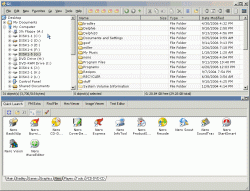 One of the things that you need to think about when it comes to maintaining your computer is the software that you are going to use to actually maintain your files. It is important because while a lot of people simply use the Windows Explorer software to do so, Windows Explorer can actually be resource intensive as well as break down at the same time that windows itself does. There are a lot of bugs in Windows Explorer that can make life difficult from time to time and that is why the need for third party software is needed; software like the free to use A43. One of the things that you need to think about when it comes to maintaining your computer is the software that you are going to use to actually maintain your files. It is important because while a lot of people simply use the Windows Explorer software to do so, Windows Explorer can actually be resource intensive as well as break down at the same time that windows itself does. There are a lot of bugs in Windows Explorer that can make life difficult from time to time and that is why the need for third party software is needed; software like the free to use A43.
A43 is the freeware file manager that many people use instead of Windows Explorer, including all of the people that are lined up to say wonderful things about it. The one real bug it had, which was the cursor problem from version 2.51, has been completely fixed in version 2.52 and now there are really no downsides to using this program. The upsides are of course lack of resources needed to use it as well as no installer necessary. It is simply a great piece of software and one that you should check out!
More information about it can be found here: http://www.primitus.us/a43/
Posted in Browsers, Business, Developer, Files and Folders, Freeware, Information Management, Main, Security, Windows | No Comments »
Thursday, August 30th, 2007
 There are so many different problems that occur when you change computers that for the most part people really hate having to do so. There are large things like the transfer of large files and programs as well as the establishing of a similar operating system set of parameters to the one that was on the previous computer and then there are the smaller things like bookmarks. Bookmarks might seem like a very small thing to some people, but when you consider that a lot of people put their web development hopes and dreams in bookmarks, what you are going to find is that the bookmarks must be transferred if the person’s normal online existence can continue. There are so many different problems that occur when you change computers that for the most part people really hate having to do so. There are large things like the transfer of large files and programs as well as the establishing of a similar operating system set of parameters to the one that was on the previous computer and then there are the smaller things like bookmarks. Bookmarks might seem like a very small thing to some people, but when you consider that a lot of people put their web development hopes and dreams in bookmarks, what you are going to find is that the bookmarks must be transferred if the person’s normal online existence can continue.
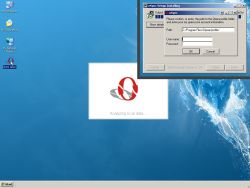
If you happen to be using Opera, then the oSync 1.0.1 can definitely help you through it. It allows you to automate the sync processes between two different systems and furthermore even sit and watch while the software does all of the work for you. The latest version of the software allows for threaded syncing, which happens to increase sync speed dramatically. In addition to that, a lot of merging work has been done so that a lot of previous errors from merging operations are now non-existent.
Give it a try if you’re on Opera as it is free to use; more information can be found at http://osync.sourceforge.net/
Posted in Browsers, Design, Developer, Freeware, Information Management, Internet, Main, Opera, Shell and Desktop, Windows | No Comments »
Thursday, August 30th, 2007
 One of the things that can drive people crazy when they are working in Windows is having to scroll through dozens of different programs before they are able to find the one they want on their taskbar. There really for the longest time was no good solution to this problem and of course because Microsoft is brilliant at coming up with ways to make problems worse more than they can make them better, they came up with the idea of actually grouping together similar icons on the taskbar to save space. Of course, while this did save space on the taskbar, the thing that ended up getting worse was the fact that if a person was switching between MSN conversations or browser windows, things just became terrible for them in terms of being able to find the specific window they were looking for. One of the things that can drive people crazy when they are working in Windows is having to scroll through dozens of different programs before they are able to find the one they want on their taskbar. There really for the longest time was no good solution to this problem and of course because Microsoft is brilliant at coming up with ways to make problems worse more than they can make them better, they came up with the idea of actually grouping together similar icons on the taskbar to save space. Of course, while this did save space on the taskbar, the thing that ended up getting worse was the fact that if a person was switching between MSN conversations or browser windows, things just became terrible for them in terms of being able to find the specific window they were looking for.
If this sounds like you and the stress of taskbar space conservation has just become too much, then take a look at TrayIt! This is an innovative program that has been around for awhile, but has recently gotten a whole lot better. It allows you to save all of that taskbar space by using a small icon on the system tray for each application instead of the regular rectangular indication of the minimized window that you commonly see. It is great to use, free and even works with Windows Vista!
More information can be found at http://www.teamcti.com/trayit/trayit.htm
Posted in Design, Files and Folders, Main, Shareware, Shell and Desktop, Utilities, Windows | No Comments »
Wednesday, August 29th, 2007
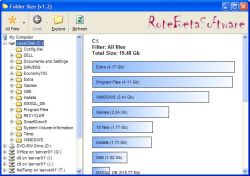 If you’re like, chances are you download a lot of stuff and save a lot of stuff from Microsoft Office programs onto your hard drive. In some cases, you might even have remnants of old folders that were part of an earlier attempt to organize files on your hard drive. I know that at one point I have up to three or four different generations worth of organizational folders on my hard drive and in some cases had the same file saved once in all of them! Redundancy is a bad thing because it can really hamper your ability to save new files onto your hard drive, but if you download Folder Size 1.3, you can figure out where the redundancies might be and cut them down. If you’re like, chances are you download a lot of stuff and save a lot of stuff from Microsoft Office programs onto your hard drive. In some cases, you might even have remnants of old folders that were part of an earlier attempt to organize files on your hard drive. I know that at one point I have up to three or four different generations worth of organizational folders on my hard drive and in some cases had the same file saved once in all of them! Redundancy is a bad thing because it can really hamper your ability to save new files onto your hard drive, but if you download Folder Size 1.3, you can figure out where the redundancies might be and cut them down.
With Folder Size 1.3 installed, what you are going to find is that when you highlight a folder, a bar graph will appear with the sizes of all of the folders contained in that folder clearly highlighted for you to see. You don’t have to go to the properties of each folder any more to figure out what is where and ultimately this will make the process of cleaning up your hard drive much easier to do. In addition to that, there are a number of different tasks that are easier now because you can see the size of each folder right away.
More information can be found at the developer’s home page at http://www.rotebetasoftware.com/foldersize.html
Posted in Catalogue, Developer, Files and Folders, Information Management, Main, Shareware, Utilities, Windows | No Comments »
Wednesday, August 29th, 2007
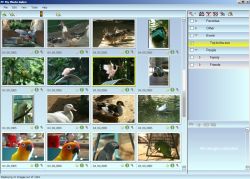 One of the most important things in the lives of a lot of people when it comes to activities on their computer is file sharing. And for people that are not really that computer savvy, the one thing you need to be thinking about is that they are probably into photo sharing. Where other areas of internet activity have really only been popularized by people that are computer savvy, the idea of being able to use digital cameras to take pictures and then upload those pictures into album software packages is something that has really been adopted by almost every household around. One of the most important things in the lives of a lot of people when it comes to activities on their computer is file sharing. And for people that are not really that computer savvy, the one thing you need to be thinking about is that they are probably into photo sharing. Where other areas of internet activity have really only been popularized by people that are computer savvy, the idea of being able to use digital cameras to take pictures and then upload those pictures into album software packages is something that has really been adopted by almost every household around.
That is why software pieces like MyPhotoIndex are extremely useful in today’s society. It is a free photo organizer that allows you to assign categories to all your photos and sort them in a number of different ways. You can even print them, save them in multiple file formats and attach them to outgoing outlook express packages with extreme ease. While the program is still in its early stages, it is expanding in leaps and bounds and should be very good to use very soon. Oh yeah, and it’s absolutely free!
More info available at http://www.myphotoindex.com/
Posted in Design, Developer, Freeware, Main, Photo, Windows | 1 Comment »
Wednesday, August 29th, 2007
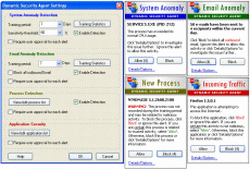 If you’ve been connected to the Internet for any amount of time in your life, then you probably understand the need for some kind of protection for your machine. Even if you’ve never had experiences with viruses, chances are that you’ve had experiences with spyware that have resulted in a complete slowdown of the system resources that you have available to you. If you’ve been unlucky, then you’ve also encountered malware; stuff that can seriously harm your computer or any other computer that your computer might come into contact with (i.e . anything that is part of the same network). It is very important that you find a good security mechanism for your computer, but doing so is very much easier said than done in today’s world. If you’ve been connected to the Internet for any amount of time in your life, then you probably understand the need for some kind of protection for your machine. Even if you’ve never had experiences with viruses, chances are that you’ve had experiences with spyware that have resulted in a complete slowdown of the system resources that you have available to you. If you’ve been unlucky, then you’ve also encountered malware; stuff that can seriously harm your computer or any other computer that your computer might come into contact with (i.e . anything that is part of the same network). It is very important that you find a good security mechanism for your computer, but doing so is very much easier said than done in today’s world.
However, the Dynamic Security Agent 1.0.6.27 is perhaps the best you are going to get for being a free piece of software. According to the publisher, it is capable of providing zero hour protection from any type of spyware, malware or other type of intrusion that happens to be known to the software (i.e . in its database). Reviews of this one are very positive and suggest that it is a good piece of software to use if you are looking for good protection for free!
More info is available here.
Posted in Developer, Freeware, Internet, Main, Security, Utilities, Windows | No Comments »
Wednesday, August 29th, 2007
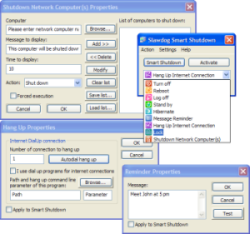 One of the most annoying things to do when it comes to dealing with computers is figure out what to do with them when you want a specific part of the resources to be freed up for use elsewhere. For example, my copy of Windows Vista has options for shut downs, restarts, reboots, sleeps, standbys, locks and any other synonym you could possibly think of on those commands. Each one is useful, but when you are presented with an incoherent mass of commands, you are not going to be very sure of which one would be most appropriate for the situation that you are currently in. One of the most annoying things to do when it comes to dealing with computers is figure out what to do with them when you want a specific part of the resources to be freed up for use elsewhere. For example, my copy of Windows Vista has options for shut downs, restarts, reboots, sleeps, standbys, locks and any other synonym you could possibly think of on those commands. Each one is useful, but when you are presented with an incoherent mass of commands, you are not going to be very sure of which one would be most appropriate for the situation that you are currently in.
Thankfully, this is where pieces of software like the Slawdog Smart Shutdown 1.4.1 Build 244 comes in. This software has by far the most comprehensive list of shut down options you are ever likely to see in your life. The Smart Shutdown 1.4.1 is simply a great piece of software technology because not only does it contain all of the commands that the Windows software itself normally has, but it also has sub-commands you can use if all you want to do is get your recycling bin emptied or your cache reset. There are so many things you can do with the Smart Shutdown such as setting periodic reminders that it would be a steal at any price; and you get it for free!
More information can be found at Slawdog.com.
Posted in Developer, Freeware, Main, Utilities, Windows | No Comments »
Tuesday, August 28th, 2007
How often have you tried to hide something on your system from others, both at office and home? Well with HideWizard you can hide almost all the programs and windows automatically. You can lock the screen and also use the shortcut keys for the functioning. It shows all the programs and icons present on the desktop.
Downloading and installation is smooth. The software starts up with a blue screen with simple options. List of the all the programs and tray icons present on the desktop is shown in a box on the screen. You can select one and with the right click add it to quick hide or auto hide list. You can also set the transparency level to be soft, opaque, or high, etc. ‘Settings’ option let you to set the quick hide option. Select the keyboard hotkey, or make the hide windows start on double right clicks of the mouse. You can mention the special program for hiding and also hide special windows. Set the mute while hiding window, enable hiding IE windows. Select the hidden windows not to be shown when hotkeys clicked again. In the ‘Auto Hide’ option select the programs and window; and the excluded windows can be seen. Easily the selection can be made to switch into the default or virtual desktop with mouse’s middle button. Select the hotkey, lock the screen, set the mute and there are other options also. It can be set to auto start with the windows, select hotkey for hide wizard or disable Ctrl-Alt-Delete. Small icon options on the top of the screen are to refresh the list and for hiding or displaying programs of auto hide list. It goes to the system tray when minimized. The hidden programs are protected with the password and can be seen with the Hide Wizard only. Overall the software does a great job of what it promises and it can come in real handy when you are sharing your system with another individual.
(More info and Download)
Posted in Shareware, Shell and Desktop, Utilities, Windows | No Comments »
Tuesday, August 28th, 2007
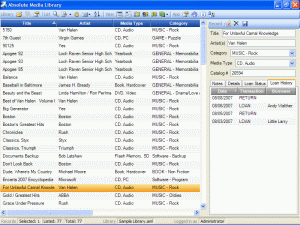 In case you are looking for a tool to track your information, then do give a thought to the Absolute Media Library which makes the job a cakewalk. It would help you with all the data that you need to keep record of and access them whenever you feel like. The software has good functioning and would help you to effortlessly manage a great deal of data. In case you are looking for a tool to track your information, then do give a thought to the Absolute Media Library which makes the job a cakewalk. It would help you with all the data that you need to keep record of and access them whenever you feel like. The software has good functioning and would help you to effortlessly manage a great deal of data.
The software after taking a moderate time for downloading and installing, starts up with a simple screen. It has the different features for performing the task. It is of great use for the personal as well as professional details. You can check the loan status and the history and even you can have the notes and other details. The screen in the middle shows the record of the listed and the selected files. It shows details like title, file type, category, etc. The right side column shows some of the option and the list of the chosen category. You can make the library search; select the ‘Search for’ option and the type of files you want. You can search the listed records or the library. You can set and see the borrower’s database showing all the information about the person. The list is shown and you can see the terms of loans, address and other notes. Select from the list and the information about the person is shown on the right side. You can also view the reports of the inventory and you can get a print also. The information about the records, library and log in is shown on the lower part of the screen. There are different other option on the menu bar like for listing and changing the view. Record or delete according to your requirement and save the details.
The software overall does a commendable job in quickly tracking and logically storing all information that is often required by you. With the accompanying Help guide you are sure to find a pleasure to use.
(More info and Download)
Posted in Catalogue, Commercial, Developer, Information Management, Internet, Multimedia, Shareware, Windows | No Comments »
Tuesday, August 28th, 2007
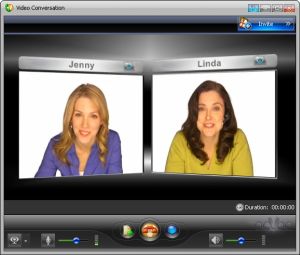 With the recent boom of the internet, one thing that has become a whole lot popular is the concept of online chat. However, the concept of online chat has really evolved from what it used to be. Chat used to be IRC and rooms on different internet sites with little more functionality than being able to type in something and then have that something appear in the chat room. And while a lot of people enjoyed that and in the case of IRC still enjoy it, many others thirsted for more. With the recent boom of the internet, one thing that has become a whole lot popular is the concept of online chat. However, the concept of online chat has really evolved from what it used to be. Chat used to be IRC and rooms on different internet sites with little more functionality than being able to type in something and then have that something appear in the chat room. And while a lot of people enjoyed that and in the case of IRC still enjoy it, many others thirsted for more.
Well, MSN got things started and with MSN’s live chat feature allowing for the first time a lot of great video chatting features, what people eventually saw was that there was demand for such a thing. And this is the demand that ooVoo fills with its presence.
One of the best things about this program is that it can actually support up to six users at the exact same time. In addition to that, you can also send video files back and forth between ooVoo users and even send such files to people that don’t have the software installed! It is simply an amazing piece of software and because of its free status, it is one that people have really embraced.
More information can be found at http://www.oovoo.com/
Posted in Freeware, Internet, Main, Multimedia, Social Software, Video, Web services, Windows | No Comments »
|
|
|




