Archive for the 'Windows' Category
Thursday, November 30th, 2006
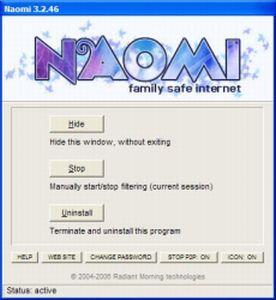
 Naomi is a free Internet parental control filter to help prevent your kids from viewing inappropriate material while online. Naomi is a free Internet parental control filter to help prevent your kids from viewing inappropriate material while online.
Naomi doesn’t rely on a simple list of banned sites like a lot of similiar programs do. Instead it examines in real time, all the data being transmitted and received through the Internet application, such as web browsers and chat programs. Monitoring is not limited to web sites, but covers the whole local Internet traffic. It also allows blocking of file-sharing applications and the whole thing can be password-protected. It’s also got some useful plug ins that may be of use, such as one to block Myspace access and one to hide the tray icon.
All in all its worth checking out if you’ve been looking for a free way of protecting your kids when they’re online! You can get more info and the free download from here.
Posted in Developer, Freeware, Internet, Main, Security, Utilities, Windows | 2 Comments »
Wednesday, November 29th, 2006
 This is a free open-source MSN Messenger clone called aMSN. If for any reason you want to use MSN messenger but without using the official MSN messenger client, then maybe its time to check this out. This is a free open-source MSN Messenger clone called aMSN. If for any reason you want to use MSN messenger but without using the official MSN messenger client, then maybe its time to check this out.
It does just about everything the official MSN messenger program does, plus some more, such as being able to sign into more than one account at a time. It supports display pictures, custom emoticons, file transfer, even webcam support.
When you read the list of features, you’ll see its virtually identical to the official client in every way, but one potentially useful thing is that you can download plug-ins from the site, as well as this, its also skinnable.
You can check out all the features in full and download it by going here.
Posted in Commercial, Developer, Internet, Main, Open Source, Shareware, Shell and Desktop, Social Software, Utilities, Windows | No Comments »
Wednesday, November 29th, 2006
 Sticky note paper is a popular way of taking down reminders, shopping lists, to-do lists, etc. Some people even ‘borrow’ some from work and use them for posting notes on the fridge freezer. The bright yellow pad enables us to quickly see a reminder note. Sticky note paper is a popular way of taking down reminders, shopping lists, to-do lists, etc. Some people even ‘borrow’ some from work and use them for posting notes on the fridge freezer. The bright yellow pad enables us to quickly see a reminder note.
Hott Notes is a free tool that enables you to write and place sticky-type notes on your desktop (ok, not the actual top of your desk, but on your screen,that thing you’re looking at now). You can use these notes in the usual manner – reminders, lists and more. The notes can be displayed in various translucent colors, so that you can use one color for reminders, another for business notes and one for home-related reminders.
You can even draw or write freehand on them!
Unlike the ‘borrowed’ from work sticky note paper, Hott Notes really is free and you can get it here with more info and here’s some screenshots.
Posted in Business, Commercial, Developer, Freeware, Information Management, Main, Open Source, Shell and Desktop, Text, Utilities, Windows | 2 Comments »
Wednesday, November 29th, 2006
 CDBurnerXP Pro is CD/DVD burning software with quite a lot to offer, considering it’s totally free! CDBurnerXP Pro is CD/DVD burning software with quite a lot to offer, considering it’s totally free!
It supports creation of multi-session disks, which is always useful if you have disc you want to keep coming back to add data or files to. It also creates Audio-CDs from mp3, wav, ogg and wma files. In addition to CD burning, you can also rip audio CDs, normalize WAV files, encode MP3 files, and erase disks. All this and it supports use of high write speeds too.
It’s able to write CD-R, CD-RW, DVD+R/RW, DVD-R/RW discs, creating either data or video discs. It can also rip audio-CDs, burn and create ISO images, convert WAV files to MP3 and vice versa, verify discs after burning, create bootable discs, print covers for your creation, convert BIN/NRG to ISO, etc. It supports Burn on the Fly and Burn-Proof hardware.
If you’ve been looking for CD/DVD burning software but don’t have money to burn, you won’t be playing with fire if you check out this freeware software right here! Some screenshots of this tool ‘in work’ can be found here.
Posted in Audio, Developer, Freeware, Main, Utilities, Video, Windows | 2 Comments »
Tuesday, November 28th, 2006
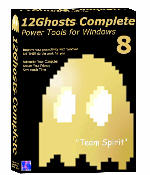 Looking for an all-in-one package that can help you deal with the common daily problems you encounter on your PC? 12Ghosts might just be the thing for you. Looking for an all-in-one package that can help you deal with the common daily problems you encounter on your PC? 12Ghosts might just be the thing for you.
12Ghosts is a package that contains various utilities that accelerate and facilitate your working with your computer. If you need help with securing your important documents, automating daily tasks and so much more, 12Ghosts is right for you. Everything from an automatic saving device for documents to a shut down control tower is available, as well as Windows shell enhancements for easier and faster usage of Windows itself.
Recently a new updated version, 12Ghosts 8.10 was released. Some of the latest changes in this version include:
- ShutDown: New! Super fast shut down! This will just exit Windows and turn off the computer (or restart). Nothing is saved, though. Windows is NOT properly shut down. Use in emergency situations only
- Backup: The destination folder now is allowed to be below the source folder. It is excluded from backup automatically. For example, if you backup “C:\” to “C:\12-Backup” everything is backed up, except of course “C:\12-Backup” itself
- Wash: New! Suppress programs from START menu! Frequently used programs are added to the start menu automatically (XP/Vista). Protect your privacy and prevent certain programs from ever appearing there again
- Shredder is now checking if clean up of “delete_me…XX.del” files is required at startup of 12-Shredder. This may be necessary if Wipe Disk was interrupted before it could complete a Remove Old Names pass
- Tower: New color scheme with light background
Want to check it out? CLICK HERE!
Posted in Business, Commercial, Developer, Information Management, Internet, Main, Multimedia, Programming, Security, Shareware, Shell and Desktop, Utilities, Windows | 4 Comments »
Tuesday, November 28th, 2006
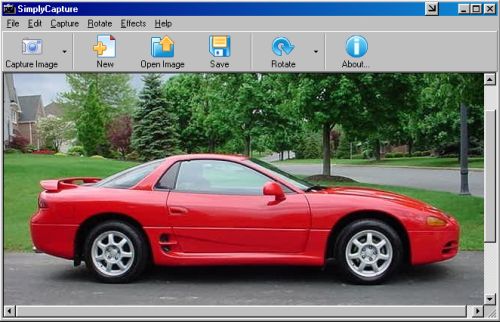
 This cool freeware is something you need to check out! SimplyCapture is a powerful screen/video capture tool that is really simple and very easy to use. With SimplyCapture you can capture exactly what you want in the screen (3 capture options: Full Screen, Active Window and Selected Area). This cool freeware is something you need to check out! SimplyCapture is a powerful screen/video capture tool that is really simple and very easy to use. With SimplyCapture you can capture exactly what you want in the screen (3 capture options: Full Screen, Active Window and Selected Area).
What I really love about it is that it allows you to capture screenshots of any video file! Just play a video in the SimplyCapture Video Player and start capturing screenshots of your favorite movies!
Some of it’s cool Features include:
- Great program layout
- Capture screenshots of video files
- Capture shots of your favorite movie files
- Integrated Video Player and Image Viewer for easy viewing of your captured movie images and a lot more
- Rotate and Flip image Options
- Cool Image Effects available to make your captured image even better
- Exclusive JPEG Conversion Tool (converts any image file to JPEG format; you can customize the output image quality and much more)
- And much more!
This great freeware works well with Windows 98/98SE/ME/2000 & XP
BE SURE TO CHECK IT OUT! IT’S FREE!
Posted in Business, Design, Developer, Freeware, Main, Multimedia, Photo, Windows | No Comments »
Tuesday, November 28th, 2006
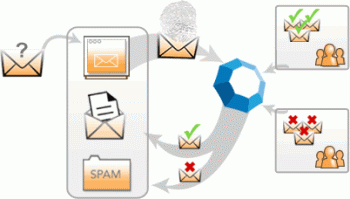 Cloudmark is an add-on for Microsoft Outlook and Outlook Express to prevent spam and also prevent and report phishing attacks. It can also block email viruses before they can do any potential damage. Cloudmark is an add-on for Microsoft Outlook and Outlook Express to prevent spam and also prevent and report phishing attacks. It can also block email viruses before they can do any potential damage.
To give it it’s full name, Cloudmark Desktop (formerly known as Cloudmark Safetybar) installs directly inside Outlook and Outlook Express, filters through your mail as it downloads, and moves suspected junk into a folder for you to review it later. The filtering mechanism is based on the Cloudmark service, the largest community-based platform used to stop the plague of junk email and email fraud, and it doesn’t require you to create any filters or rules. You can however create a white list, to make sure certain contacts will never be filtered, and also re-classify selected messages.
This is how it works. When a user clicks the ‘Block Spam’ or ‘Block Phish’ buttons, Cloudmark compares this feedback with feedback from other users. If other users in the network also consider the message to be spam or fraud, then similar messages are automatically blocked in the future, for all users in the network.
Likewise, if a user drags a message out of the Spam folder or clicks the ‘Unblock button’, Cloudmark compares this feedback with that of other users. If they agree, the message is unblocked throughout the Cloudmark network.
Well worth checking out if you’ve had it with too much spam. You can check out more info and a free trial by going here.
Posted in Business, Commercial, E-mail, Internet, Main, Security, Shareware, Windows | No Comments »
Tuesday, November 28th, 2006
 Ever wondered how life would be without your start menu? Now you have an opportunity to find out with this software, LAUNCHY. Ever wondered how life would be without your start menu? Now you have an opportunity to find out with this software, LAUNCHY.
Launchy is a free windows utility designed to help you forget about your start menu, the icons on your desktop, and even your file manager. Launchy indexes the programs in your start menu and can launch your documents, project files, folders, and bookmarks with just a few keystrokes!
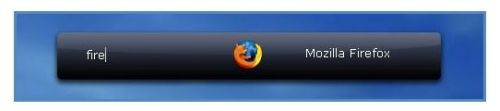
What really trips me about this application is that once you start running it, it hides in the background. You have to bring it forward by holding the alt key and tapping the space key. Then you just type in a few keys of the program you are searching for and hit enter once it has been found.
You can perform a disappearing act on it again by hitting escape or Alt+Space.
CHECK IT OUT!
SYSTEM REQUIREMNETS: Win98/98SE/2000/ME/XP FILE SIZE: 822 KB
Posted in Freeware, Main, Open Source, Themes, Utilities, Windows | 1 Comment »
Monday, November 27th, 2006
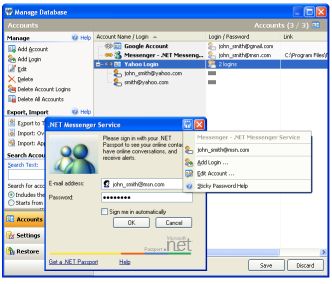 Remembering your passwords for different logins is not an easy task when there are so many of them. But a handy tool has just been released that can help you accomplish this with ease. Remembering your passwords for different logins is not an easy task when there are so many of them. But a handy tool has just been released that can help you accomplish this with ease.
Sticky Password automatically fills login and password fields in web forms and usual dialog windows. With its unique “Sticky Button” which appears on any window that it has password saved for, you get to do this with ease. I love the fact that there is a backup feature that keeps all passwords safely stored until the need arises for them.
Sticky Password also allows you to have multiple logins and passwords for a single account.
This software is a shareware, there is a trial version available but the full version costs about $24.95. But in case you are wondering what the big deal is about this software, there are so many others out there that are even free. Right? What makes it different from others is that unlike other password managers that are just used to keep and recall passwords, Sticky Password integrates password management features to any program on your computer.
Some of the key features of Sticky Password:
- The Password Protector is the most innovative and unique feature that prevents password theft. Learn more about password protector and anti-phishing.
- Portable Version allows you to always keep passwords in your hand. Sticky Password can run from any portable device – USB drive or even CD.
- Alternate authentication methods allow you to use any USB or Bluetooth device to unlock Sticky Password. Now you don’t need to type any passwords at all!
- The password storage database is protected with strong encryption algorithms that make it impossible to decrypt it in any acceptable amount of time. Learn more about password storage
- The form filler works for usual programs as well as web pages. Password, login and other fields are filled automatically only when you need it. Learn more about form filler
- Multiple logins and passwords are supported for a single account etc.
Click here to check out the trial version and for more info. NOTE: the trial version has a 30-day time out
UPDATE: Special offer from the owner of Sticky Password for our readers. More details in Comments
Posted in Information Management, Internet, Main, Multimedia, Programming, Shareware, Shell and Desktop, Text, Utilities, Windows | 9 Comments »
Sunday, November 26th, 2006
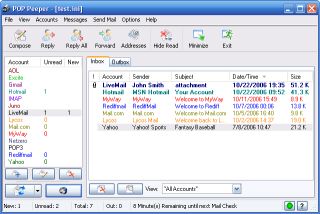 Pop Peeper is a small utility that runs in your task tray and allows you to keep a check on all your email accounts. It works for both POP3 mail and webmail and it supports multiple accounts, so you can check email from Yahoo, Hotmail, Gmail and many others, there’s a full regularly updated list on the website, so i’ll refrain from listing them all here.It allows you to preview the headers of your email, and view the messages. There is also support for file attachments, which allows you to view the name of the files. Using POP Peeper, you can quickly scan which messages are important enough to read, and which ones can be deleted without even opening your email client. A great little tool that works fast and efficient. Pop Peeper is a small utility that runs in your task tray and allows you to keep a check on all your email accounts. It works for both POP3 mail and webmail and it supports multiple accounts, so you can check email from Yahoo, Hotmail, Gmail and many others, there’s a full regularly updated list on the website, so i’ll refrain from listing them all here.It allows you to preview the headers of your email, and view the messages. There is also support for file attachments, which allows you to view the name of the files. Using POP Peeper, you can quickly scan which messages are important enough to read, and which ones can be deleted without even opening your email client. A great little tool that works fast and efficient.
Idea: When you go away on vacation, simply take a Flash drive with a copy of POP Peeper to keep a check on your email easily from any computer you use. POP Peeper is freeware too! Always an added bonus!
Pop on over here to peep at more info and download it (Sorry! Couldn’t resist)!
Posted in E-mail, Freeware, Internet, Main, Utilities, Windows | No Comments »
|
|
|