Archive for the 'Windows' Category
Sunday, November 26th, 2006
 Here’s one more web based service that’ll help you to resize your pictures online – QuickThumbnail. You simply upload an image, than choose an option how to resize it and then download the resulting file. Once again it’s easy it can be! Here’s one more web based service that’ll help you to resize your pictures online – QuickThumbnail. You simply upload an image, than choose an option how to resize it and then download the resulting file. Once again it’s easy it can be!
The fastest way to resize your pictures and images. Choose an image file, select some resize options, and hit Resize it. Your image will be uploaded to the server and resized, and then any or all of the resized images will be provided in a single convenient view. Not only can you get simultaneous generation of different sizes but you can enlarge your images too.
It takes you just a few seconds and the quality of the newly-made picture… well, it’s really good! You just have to check it up for yourself. It also can make two or three different types of resized pictures simultaneously!
Just note, that uploaded photos and their resulting copies are kept on the site’s server for only 10 minutes as a security precaution.
Posted in Design, Freeware, Internet, Linux, Mac Stuff, Main, Photo, Web services, Windows | 1 Comment »
Sunday, November 26th, 2006
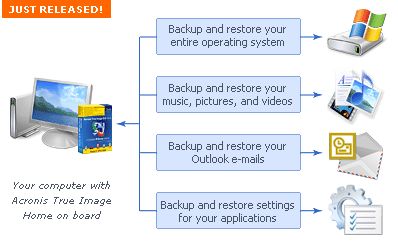 Acronis True Image is the ideal solution for making an entire exact copy of the contents of your hard disk. This means an exact clone including the operating system, applications, user settings, and all data. This is extremely useful if you’ve just bought a new computer or drive and want to move everything from your old computer or drive to the new one. Acronis True Image is the ideal solution for making an entire exact copy of the contents of your hard disk. This means an exact clone including the operating system, applications, user settings, and all data. This is extremely useful if you’ve just bought a new computer or drive and want to move everything from your old computer or drive to the new one.
It does exactly what it claims to, all it takes is a few hours, depending on size of course, size doesn’t matter with Acronis True Image either!
It’ll work no matter how big your hard disk is, but obviously time taken to clone is relative to size, although it worked pretty fast cloning a 20 GB drive the time i used it. It can even work in the background. The best thing is that even though you wont need to clone an entire drive for upgrade purposes often, it works good as a ‘normal’ backup program too.
Tip: Check the site for updates first before using to avoid any potential problems.
You can get a 15 day trial and more info by going here
Posted in Business, Commercial, Main, Open Source, Shareware, Social Software, Utilities, Windows | 1 Comment »
Friday, November 24th, 2006
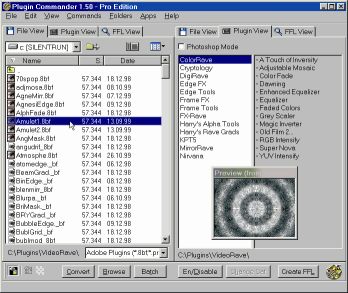 If you’ve had problems using plug-ins, tubes or other add-ons in a graphics, video or animation application then you might find this software, which I recently came across, very useful. It’s called Plugin Commander. If you’ve had problems using plug-ins, tubes or other add-ons in a graphics, video or animation application then you might find this software, which I recently came across, very useful. It’s called Plugin Commander.
Plugin Commander is a tool for dealing with various image formats, plugins and effect types from various graphics applications. It allows you to manage and preview your plugin, tube and add-on collection quickly and easily. You can deactivate the plug-ins you rarely need and define how your favorite effects will appear in the host application.
There are two editions of this useful software, the commercial Pro Edition and the Light Edition, which is freeware. The light edition being freeware has limited features but to enjoy a fully-featured version, it’s best you go for the Pro Edition.
CHECK IT OUT!
Posted in Audio, Browsers, Business, Commercial, Design, Developer, Information Management, Internet, Main, Multimedia, OS Updates, Photo, Security, Shareware, Shell and Desktop, Utilities, Video, Windows | No Comments »
Friday, November 24th, 2006
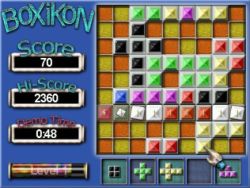 Having always been a fan of one of the most ageless games in the world, TETRIS; I was itching to see if anyone could come up with a Tetris – styled game that would be totally different. BoXiKon did that for me. Having always been a fan of one of the most ageless games in the world, TETRIS; I was itching to see if anyone could come up with a Tetris – styled game that would be totally different. BoXiKon did that for me.
BoXiKoN is a logic based puzzle game of strategy and forward thinking. The game obviously belongs to the Tetris family of shape games, but it really is quite different. There is a large emphasis on planning, organization and selection and less on arcade style quick reactions.
There is also a version for available for Mac users.
More info and download!
Posted in Fun, Games, Mac Stuff, Main, Shareware, Windows | No Comments »
Wednesday, November 22nd, 2006
 YamiPod is a freeware standalone iPod manager which allows you to manage the content of your iPod without the need to have iTunes installed. It needs no installation and can be run directly from your iPod. So,for example, it doesn’t matter if it is not your computer where you want to run it, you still can! YamiPod is a freeware standalone iPod manager which allows you to manage the content of your iPod without the need to have iTunes installed. It needs no installation and can be run directly from your iPod. So,for example, it doesn’t matter if it is not your computer where you want to run it, you still can!
It comes with many useful features such as iPod ‘notes’ editing features, exporting your song list to HTML, management for duplicate files, the ability to locate lost music files, AAC file support and of course PC to iPod synchronization! It can automatically download the latest version and includes a built in music player.
This is a worthwhile alternative to the official iPod client which many people think is bloated and overrated. Personally i think iPods are overrated anyway as mp3 players existed long before they claimed the market, but if you have an iPod, this alternative is definitely worth checking out!
It’s freeware and you can get more info and download it from here.
Posted in Audio, Freeware, Information Management, Linux, Mac Stuff, Main, Windows | No Comments »
Tuesday, November 21st, 2006
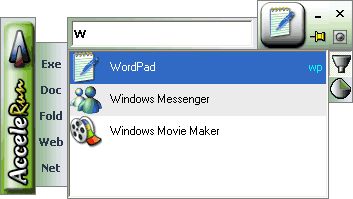 A couple of days ago, November 19 to be precise, AcceleRun was updated to version 1.6. Accelerun is a software that launches any of hundreds of installed programs within two seconds. A couple of days ago, November 19 to be precise, AcceleRun was updated to version 1.6. Accelerun is a software that launches any of hundreds of installed programs within two seconds.
You don’t need to search through long menus again; you don’t have to worry about complex key combinations. All you have to do is to type in a few letters in the name of the program, folder, file or website, and Accelerun will find the matches – the more letters you type, the more the search narrows.
Accelerun makes your PC easier to navigate; you can move round a lot quicker using Accelerun. The fact that it requires minimum memory usage, has an easy-to-use design and it is ready for use in minutes after first launch make it a very useful tool.
Latest Changes in this latest version include:
- New options
- Speed and size optimizations
- Bug fixes
Learn more and check out the free version!
Posted in Commercial, Developer, Main, News, Shareware, Shell and Desktop, Utilities, Windows | No Comments »
Tuesday, November 21st, 2006
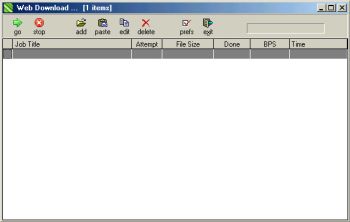 If you are in need of a simple software that can effectively manage your downloads, you might want to check this out! If you are in need of a simple software that can effectively manage your downloads, you might want to check this out!
Web Downloader helps you to manage all your Internet downloads. With it you can drag and drop links to it’s window, copy from clipboard, choose how fast and how many simultaneous downloads, where to save files to, change file names, etc.
The fact that you can also stop and resume downloads at will, and even use multiple threads for faster downloads makes the freeware a very useful tool. This simple and easy to use software works with proxies and supports authentication and is compatible with all Windows OS.
Check it out! It’s Free!
Posted in Developer, Download Managers, Freeware, Internet, Main, Utilities, Windows | 2 Comments »
Saturday, November 18th, 2006
 Microsoft being so generous lately. What do I mean? Well, guys at Neowin.net got an info that everyone who took part in the Windows Vista beta test (and that’s about 20,000) company have provided a complimentary copy of Windows Vista Business or Ultimate. But there’s a little catch – really not all of 20,000 testers got new & hot software but only those who submitted at least 1 bug report. Microsoft being so generous lately. What do I mean? Well, guys at Neowin.net got an info that everyone who took part in the Windows Vista beta test (and that’s about 20,000) company have provided a complimentary copy of Windows Vista Business or Ultimate. But there’s a little catch – really not all of 20,000 testers got new & hot software but only those who submitted at least 1 bug report.
Microsoft sent out a mail to those testers just a few minutes ago which specified that it is being offered as a download only. No media will be mailed, and only currently active, invited members of the Windows Vista technical beta program who filed at least one bug are receiving this offer.
Well, can you say now Long Live Micrisoft or still not?
via Neowin
Posted in Business, Commercial, Main, News, Social Software, Windows | 1 Comment »
Thursday, November 16th, 2006
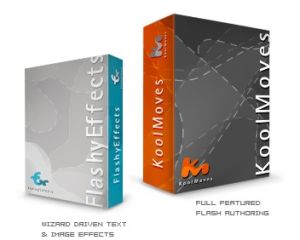 Flash has long established itself as the standard for animation on the Internet. Its everywhere you look, banners, games, flash movies, even entire sites! So, there’s two ways you can go about making flash stuff, one is with the official Flash program from Macromedia, and the other is with programs such as this! The second option is usually a lot easier than learning Flash. Flash has long established itself as the standard for animation on the Internet. Its everywhere you look, banners, games, flash movies, even entire sites! So, there’s two ways you can go about making flash stuff, one is with the official Flash program from Macromedia, and the other is with programs such as this! The second option is usually a lot easier than learning Flash.
This program is great for making some pretty impressive stuff that would take hours to make in Macromedia Flash, you can make some very decent stuff with this thing. When you first use it, it walks you through a tutorial which makes you feel comfortable pretty quick. It has a simple to use interface and for the more experienced users it has a pretty good advanced mode too. They have a lite version of this program too, called ‘Flashy effects’, that mostly focuses on just text effects and banners. You can check them out by going here.
Posted in Main, Multimedia, Shareware, Windows | No Comments »
Thursday, November 16th, 2006
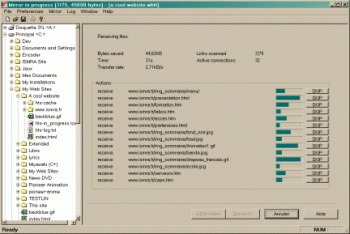 As great a tool as the Internet is, not being able to have access to certain information in certain sites because of server problems, limited Internet access or whatever can really be frustrating. So if you are looking for a way to stay connected to the Internet even when you are not connected, you might find this useful. As great a tool as the Internet is, not being able to have access to certain information in certain sites because of server problems, limited Internet access or whatever can really be frustrating. So if you are looking for a way to stay connected to the Internet even when you are not connected, you might find this useful.
HTTrack is an offline browser utility that allows you to download a website from the Internet to a local directory, building recursively all directories, getting html, images, and other files from the server to your computer.
The fact that it arranges the original site’s relative link-structure makes this software a really useful tool. All you have to do is to simply open a page of the “mirrored” website in your browser, and you can browse the site from link to link, as if you were viewing it online. It can also update an existing mirrored site, and resume interrupted downloads. It is fully configurable, and has an integrated help system.
If you have limited Internet access then this software is for you but if you have unlimited access to the Internet you may not really find it useful. But you can use it as backup for your favorite sites so that you can access necessary information whether you are connected or not, whether your server is down or not.
WinHTTrack is the Windows 98/NT/2000/XP release of HTTrack, and WebHTTrack the Linux/Unix/BSD release. Check out the download page.
Posted in Browsers, Freeware, Internet, Linux, Main, Utilities, Windows | No Comments »
|
|
|




