Archive for the 'Windows' Category
Thursday, January 3rd, 2008
 Keeping your computer safe and secure is the biggest issue that is experience by every computer user. You always need to be alert for any spywares, adwares or any other malicious program. So to deal with this problem the Malwareguard 1.1.0.1 software would prove to be a worthy ally. The software would protect your PC by removing any content that would harm and spoil it. The software is convenient to use and improves your working experience by making your computer safe. The software uses a reference database that is updated automatically to prevent your PC from all the latest dangers. Keeping your computer safe and secure is the biggest issue that is experience by every computer user. You always need to be alert for any spywares, adwares or any other malicious program. So to deal with this problem the Malwareguard 1.1.0.1 software would prove to be a worthy ally. The software would protect your PC by removing any content that would harm and spoil it. The software is convenient to use and improves your working experience by making your computer safe. The software uses a reference database that is updated automatically to prevent your PC from all the latest dangers.
Malwareguard 1.1.0.1 software is has the features that provide you with Complete Scan and Quick scan. When you have enough time then you can perform the Complete Scan and when you need to check your PC quickly than the Quick Scan is good. When you perform the scanning you can remove automatically the entire infected files. To your convenience and saving of time you can perform the scanning of your full system or even you can scan the particular folders that you are working with, or as desired.
The Malwareguard Startup Manager of the program helps you to remove or clean the programs that are not required so that they do not auto start and also free the CPU. The software protects you from numerous types of adwares, spywares, hijackers, viruses, Trojans, and other threats. Take the guidance with the Help provided so that you can set it to work at the best of its efficiency. It can be configured to be updated automatically and or manually as per your desire.
The fact that the software removes useless stuff and makes your system work faster also contributes to its positive score.
{More Info and Download}
Posted in Developer, E-mail, Internet, Main, Security, Shareware, Utilities, Windows | No Comments »
Thursday, January 3rd, 2008
 In case you were looking for a card creator that would allow you to make attractive cards with varied styles and via different design tools then you should definitely check out the Easy Card Creator Professional 5.20.51 software. It is loaded with superlative features to make various professional cards that too fully customized as per your desire. You can impress you clients, make a pattern cards for your company and do much more. The software provides you with the tool for the graphic personalization of the cards and supports one click capturing of the Photos. The options are uncomplicated such that you can use them with ease and do not need to be a professional for operating it. In case you were looking for a card creator that would allow you to make attractive cards with varied styles and via different design tools then you should definitely check out the Easy Card Creator Professional 5.20.51 software. It is loaded with superlative features to make various professional cards that too fully customized as per your desire. You can impress you clients, make a pattern cards for your company and do much more. The software provides you with the tool for the graphic personalization of the cards and supports one click capturing of the Photos. The options are uncomplicated such that you can use them with ease and do not need to be a professional for operating it.
Easy Card Creator Professional 5.20.51 software is set with different options to let you make unlimited number of stylish and yet professional cards. With a pleasant outlook the software presents itself in front of you when you launch it. When the program is launched it shows you templates wizard to select for making the cards. You can select the one you want and the template is shown at the left middle of the screen.
You can place text on the card, put the logo of the company and change the picture for the background of the cards. You can set figures like rectangle, ellipse and also set the pictures of the employees if required. You can change the templates settings; you can open, clone, close or even change the orientation of the templates. The properties of each function that you use are shown on the right side for customize them. You can change the name of the font, color, size, alignment, etc of the text. You can customize both the sides of the cards and set the properties according to your requirements.
The program supports batch printings and also set the page before printing. It provides with easy features to record employee information as well as their pictures. The elaborated help file shows all the details relating to the program.
{More Info and Download}
Posted in Business, Commercial, Design, Developer, Shareware, Windows | No Comments »
Friday, December 28th, 2007
 About: WebAsyst Quick Pages is a powerful, easy to use visual web based software tool which enables you to create and instantly publish web pages, user manuals, employee handbooks, user guides or help systems with a hierarchical Table of Contents. About: WebAsyst Quick Pages is a powerful, easy to use visual web based software tool which enables you to create and instantly publish web pages, user manuals, employee handbooks, user guides or help systems with a hierarchical Table of Contents.
Pros: WebAsyst Quick Pages is web based publication tool. It is possible to publish a large range of document types. Besides web pages this could be tutorials, user manuals, newsletters, scientific research papers, genealogies, employee handbooks, user guides or help systems. A hierarchical table of content is made available too.
A flexible HTML editor is available to take care of editing the pages and the results are publication ready HTML pages. Images can be used in the book that is created from web page, meta tabs that describe keywords and descriptions can be added, as can be themes available or a customized one.
WebAsyst Quick Pages being web based is available anywhere through a browser.
Several other services are available. These are services that are typically available at different web sites. Only now, several major portals are trying to combine them. But these sites retain their separate identities except that they can be reached from the same portal. WebAsyst combines these services right from the start. These services include file sharing, photo uploads, Mail and contacts, On line project management tool and a issue tracker, notes and web pages. Latest addition is shopping carts so that turning your website commercial is easy. Each of these services are full featured, no toy applications.
Once a user reaches his account page and control panel navigation and use of the site is through a set of icons and could not possibly have been simpler.
Cons: None noticed.
Overall: Without doubt a 5 star application package.
{More Info and Download}
Posted in Business, Developer, Information Management, Internet, Shareware, Web services, Windows | No Comments »
Wednesday, December 26th, 2007
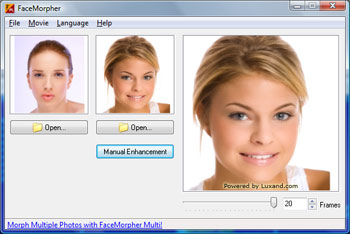 About: Simple to use application that morphs one face into another. Just load the two faces and play. About: Simple to use application that morphs one face into another. Just load the two faces and play.
Pros: Morphing is one scene changing into another. Usually takes quite a bit of skill to identify control points and arranging the two pictures properly. FaceMorpher Lite 2.1 is actually a light version that allows one face to be morphed into another. You would not be using this for scenes in a movie like the Terminator but works pretty well to provide fun and amusement.
Facemorpher supposedly identifies the facial features to mark the control points to be used for morphing. The user interface is simple and consists of three windows. Two for the faces to be used for morphing and a third window that shows a short video showing one face getting morphed into another. This could be saved as an AVI file and later used for animated GIF item on a website or as a flash movie.
Cons: For best effects both face pictures need to be looking straight to the camera, full face front and similar orientation. That limits the utility of the application but then it is this trade off that is the attraction of the package. It is not meant to be a general morphing application. Given the set pictures, you get a quick morphing effect fast. One would need to prepare two images that are oriented similarly as far as possible.
Overall: For the stated purpose the package does its job well. The FaceMorpher Lite interface is really simple to use, just browsing through the interface and picking the two facial images. Overall rating 4 stars.
{More Info and Download}
Posted in Developer, Fun, Windows | 1 Comment »
Wednesday, December 26th, 2007
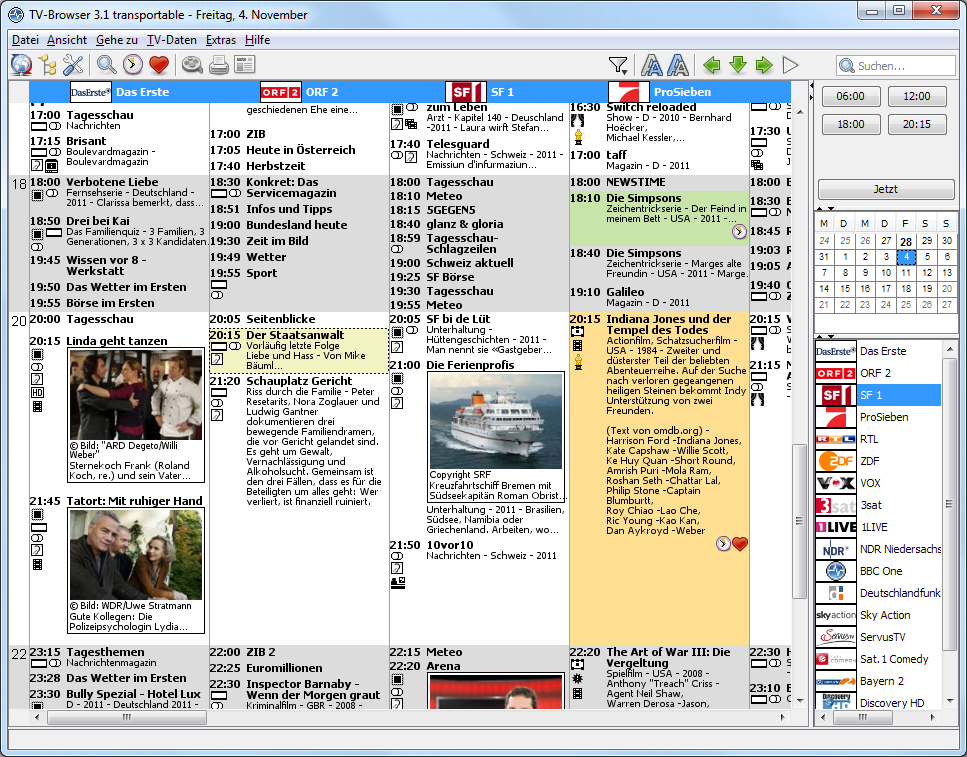 There are a number of different programs out there that are good at simulating the effects of a particular television software, but at the same time there are very few programs out there that are good at functioning as a guide as to what you can watch on TV. In other words, there aren’t any programs out there that emulate the functions of a TV guide very good and the TV-browser for Windows is definitely one of the best programs in that particular field. There are a number of different programs out there that are good at simulating the effects of a particular television software, but at the same time there are very few programs out there that are good at functioning as a guide as to what you can watch on TV. In other words, there aren’t any programs out there that emulate the functions of a TV guide very good and the TV-browser for Windows is definitely one of the best programs in that particular field.
The browser is designed in java and is intended for you to be able to use whenever you want to find out what is on television in your area. You can extend the function of the TV-Browser quite easily through the use of different Java plug-ins and the actual layout of the browser is actually modelled after the TV guide. This makes it an excellent piece of software that you can use for your convenience, but also makes it a throwback to the guide that initially defined television viewing convenience.
More information about this program can be found at http://www.tvbrowser.org/.
Posted in Commercial, Developer, Freeware, Linux, Mac Stuff, Main, TV, Windows | No Comments »
Wednesday, December 26th, 2007
 How many times have you wished to improve the performance of your PC and yet found that manually trying to boost up performance is a very time consuming affair. Well now there is reason for you to cheer as the remarkable Power Memory Optimizer Free Version 5.0.0.1 is around to optimize and manage the memory and quicken up the speed of your system. How many times have you wished to improve the performance of your PC and yet found that manually trying to boost up performance is a very time consuming affair. Well now there is reason for you to cheer as the remarkable Power Memory Optimizer Free Version 5.0.0.1 is around to optimize and manage the memory and quicken up the speed of your system.
Power Memory Optimizer Free Version 5.0.0.1 software is surly worth using as it would relieve you from the hassles that you often face because of the slow performance and low memory warnings. The software opens with simple but appealing outlook with the options well set on the screen. Right after the installation the software starts working and presents you with the graph showing the memory usage. Click the ‘Performance’ that gives you the details relating to the CPU and Page File Usage. Fast Free option is there for a quick overview and Deep Compress is for having the processing done. You can have the defragmentation done that would show the CPU usage, Physical memory and Page File Usage. Start the process and you would be shown the Defrag Process’s progress. Active Settings show the status and the ‘Advanced’ option takes you to enable the time interval, compress process and CPU protection features. You can also set the specified size of the memory to be free and also select the level. Change the settings as you require; you can set the program to automatically run on windows startup, allow to set the paging file, etc. Set the Driver, initial size and the maximum size for the Page File Settings. Apply the settings and the software would keep on working at the background to provide you with fantastic performance of your PC.
{More Info and Download}
Posted in Developer, Freeware, Information Management, Internet, Security, Utilities, Windows | 1 Comment »
Monday, December 24th, 2007
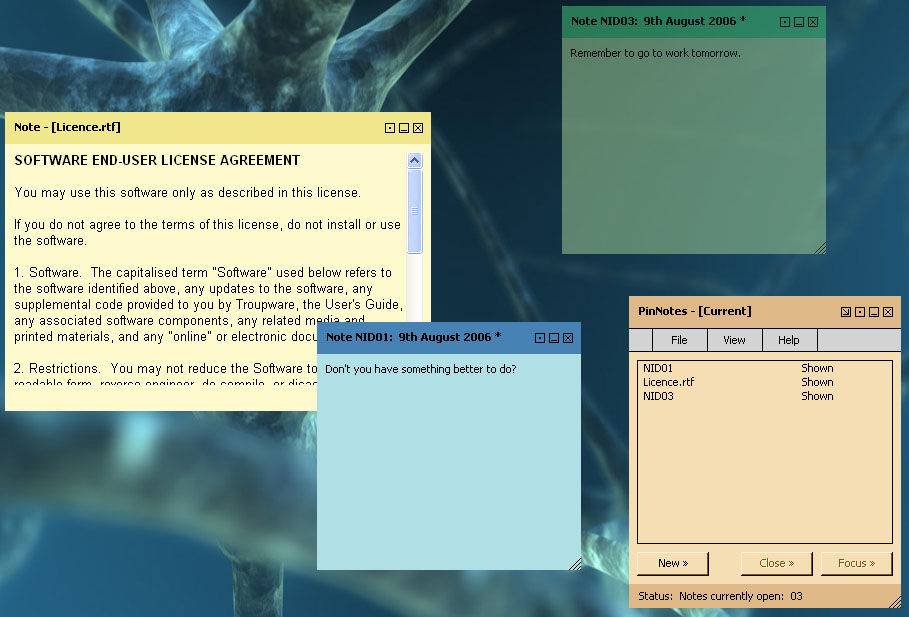
 There are a number of different notes programs around and therefore in order to make the list of freeware programs a note program has to be particularly special in some way. Well, I think I can say with confidence that the PinNotes program is a very special one. Not only is the program compatible with Windows Vista (something that a lot of different programs can not attest to as of yet), but it is also a program that allows you to use rich text support combined with different note colours in order to get exactly what you want. It is a fantastic program because of the choice that it offers the user and this combined with the fact that the program is free is very good indeed. There are a number of different notes programs around and therefore in order to make the list of freeware programs a note program has to be particularly special in some way. Well, I think I can say with confidence that the PinNotes program is a very special one. Not only is the program compatible with Windows Vista (something that a lot of different programs can not attest to as of yet), but it is also a program that allows you to use rich text support combined with different note colours in order to get exactly what you want. It is a fantastic program because of the choice that it offers the user and this combined with the fact that the program is free is very good indeed.
The latest release of the PinNotes software was on December 7th and a number of new features were added. You can now get to the website for the program directly from the about menu of the software and you can also create live links that are able to be opened by simply clicking on them in the actual note. There is also a splash screen added for effect and a number of new options are now available for you to customize your notes to a greater degree. All in all, this software continues to make great strides and it wouldn’t be that surprising if it quickly became one of the most popular notes software packages around.
More information can be found at http://www.pinnotes.co.uk/
Posted in Commercial, Design, Developer, Information Management, Main, Reminder, Text, Utilities, Windows | No Comments »
Monday, December 24th, 2007
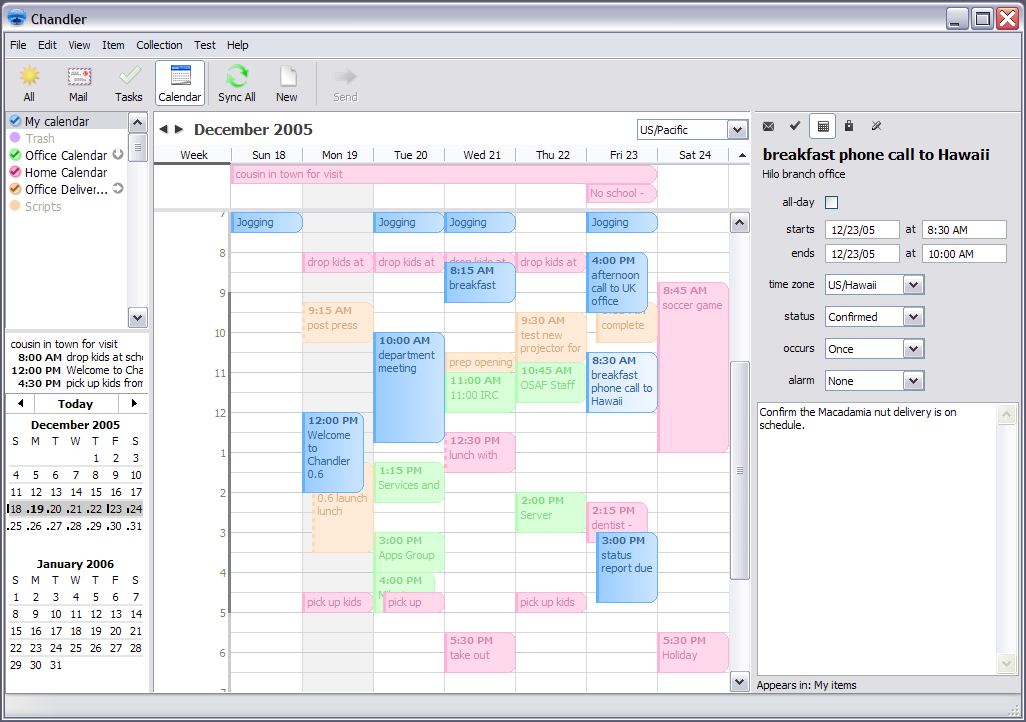
Chandler is an interesting piece of software that is intended for personal information management. In that vein, it has a number of different things that people will like about it that are typical of all PIM programs. For example, you can use Chandler to store your e-mail and manipulate them in different ways to ensure that you are able to have quick access to the important e-mails that are still active in your inbox. In addition to that however, it is also something that you can use to plan your day out; almost like a digital version of a daily planner and something that you can easily structure your life around without changing a great deal.
Additionally, you can also use Chandler for Windows to store contacts and create different task lists for yourself that you can then adjust as the day goes on and you are able to finish different tasks. Another cool part of the program is your ability to create notes for yourself in different ways. All in all, there is nothing particularly innovative about this software packages except for the fact that it is very convenient in that it combines all of the things that you might need access to for managing your personal information.
More information is available at http://www.osafoundation.org/
Posted in Commercial, Developer, Freeware, Information Management, Internet, Main, Open Source, Reminder, Time Managment, Windows | No Comments »
Friday, December 21st, 2007
 The images that you take while traveling through scenic places with your beloved or celebrating any suspicious occasion are precious rather precious to most of us. What about making them more beautiful and attractive? You can make it possible by adding up frames to your images. Frame Maker Pro 2.41 software would assist you to have your pictures made rather amazing and eye catchy. The options that are presented by the program are simpler to use and the program can be operated by any normal computer user. The Help guide further assists you to work with the program so that you do not face any problems. The images that you take while traveling through scenic places with your beloved or celebrating any suspicious occasion are precious rather precious to most of us. What about making them more beautiful and attractive? You can make it possible by adding up frames to your images. Frame Maker Pro 2.41 software would assist you to have your pictures made rather amazing and eye catchy. The options that are presented by the program are simpler to use and the program can be operated by any normal computer user. The Help guide further assists you to work with the program so that you do not face any problems.
Frame Maker Pro 2.41 software is little time taking to download and smooth to install at the system. The software opens with a blank screen with the option placed rather neatly on it. You need to open the image for having the frame added to it. You can set the scaling for the images from the right side panel options. You can make the images Fit to window or enable the Interpolation. You can make then selection for the Frames from the given collection. Set the thickness of the frame, matte size and also make the selection of the Background. Making your picture look more attractive and to give it a complete feel you can add the inner border. Make it colorful experience as you can set the colors for inner border as well as for the background. Add various shapes for the frames and have different styles to be selected. You can change the height and width of the border, and also you can enable the Inner Contour or Outer Contour. Crop the picture and set the contrast, brightness according to your likes. Make the selection from the various Effects and also have the color balancing done. You can do wonders to make your pictures more memorable.
You and Frame Maker Pro 2.41 software can do wonders with the images that you have saved at your system. Add frames of different styles and have fun!
{More Info and Download}
Posted in Design, Developer, Fun, Photo, Windows | No Comments »
Thursday, December 20th, 2007
 Actual Planner is a powerful organizer that allows you to schedule tasks, generate your personal schedule, maintain your address book, maintain your blog and a lot more. Actual Planner is a powerful organizer that allows you to schedule tasks, generate your personal schedule, maintain your address book, maintain your blog and a lot more.
Pros: The application is an organizer of things to do. The usual facilities for maintenance of tasks, birthday/anniversary reminders and contacts management are there. Additionally writing to your blog page, maintaining it is easy too through this package. Maintain notes too created during the day. As the data is maintained in one database, it is easy to move back and forth between home and work computers.
It is possible to view tasks created over a span of time, It could just for the current day, the week, month or whatever. Complete contact details of your contacts can be created and viewed.
Notes are based on post-it like freeform pieces of texts that can be tacked on to a specific area. Obviously the notes can be about anything. Blog facilities include an editor that creates the html text necessary for posting at a site. Blog can be published at any of several popular blog sites.
The interface is simple and fairly easy to use, other forms and user screens that appear are easy to use too.
Cons: Nothing obviously problematic was noticed. Only issue to my mind was if this exact combination of aggregation is required by a large community of users. For the rest, there are several other packages available already.
Overall: Quite easy to use application. This is particularly useful for people who manage several blog sites. Overall, I would think, this is at the 4 star level.
{More Info and Download}
Posted in Calendar, Design, Desktop, Developer, Information Management, Reminder, Windows | No Comments »
|
|
|