Author Archive
Tuesday, November 28th, 2006
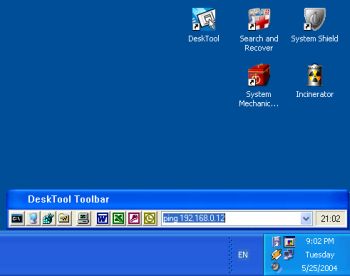 DeskTool is a desktop toolbar designed to give you easy access to frequently used applications by displaying an organized row of buttons from which to choose. DeskTool is tightly integrated into the desktop shell of Windows 9x and Windows NT/2000/XP. DeskTool is a desktop toolbar designed to give you easy access to frequently used applications by displaying an organized row of buttons from which to choose. DeskTool is tightly integrated into the desktop shell of Windows 9x and Windows NT/2000/XP.
It supports Drag and Drop for adding, deleting and moving buttons around on the toolbar. The really cool thing about it is that you can “dock” it to any one of the 4 edges of your screen (remember the Windows 95 taskbar?), or leave it free floating on the desktop. You can also make the toolbar “auto-hide” when docked to an edge, just as you can with the taskbar.
The fact that DeskTool can be made to stay on top of other windows makes it readily accessible.
A new updated version was released this month featuring these changes:
- Added support for multi-monitor configurations
- Added workaround when DeskTool appears out of the screen
- Changed location of the configuration file
- Improved installation
One downside to this shareware is that there are freeware that does similar things though not having the same feautures as DeskTool. Desktool goes for $15? Is it worth it? You’ll be the judge of that!
But since it really does what it is supposed to do very well, you might want to try it out! At least you can use the trial version freely to know if it’s worth it.
Check it out!
Posted in Business, Commercial, Developer, Information Management, Main, Shareware, Shell and Desktop, Utilities | 1 Comment »
Tuesday, November 28th, 2006
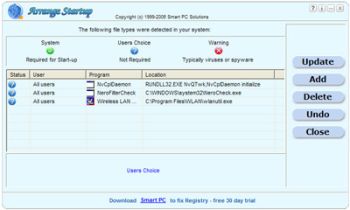 When you first started using your PC it used to boot pretty fast, right? If presently that is not the case and you’ve been looking for a software that can help you, Arrange Startup might come in handy. When you first started using your PC it used to boot pretty fast, right? If presently that is not the case and you’ve been looking for a software that can help you, Arrange Startup might come in handy.
The reason why some PC’s take too much time to boot at times is that too many applications which can be executed when needed form part of the startup list wasting hardware resources after each startup. This slows things down. Arrange Startup will help you to remove programs from start up list or add to them.
Arrange Startup classifies all of your programs that are executed at startup as system programs, suspicious applications that can be viruses, and the programs that are not necessary for startup.
One downside to this software is though they call it a freeware the fact that it puts a link to their website on your desktop may make you want to categorize it as an adware. Another problem you might encounter is that it may give warnings about applications that you know are harmless. It’s just trying to help you reduce the unnecessary load on your startup.
All in all it is a useful software. Check it out, it’s free!
Posted in Business, Developer, Freeware, Information Management, Main, Shell and Desktop, Utilities | 1 Comment »
Tuesday, November 28th, 2006
 Looking for an all-in-one package that can help you deal with the common daily problems you encounter on your PC? 12Ghosts might just be the thing for you. Looking for an all-in-one package that can help you deal with the common daily problems you encounter on your PC? 12Ghosts might just be the thing for you.
12Ghosts is a package that contains various utilities that accelerate and facilitate your working with your computer. If you need help with securing your important documents, automating daily tasks and so much more, 12Ghosts is right for you. Everything from an automatic saving device for documents to a shut down control tower is available, as well as Windows shell enhancements for easier and faster usage of Windows itself.
Recently a new updated version, 12Ghosts 8.10 was released. Some of the latest changes in this version include:
- ShutDown: New! Super fast shut down! This will just exit Windows and turn off the computer (or restart). Nothing is saved, though. Windows is NOT properly shut down. Use in emergency situations only
- Backup: The destination folder now is allowed to be below the source folder. It is excluded from backup automatically. For example, if you backup “C:\” to “C:\12-Backup” everything is backed up, except of course “C:\12-Backup” itself
- Wash: New! Suppress programs from START menu! Frequently used programs are added to the start menu automatically (XP/Vista). Protect your privacy and prevent certain programs from ever appearing there again
- Shredder is now checking if clean up of “delete_me…XX.del” files is required at startup of 12-Shredder. This may be necessary if Wipe Disk was interrupted before it could complete a Remove Old Names pass
- Tower: New color scheme with light background
Want to check it out? CLICK HERE!
Posted in Business, Commercial, Developer, Information Management, Internet, Main, Multimedia, Programming, Security, Shareware, Shell and Desktop, Utilities, Windows | 4 Comments »
Tuesday, November 28th, 2006
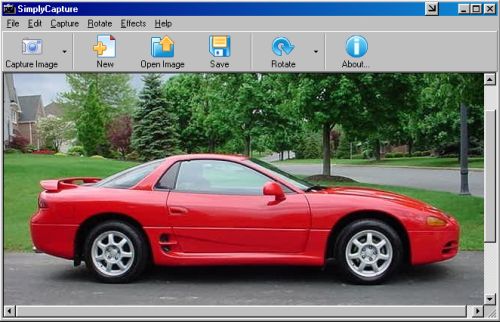
 This cool freeware is something you need to check out! SimplyCapture is a powerful screen/video capture tool that is really simple and very easy to use. With SimplyCapture you can capture exactly what you want in the screen (3 capture options: Full Screen, Active Window and Selected Area). This cool freeware is something you need to check out! SimplyCapture is a powerful screen/video capture tool that is really simple and very easy to use. With SimplyCapture you can capture exactly what you want in the screen (3 capture options: Full Screen, Active Window and Selected Area).
What I really love about it is that it allows you to capture screenshots of any video file! Just play a video in the SimplyCapture Video Player and start capturing screenshots of your favorite movies!
Some of it’s cool Features include:
- Great program layout
- Capture screenshots of video files
- Capture shots of your favorite movie files
- Integrated Video Player and Image Viewer for easy viewing of your captured movie images and a lot more
- Rotate and Flip image Options
- Cool Image Effects available to make your captured image even better
- Exclusive JPEG Conversion Tool (converts any image file to JPEG format; you can customize the output image quality and much more)
- And much more!
This great freeware works well with Windows 98/98SE/ME/2000 & XP
BE SURE TO CHECK IT OUT! IT’S FREE!
Posted in Business, Design, Developer, Freeware, Main, Multimedia, Photo, Windows | No Comments »
Tuesday, November 28th, 2006
 Ever wondered how life would be without your start menu? Now you have an opportunity to find out with this software, LAUNCHY. Ever wondered how life would be without your start menu? Now you have an opportunity to find out with this software, LAUNCHY.
Launchy is a free windows utility designed to help you forget about your start menu, the icons on your desktop, and even your file manager. Launchy indexes the programs in your start menu and can launch your documents, project files, folders, and bookmarks with just a few keystrokes!
What really trips me about this application is that once you start running it, it hides in the background. You have to bring it forward by holding the alt key and tapping the space key. Then you just type in a few keys of the program you are searching for and hit enter once it has been found.
You can perform a disappearing act on it again by hitting escape or Alt+Space.
CHECK IT OUT!
SYSTEM REQUIREMNETS: Win98/98SE/2000/ME/XP FILE SIZE: 822 KB
Posted in Freeware, Main, Open Source, Themes, Utilities, Windows | 1 Comment »
Monday, November 27th, 2006
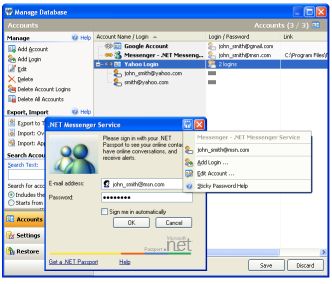 Remembering your passwords for different logins is not an easy task when there are so many of them. But a handy tool has just been released that can help you accomplish this with ease. Remembering your passwords for different logins is not an easy task when there are so many of them. But a handy tool has just been released that can help you accomplish this with ease.
Sticky Password automatically fills login and password fields in web forms and usual dialog windows. With its unique “Sticky Button” which appears on any window that it has password saved for, you get to do this with ease. I love the fact that there is a backup feature that keeps all passwords safely stored until the need arises for them.
Sticky Password also allows you to have multiple logins and passwords for a single account.
This software is a shareware, there is a trial version available but the full version costs about $24.95. But in case you are wondering what the big deal is about this software, there are so many others out there that are even free. Right? What makes it different from others is that unlike other password managers that are just used to keep and recall passwords, Sticky Password integrates password management features to any program on your computer.
Some of the key features of Sticky Password:
- The Password Protector is the most innovative and unique feature that prevents password theft. Learn more about password protector and anti-phishing.
- Portable Version allows you to always keep passwords in your hand. Sticky Password can run from any portable device – USB drive or even CD.
- Alternate authentication methods allow you to use any USB or Bluetooth device to unlock Sticky Password. Now you don’t need to type any passwords at all!
- The password storage database is protected with strong encryption algorithms that make it impossible to decrypt it in any acceptable amount of time. Learn more about password storage
- The form filler works for usual programs as well as web pages. Password, login and other fields are filled automatically only when you need it. Learn more about form filler
- Multiple logins and passwords are supported for a single account etc.
Click here to check out the trial version and for more info. NOTE: the trial version has a 30-day time out
UPDATE: Special offer from the owner of Sticky Password for our readers. More details in Comments
Posted in Information Management, Internet, Main, Multimedia, Programming, Shareware, Shell and Desktop, Text, Utilities, Windows | 9 Comments »
Sunday, November 26th, 2006
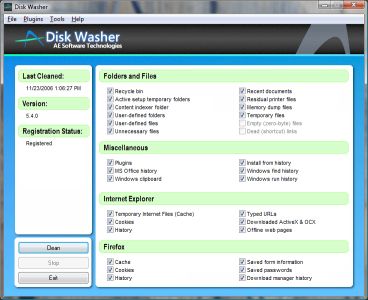 A new version of Disk Washer has just been recently released. Disk Washer is a software that helps you to maintain peak performance for your system by removing unnecessary files from your system. A new version of Disk Washer has just been recently released. Disk Washer is a software that helps you to maintain peak performance for your system by removing unnecessary files from your system.
Installation programs leftover, DLL problems and system registry errors are part of the things that Disk Washer resolves. Disk Washer helps to eliminate the things that clog your drive and make your system slow and instable. Latest Changes in the new version includes new GUI, enhancements, and stability improvements.
On first observation you might be tempted to rule out this software thinking that there are freeware like CCleaner, which have similar use. But a deeper look reveals that Disk Washer really is different as it helps you to recover disk space, clear your tracks, fix Windows problems, back up your files among other things. But the big question is this, “Is it worth the price that it is sold for?” That’s up to you! Check it out and see whether it works well with your PC or not. Try out the trial version first and see if it good enough for you.
Click here for more info on its features and trial download!
Posted in Developer, Internet, Main, Security, Shareware, Utilities | No Comments »
Friday, November 24th, 2006
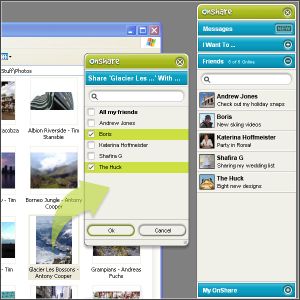 Just found a new way to share files and chat with friends in complete privacy. All thanks to this software, Onshare. Just found a new way to share files and chat with friends in complete privacy. All thanks to this software, Onshare.
OnShare is a free way to share files and chat with your friends in complete privacy. It’s a simple download that directly networks computers together. The fact that you get to control exactly what your friends can see and get their hands on really makes this useful tool. You only share files with people you invite so you know they’re from a trusted source and the files you share stay exactly where they are on your computer.
One cool feature that this software has is that its pioneering technology lets you reach into your friends’ computers, grab whatever you want and use it just as if it were on your own computer. And, if you have more than one computer, you can easily share between them wherever they are in the world.
The security of your files and chat is guaranteed as the file sharing and messaging is encrypted at 2048 bit, so secure that no one can intercept your chats and files. It is even said that the security model was conceived and developed by ex–military scientists. [I don’t know how true that is]
In case you are wondering how this works, your friends appear as drives on your computer, meaning you can access their shared files directly from within Windows. View, drag, drop, copy and paste just like you’re used to.
Click here to find out more and download it.
Posted in Internet, Main, Multimedia, Open Source, Shareware, Utilities | 2 Comments »
Friday, November 24th, 2006
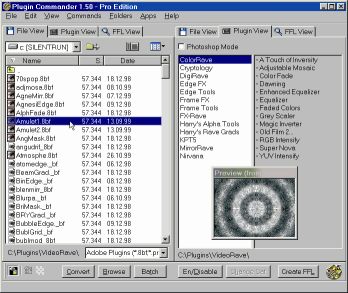 If you’ve had problems using plug-ins, tubes or other add-ons in a graphics, video or animation application then you might find this software, which I recently came across, very useful. It’s called Plugin Commander. If you’ve had problems using plug-ins, tubes or other add-ons in a graphics, video or animation application then you might find this software, which I recently came across, very useful. It’s called Plugin Commander.
Plugin Commander is a tool for dealing with various image formats, plugins and effect types from various graphics applications. It allows you to manage and preview your plugin, tube and add-on collection quickly and easily. You can deactivate the plug-ins you rarely need and define how your favorite effects will appear in the host application.
There are two editions of this useful software, the commercial Pro Edition and the Light Edition, which is freeware. The light edition being freeware has limited features but to enjoy a fully-featured version, it’s best you go for the Pro Edition.
CHECK IT OUT!
Posted in Audio, Browsers, Business, Commercial, Design, Developer, Information Management, Internet, Main, Multimedia, OS Updates, Photo, Security, Shareware, Shell and Desktop, Utilities, Video, Windows | No Comments »
Friday, November 24th, 2006
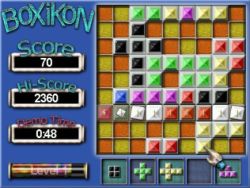 Having always been a fan of one of the most ageless games in the world, TETRIS; I was itching to see if anyone could come up with a Tetris – styled game that would be totally different. BoXiKon did that for me. Having always been a fan of one of the most ageless games in the world, TETRIS; I was itching to see if anyone could come up with a Tetris – styled game that would be totally different. BoXiKon did that for me.
BoXiKoN is a logic based puzzle game of strategy and forward thinking. The game obviously belongs to the Tetris family of shape games, but it really is quite different. There is a large emphasis on planning, organization and selection and less on arcade style quick reactions.
There is also a version for available for Mac users.
More info and download!
Posted in Fun, Games, Mac Stuff, Main, Shareware, Windows | No Comments »
|
|
|