Archive for the 'Developer' Category
Tuesday, January 30th, 2007
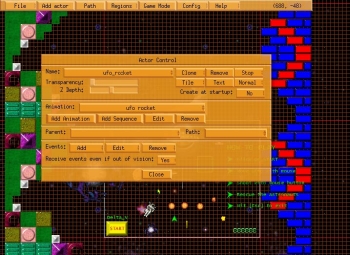 You are going to love this software. It’s called Game Editor. You are going to love this software. It’s called Game Editor.
Game Editor is a game design software. It lets you create the games of your dreams. I love the fact that it is so easy to use you can create nice games with little or no programming or technical knowledge.
With Game Editor you can design and develop 2D games for personal computers and mobile devices.
What about compatibility issues?
I don’t think you need to worry about system issues or compatibility, though I’ll advise that you use at least windows 98 for better output.
Game Editor is designed to be portable across all popular platforms, including Windows (95, 98, Me, NT, 2000, 2003, XP), Linux, Pocket PC, Handheld PC, GP2X and Windows Mobile-based Smartphones.
Go check out the trial version HERE!
Posted in Commercial, Developer, Fun, Games, Linux, Main, Mobile, Programming, Shareware, Windows | 4 Comments »
Tuesday, January 30th, 2007
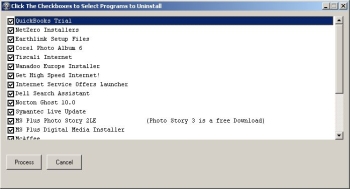 When you’ve just bought a new computer, it usually comes preloaded with numerous “Helpful” programs, most of which you’ll never use. They’ll usually only serve to slow your new computer down to a crawl. Think of “PC Decrapifier” as an automatic garbage cleaner for them! Even if your computer isn’t brand new, but still has some pre-installed garbage on it, you can use it to get rid of some of those difficult to remove, factory-installed applications. When you’ve just bought a new computer, it usually comes preloaded with numerous “Helpful” programs, most of which you’ll never use. They’ll usually only serve to slow your new computer down to a crawl. Think of “PC Decrapifier” as an automatic garbage cleaner for them! Even if your computer isn’t brand new, but still has some pre-installed garbage on it, you can use it to get rid of some of those difficult to remove, factory-installed applications.
It was originally called the Dell Decrapifier but the author decided to rename it to the more politically correct PC Decrapifier. After all, Dell is not the only manufacturer that does this. This is a most welcome and much needed program to simplify the removal of some of those difficult to remove, factory-installed, unwanted applications.
Visit the website here to download it and also to view a list of the programs it can uninstall.
Posted in Browsers, Commercial, Developer, Information Management, Main, Security, Shareware, Utilities, Windows | 1 Comment »
Tuesday, January 30th, 2007
 Yodio, short for ‘Your Audio’, is a site where anyone can create audio content to go with pictures they upload. It offers members the ability to record audio by calling in to a toll free number, upload a photo or photos to go with it, and publishing it online for the world to see/hear! Yodio, short for ‘Your Audio’, is a site where anyone can create audio content to go with pictures they upload. It offers members the ability to record audio by calling in to a toll free number, upload a photo or photos to go with it, and publishing it online for the world to see/hear!
You can even sell your Yodio creations if its something such as useful information which people may be willing to pay for!
This seems like it could be potentially useful for many different things such as museum tours, restaurant reviews, corporate marketing promotions, product assembly guides, audio blogs and greetings etc.
Best of all its free to join, you can check it out by visiting the site here for more information and a demonstration.
Posted in Audio, Design, Developer, Fun, Information Management, Internet, Main, Multimedia, Open Source, Social Software, Web services | No Comments »
Tuesday, January 30th, 2007
 Halma is a game played on a solitaire type board with 10 pins by 2-3 players. These players can be either computer or human, and you can save games to pick up later if you wish. It’s identical to the board game Halma. Halma is a game played on a solitaire type board with 10 pins by 2-3 players. These players can be either computer or human, and you can save games to pick up later if you wish. It’s identical to the board game Halma.
The game (named from the Greek word meaning “jump”) is a board game invented in the 1800s by a surgeon at Harvard Medical School, a guy called George Howard Monks. There was apparently an English game called Hoppity before this but Halma was different. You use a checkered board, divided into 16×16 squares, and playing pieces are of course black & white for two-player games, and of various colors in games of four players or more.
Curiously addictive. Oh and there’s no Hippos in the game. In fact it’s just the name of the software company. Also no hippos were harmed in the making of this game. 🙂
Posted in Developer, Freeware, Fun, Games, Main, Windows | 2 Comments »
Monday, January 29th, 2007
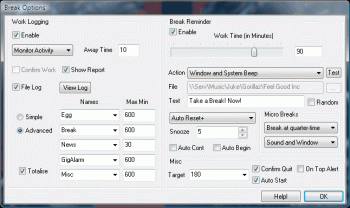 At times we get so carried away by the work we have to do, sitting at the computer for so long that we forget to take healthy breaks. Break is a useful software created to help you work effectively without killing yourself. At times we get so carried away by the work we have to do, sitting at the computer for so long that we forget to take healthy breaks. Break is a useful software created to help you work effectively without killing yourself.
Break is designed to help you not work too long at one time on the computer. It lets you set a timer from 1- 120 minutes to remind you to get up and go for a walk, have a coffee, go home, go to bed etc. Auto reset and auto boot are also supported.
Break works in two basic ways, as a work logger and as a rest reminder. As a work logger it records your work times. Work can be divided into five different categories, with maximum work capping for each category. It maintains a running total to show you how long you are on your computer, and what you do most while on it. As a rest reminder it simply reminds you to take a break.
Go Check it Out HERE!
Posted in Developer, Health, Information Management, Main, Shareware, Shell and Desktop, Themes, Utilities, Windows | No Comments »
Monday, January 29th, 2007
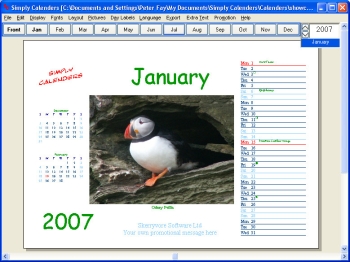 Here is a nice tool fro you to create personalized calendars with. Here is a nice tool fro you to create personalized calendars with.
Simply Calenders, as the name goes, is simply about calendars. But this is no simple calendar creator, it can quickly create high quality personalized calendars and planners in any of 70+ languages. Isn’t that something?
It’s very easy to use; in fact there is a Calendar Creation Wizard that helps you walk through each step. What I really like about this software is that it allows you to include your own photos, birthdays and other events. That’s not all, with a click of the mouse; you can choose to include any of a wide range of national astronomical and religious events.
If it’s for office purposes, you can add your company logo and message. With cool features like 51 customizable styles for any year from 1582 until 9999, your choice of colors and fonts, multilingual options etc, you won’t have any problems designing really cool calendars which you can print and give out to friends, relatives, colleagues, customers or just for your personal use.
Create really cool personalized calendars and define your days clearly.
Check it out! CLICK HERE
Posted in Commercial, Developer, Information Management, Main, Shareware, Shell and Desktop, Themes, Utilities, Windows | No Comments »
Monday, January 29th, 2007
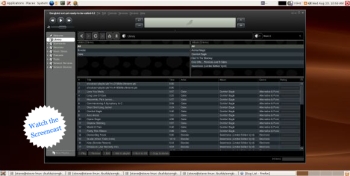 Songbird is a media player, but not all media players are quoted as promising “to be the Firefox of media players”. Songbird is a media player, but not all media players are quoted as promising “to be the Firefox of media players”.
Apparently the user interface is very similar to iTunes, but the main thing I noticed about this media player is its ability to list all the sound or video files on a page, almost as if they were local files.
You see how this thing operates, is you surf to sites such as mp3 blogs etc, by using the built-in browser, and all the media on the page will be listed. You can then choose if you would like to save or play any of these songs/videos locally to your collection. Of course you can also play and organize playlists etc, with your current mp3 or video collection that resides on your computer.
It is pretty cool to be able to instantly play media without having to open it in a separate program.
This might be useful software for anyone who routinely browses for music or videos online. You can find out more details and download it by clicking here!
Posted in Business, Commercial, Developer, Fun, Information Management, Internet, Linux, Mac Stuff, Main, Multimedia, Music, Shareware, Social Software, Utilities, Windows | No Comments »
Monday, January 29th, 2007
7-Zip is an open-source file archiver with high compression ratio. It can compress your files using a variety of methods, such as 7z, ZIP, GZIP, BZIP2 and TAR. It can also extract RAR, CAB, ISO, ARJ, LZH, CHM, Z, CPIO and NSIS archives.
 Like other file archives you may be used to, 7-zip can integrate into the windows shell and it also has a command-line version. 7-ZIP also offers some advantages over other windows based archive programs such as winzip and winrar: Like other file archives you may be used to, 7-zip can integrate into the windows shell and it also has a command-line version. 7-ZIP also offers some advantages over other windows based archive programs such as winzip and winrar:
Open-source – You can read and modify the program source code.
- Cross-platform – You can run 7-zip on any modern operating system (Windows, Linux, OS X, and so on)
- No registration – There are no annoying splash screens or nagging registration pop-ups
- Provides a compression ratio that is 2-10% better than PKZIP and WINZIP provide for ZIP and GZIP archives.
Note that you can register 7-zip if you want to support it by clicking Help->About 7-Zip->register in the 7-Zip File manager but it’s not a requirement and it will never bug you to.
There are two basic ways you can associate certain file types with 7-zip. The easiest way is to open up the 7-zip file manager and choose Tools->Options and in the System tab choose the file extensions you want to associate with 7-zip. This will make it so files ending in those extensions are automatically opened in the 7-Zip file manager for extraction. If you choose to add the associations manually by the standard MS Windows way of right-clicking on a file, choosing “open with”, selecting the “always open files of this type with this program” and then browse for the 7-zip program then make sure you select C:\Program Files\7-Zip\7zFM.exe. There are two other binaries in the 7-Zip installation folder that could confuse you and they are called 7z.exe and 7zG.exe; so make sure to use 7zFM.exe (FM means File Manager)
It is possible that 7-Zip can handle all your file archiving needs but you may run into some files that were compressed using Winzip and they won’t always be compatible with 7-Zip. I personally haven’t came across this issue but just be aware of it.
To extract all the files of an archive first click Edit->Select All and then click the ‘Extract’ Button (As shown in the included screenshot)
Posted in Developer, Freeware, Linux, Mac Stuff, Main, Open Source, Social Software, Utilities, Windows | 8 Comments »
Monday, January 29th, 2007
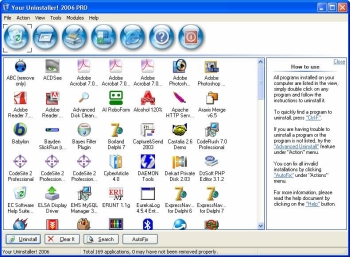 If you want to try something new or you are just looking for a worthy substitute to the Windows Add/Remove program, you might want to check this program out. It’s called Your Uninstaller! If you want to try something new or you are just looking for a worthy substitute to the Windows Add/Remove program, you might want to check this program out. It’s called Your Uninstaller!
Your Uninstaller! provides a total solution for your uninstalling tasks. Built to be a worthwhile alternative to the Windows Add/Remove program, it offers a much more user-friendly way to remove applications that you don’t need or those that have become a source of headache to you on your computer and it’s faster too. It starts up about 5-10 times faster than Add/Remove program.
Your Uninstaller! displays appropriate icons applications, so that you can easily find out the application you want to uninstall. One other good thing about this software is that it can automatically detect rubbish registry keys and entirely delete them with your permission.
Had it with those stubborn programs that just won’t go away, try Your Uninstaller!
Check it out: http://www.ursoftware.com/
Posted in Business, Commercial, Developer, Information Management, Main, Security, Shareware, Utilities, Windows | No Comments »
Friday, January 26th, 2007
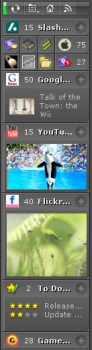 Got this cool way for you to stay on top of things easily. It’s called KlipFolio. It is a small, smart, and easily configurable personal dashboard. Got this cool way for you to stay on top of things easily. It’s called KlipFolio. It is a small, smart, and easily configurable personal dashboard.
What can it do?
It can be used to monitor anything online and I mean anything; weather, stocks, news, RSS feeds, auctions, whatever, the choice is yours, right on your desktop. So you can really be on top of things easily with KlipFolio, you don’t have to go check on your favorite sites always to know what the latest happenings are, this personal dashboard brings it all to your desktop.
The latest version, KlipFolio 4 Beta B , which just got released yesterday has these changes:
- Added auto-hide, always-on-top and normal window layering modes
- Layouts now saved for floating, strip and sidebar modes within session
- Minimize menu item, system tray icon and Win+K shortcut now minimizes everything
- Klips can now be collapsed by clicking on ghosts
- Made it easier to enter a sidebar mode gesturally when overshooting target
- Klips no longer ‘bumping’ offscreen (so easily)
Etc.
CLICK HERE for more info and download!
Did I fail to mention that it’s free? Yeah it is absolute free.
Posted in Commercial, Developer, Freeware, Information Management, Internet, Main, Shell and Desktop, Social Software, Windows | 1 Comment »
|
|
|





