Archive for the 'Developer' Category
Sunday, November 19th, 2006
 Software maker Adobe may sue Microsoft if it is not satisfied with the European Union’s steps to ensure Microsoft’s new operating system does not shut out rivals, Adobe’s chief executive said. Software maker Adobe may sue Microsoft if it is not satisfied with the European Union’s steps to ensure Microsoft’s new operating system does not shut out rivals, Adobe’s chief executive said.
Bruce Chizen told Germany’s Euro am Sonntag newspaper there were two options: to sue Microsoft directly or to work with the authorities and provide them with the necessary information.
“We’re doing the latter. Then we’ll see,” Chizen said in an interview released on Saturday ahead of publication on Sunday.
Microsoft’s new Vista software, due to be released early next year, contains a version of fixed document formats which would compete with Adobe’s PDF format. Microsoft has pledged to make changes to its version.
Chizen added that Adobe, known for its popular Acrobat document reader, was considering offering some of its more sophisticated software for photo and video editing over the Internet, financed by advertising.
“It would be a shame if we could not fit this into our business model,” Chizen said.
via Reuters
Posted in Business, Commercial, Developer, Main, News | No Comments »
Friday, November 17th, 2006
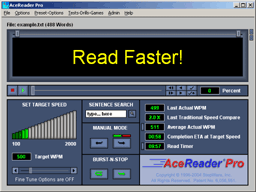 Every once in a while i come across a unique program that promises to teach a useful skill,through the magic of some well thought out yet simple technique. This is one such program. Every once in a while i come across a unique program that promises to teach a useful skill,through the magic of some well thought out yet simple technique. This is one such program.
Speed reading is simply the ability to read very fast by learning to scan the words rather than thinking about them or pronouncing them in your head. I’m not sure how well this works if you have something important to read as scanning things doesn’t really focus your attention on them, but anyway!
Acereader uses two techniques, Rapid Serial Visual Presentation (R.S.V.P.) and Tachistoscopic Scroll Presentation (try saying or even reading that 3 times!!!). It’s pretty easy to use, you can open any text file inside it or copy and paste. It has different grades from beginner to advanced and you’ll be amazed at how naturally you read fast using the method of having the words appear and scroll in front of you. It’s won a bunch of awards as you can see here for being “best educational software”, so it’s not as crazy as it sounds!
Go check out the demo and a lot more detailed info here.
Posted in Developer, Fun, Games, Main, Shareware, Utilities | 1 Comment »
Thursday, November 16th, 2006
 Now that Microsoft has finalized the code of Microsoft Office 2007 at last, corporate customers will be able to get their hands on Office Small Business 2007 soon. Now that Microsoft has finalized the code of Microsoft Office 2007 at last, corporate customers will be able to get their hands on Office Small Business 2007 soon.
The rest of us will have to wait until early next year to buy a boxed version of Word, Excel, PowerPoint, Outlook and the other members of the Office 2007 family. The consumer editions of Microsoft Office 2007 will hit the stores early next year, in step with the Vista operating system.
Some of the major changes in Office 2007 include the fact that major programs each organize features into tabs rather than drop-down menus and dialog boxes and New XML-based files, which squeeze more data into fewer kilobytes have been added. It is worthy of note that you won’t be able to open a file in the new format immediately when using earlier versions of the programs. This will make sharing work with people without the new version [those who haven’t upgraded] difficult. (more…)
Posted in Business, Commercial, Developer, Main, Office, Social Software, Text, Windows | 17 Comments »
Thursday, November 16th, 2006
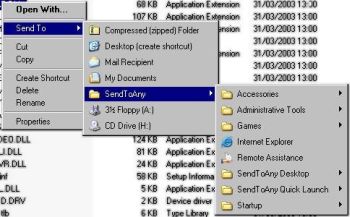 In the world of freeware and shareware there are not many programs that deliver exactly what they promise but this simple freeware really sets itself apart as it does exactly what it is supposed to do. In the world of freeware and shareware there are not many programs that deliver exactly what they promise but this simple freeware really sets itself apart as it does exactly what it is supposed to do.
SendToAny is a simple freeware that extends the Windows Explorer ‘Send To’ context menu with all known links. This is accomplished by synchronizing the Send To Menu with the Start Menu, Desktop and Quick Launch Menu. It allows any file to be sent to any application, regardless of file-type association, or an applications’ registration status.
One other thing I love about this program is that it resolves all types of links, including Microsoft Installer (MS Office, Adobe Acrobat, etc), which are normally invisible to the Send To menu.
As great as this program is I think it will be better if more options are introduced.
Want to check it out? Click Here!
Posted in Developer, Freeware, Internet, Main, Windows | No Comments »
Thursday, November 16th, 2006
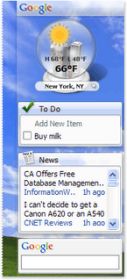 Google has refreshed the design of the recent 4.5 release of Google Desktop. To my mind now it’s better, faster and more personalized. In later versions of Google Desktop gadgets are floating on the desktop and the Sidebar has a definitely new look. Google has refreshed the design of the recent 4.5 release of Google Desktop. To my mind now it’s better, faster and more personalized. In later versions of Google Desktop gadgets are floating on the desktop and the Sidebar has a definitely new look.
The new Sidebar is transparent, so it fits seamlessly with your desktop environment. Gadgets that fought for attention now look right at home, and content-heavy gadgets get new frames and icons that make it easier to tell them apart. All of this leads to a better place to find your email, news, feeds, stock prices, weather and other essential information. And this version is compatible with all of the latest software including Microsoft Vista, Office 2007 and Mozilla Firefox 2.0.
via googledesktop
You can download and try the new Sidebar in Google Desktop now right from here.
Posted in Business, Developer, Freeware, Information Management, Internet, Main, News, Windows | No Comments »
Wednesday, November 15th, 2006
 You know what’s really weird about the concept of backing up the entire Internet? Where on earth would you put it all? You know what’s really weird about the concept of backing up the entire Internet? Where on earth would you put it all?
I don’t know how it works, but over at www.archive.org they have a thing called the Internet Wayback Machine. You can put in a URL and it will take you back to what that page looked like in 1996. It must be vestigial logs from the hosting sites or something, I don’t see how it can work, but it does. I can verify I went back to a lot of my old websites that are LONG gone and there they were, graphics and all.
That’s not even possible, is it?
Mind boggling. Go boggle your own mind at The Internet Wayback Machine.
Posted in Developer, Internet, Main, Social Software | No Comments »
Tuesday, November 14th, 2006
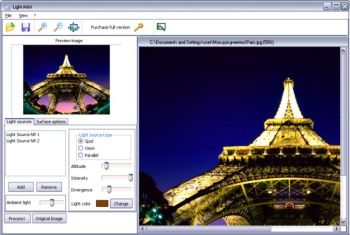 Are you tired of looking at some of your old pictures over and over again? Do you wish you could enhance the images, do something about the background, make it more romantic or whatever? That means you are ready to give your old pictures a new look? Then you’ve got to check this out! Are you tired of looking at some of your old pictures over and over again? Do you wish you could enhance the images, do something about the background, make it more romantic or whatever? That means you are ready to give your old pictures a new look? Then you’ve got to check this out!
Light Artist is a program that allows you to add realistic lighting effects to your photos. With it you can easily make your ordinary and undistinguished photos sunnier, romantic or even gloomy if you want. You can modify the light color, add multiple light sources, change the surface qualities of the image and add various ambient illumination effects.
Using one of the image channels as the texture channel you can add 3D relief to your images.
Though it is not a freeware, you can try out the evaluation version first to see if it will do what you have in mind. It doesn’t matter whether you are a pro or a greenhorn in image enhancements, it’s really easy to use.
Give it a try! For more info and download, CLICK HERE!
Posted in Developer, Main, Multimedia, Photo, Shareware | No Comments »
Tuesday, November 14th, 2006
 If you have been around the web for a little while, you’ve probably heard of PHP or PHP: Hypertext Preprocessor. This is one of the most popular web programming languages right now and for good reason. It’s flexible, powerful, relatively easy to learn, and, best of all free. If you have been around the web for a little while, you’ve probably heard of PHP or PHP: Hypertext Preprocessor. This is one of the most popular web programming languages right now and for good reason. It’s flexible, powerful, relatively easy to learn, and, best of all free.
The problem I had with beginning to program in PHP,though, was that I had no place to test it before uploading to a web server. So, I went to the search engines and found a solution: MAMP. This is a development environment consisting of Macintosh – Apache – MySQL – PHP.
I’m doing my development on my trusty little iBook, so I had to find something that would work with Macintosh. MAMP is perfect. After a rather large download, MAMP is easy to install. Simply unzip the file, mount the disk image (.dmg) file by double-clicking, and then drag and drop the MAMP folder from the disk image to your Applications folder.
Using MAMP is as easy as double-clicking the application file to turn on the servers. After that, all you have to do is copy your web files into the ‘htdocs’ folder inside the MAMP application folder and navigate to ‘localhost:8888’ in your browser.
You may know that OS X already comes with versions of Apache and PHP installed. So, why use MAMP? Because, MAMP puts it all together in one easy install. You don’t have to mess around with configuration files or downloading and installing MySQL. The installation doesn’t touch any of the important files already on your Mac and if you ever want to uninstall it, just drag the MAMP folder to the trash can. And one more great reason to use MAMP? It’s freeware.
Posted in Developer, Freeware, Internet, Mac Stuff, Main, Open Source, Programming | 3 Comments »
|
|
|





