Archive for the 'Internet' Category
Wednesday, March 7th, 2007
 Here’s an easy to use, simple to understand, budgeting program that won’t break the bank (as it’s free!). It’s called PearBudget and it can help you manage your finances a little better. Here’s an easy to use, simple to understand, budgeting program that won’t break the bank (as it’s free!). It’s called PearBudget and it can help you manage your finances a little better.
All it takes is three easy steps…
You simply enter an estimate of what you think you’ll spend during your yearly budget, this only takes a few minutes once a year. Next you hold onto your receipts and record your expenses, you only need to do this once or twice a month. Lastly you click “analyse” and it tells you how you’ve done!
While PearBudget isn’t a piece of software as such. (All it is is an Excel spreadsheet, made into a template for entering financial details.) It’s simple and effective to use!
At the moment its an .XLS file (Opens with Excel or OpenOffice) that you have to download but they are working on an online version and you can sign up for the beta of this or download the offline version, all by going here!
Posted in Business, Developer, Freeware, Internet, Main, Open Source, Shareware, Utilities, Windows | 2 Comments »
Wednesday, March 7th, 2007
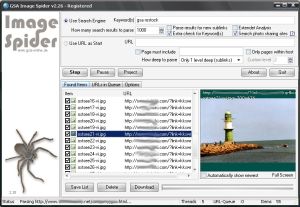 Check out this cool tool that can help you download images automatically. It is called GSA Image Spider. Check out this cool tool that can help you download images automatically. It is called GSA Image Spider.
GSA Image Spider can download all the images from a webserver automatically and this it does as you like it, with or without sublinks. It is a very easy to use software with a good user interface and it gives you amazing results in seconds.
Looking for relevant images from different websites? You can enter a keyword to find the relevant image from websites around the world easily.
Want to try out the demo version first and get a feel of the program? It provides only limited functionality and does not include many functions available in the registered version. You only get 10 images with the demo version but you will still get a feel of how it works and be able to make an informed decision whether to buy it or not.
Go check it out! Visit http://gsa-online.de/eng/image_spider.html or CLICK HERE!
Posted in Developer, Download Managers, Internet, Main, Photo, Shareware, Windows | No Comments »
Wednesday, March 7th, 2007
 Do you want a tool to help you stay on top of things, monitoring news from thousands of web sites and blogs around the world? Then Awasu is going work well for you. Do you want a tool to help you stay on top of things, monitoring news from thousands of web sites and blogs around the world? Then Awasu is going work well for you.
Awasu is a RSS client that lets you monitor news from thousands of web sites and blogs around the world. The really cool thing about this program is that it works in a unique way, and unlike other RSS clients, it has a powerful plugin architecture that allows you to monitor absolutely anything at all, even if it doesn’t provide an RSS feed. Awasu’s plugin architecture lets you extract information from any data source and monitor it in the same way as a regular feed.
This is really a very useful program that lets you do more advanced things like:
- Download your favorite podcasts
- Integrate with blogging tools
- Automatically keep your blogroll up-to-date
- Take information from within Awasu and republish it
- Keep different PC’s in sync with each other
Want to check it out? CLICK HERE or go to http://www.awasu.com/
Posted in Developer, Information Management, Internet, Main, RSS, Windows | No Comments »
Monday, March 5th, 2007
 Who says you can’t have fun with calculations? Who says you can’t have fun with calculations?
My talking calculator adds a new twist to talking calculators; it allows you to talk in your own voice and your own language. You are going to love solving your mathematical problems this time around with this easy to use calculator that is a load of fun.
A talking calculation robot, includes standard style, detail style, mini style, cartoon style, file calculation robot, unit converter, exercise center, formula manager, log manager. The user defined parameter, the unknown variable, the memory variables all make the daily calculation easy.
One other thing that is useful about this calculator apart from the fact that it does all the talking, (It could repeat talking, stop talking, talk the input key name, talk the expression , talk the result. It could talk in your own voice , if you replace the sound file) is that it displays the input and output in the same line, giving you an opportunity to be double sure about what you are calculating.
Want to check it out? Click HERE or visit http://www.ducklingsoft.com/mycalc.htm
Posted in Developer, Fun, Internet, Main, Shareware, Utilities, Windows | 1 Comment »
Monday, March 5th, 2007
 This is a free online service that lets you send a text message via the internet to be delivered to your or a friends phone at a later date. This can be very useful to remind yourself or someone you know to do something, attend an event, etc. Anything you may need a reminder of sometime in the future. This is a free online service that lets you send a text message via the internet to be delivered to your or a friends phone at a later date. This can be very useful to remind yourself or someone you know to do something, attend an event, etc. Anything you may need a reminder of sometime in the future.
At the moment the service they provide is only available in the US and with selected canadian cell providers.
You simply visit the website and input the cellphone number you want the message delivered to, the date and time (it will match your computers timezone) and the message. Here it is!
Posted in Chat, Developer, Freeware, Fun, Internet, Main, SMS, Web services | No Comments »
Friday, March 2nd, 2007
 VirusTotal is a totally free online service that can scan a file for viruses and malware. The difference with this is it scans using several well known virus scanning engines such as the following: VirusTotal is a totally free online service that can scan a file for viruses and malware. The difference with this is it scans using several well known virus scanning engines such as the following:
- Aladdin (eSafe)
- ALWIL (Avast! Antivirus)
- Authentium (Command Antivirus)
- Avira (AntiVir)
- Bit9 (FileAdvisor)
- Cat Computer Services (Quick Heal)
- ClamAV (ClamAV)
- CA Inc. (Vet)
- Doctor Web, Ltd. (DrWeb)
- Eset Software (NOD32)
- ewido networks (ewido anti-malware)
- Fortinet (Fortinet)
- FRISK Software (F-Prot)
- F-Secure (F-Secure)
- Grisoft (AVG)
- Hacksoft (The Hacker)
- Ikarus Software (Ikarus)
- Kaspersky Lab (AVP)
- McAfee (VirusScan)
- Microsoft (Malware Protection)
- Norman (Norman Antivirus)
- Panda Software (Panda Platinum)
- Prevx (Prevx1)
- Softwin (BitDefender)
- Sophos (SAV)
- Sunbelt Software (Antivirus)
- Symantec (Norton Antivirus)
- UNA Corp (UNA)
- VirusBlokAda (VBA32)
- VirusBuster (VirusBuster)
You can simply upload your file and they’ll email you back a report. Alternatively you can follow the instructions to email them your file and they’ll also send you a report. This service can only scan one file at a time that is sent to it, but the fact that it use multiple scanners makes it far superior to just using one scanner. Definitely worth bookmarking in case you ever have a suspicious file or are just the ultra paranoid type! Click Here for the homepage.
Posted in Developer, Internet, Main, Security, Shareware, Utilities, Web services, Windows | No Comments »
Thursday, March 1st, 2007
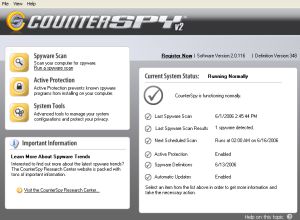 If you’ve been looking for a total solution to your spyware, adware, keyloggers, trojans etc problem, this software should so the trick. It’s called CounterSpy. If you’ve been looking for a total solution to your spyware, adware, keyloggers, trojans etc problem, this software should so the trick. It’s called CounterSpy.
Get rid of any software that might be tracking and reporting your private information to a third party with CounterSpy. Though it’s a shareware, unlike others in it’s category with a free trial of CounterSpy you can scan and remove spyware, adware, keyloggers, trojans and other malware.
What are the things you stand to gain with this software?
- Heavy-duty antispyware protection treads lightly on system resources
- Hybrid design combines antimalware technology with our award-winning spyware detection and removal
- Kernel-level Active Protection™ defends 24-7
- Deep-rooted malware is exterminated at boot time, before Windows loads
- Incremental definition updates greatly reduce update downloading time
- Vista compatible: Integrates seamlessly with theVista Windows Security Center
Want to check it out? CLICK HERE
Posted in Business, Developer, Internet, Main, Security, Shareware, Social Software, Utilities, Windows | No Comments »
Wednesday, February 28th, 2007
 This is a cool website that shows many statistics about the world. But the interesting thing is the way it does it. This is a cool website that shows many statistics about the world. But the interesting thing is the way it does it.
The goal of this project is to use the map projections known as cartograms to depict comparisons and relations between different areas of the world. Effectively showing a graphical representation of various worldwide statistics such as population, production, health, pollution, etc.
As of me writing this, the site has 294 maps in total on various statistics. Its an interesting way of viewing various aspects of our world as it resizes the world map view to reflect the various statistics, this is much easier to understand by looking at the website, so go check it out.
Posted in Design, Developer, Fun, Internet, Main, Web services | 2 Comments »
Wednesday, February 28th, 2007
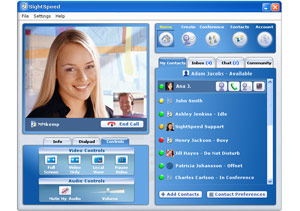 SightSpeed is a free video and voice call program that allows you to make free pc to pc voice and video calls over your broadband Internet connection. SightSpeed is a free video and voice call program that allows you to make free pc to pc voice and video calls over your broadband Internet connection.
It also allows you to make calls to regular landline phones and cell phones (similar to what you can already do in programs like Skype). Those calls do cost you money, but the costs are still lower than from a regular home phone. You can buy “phone out” credits quickly by credit card. These credits are prepaid, so you need to purchase them in advance if you plan to use SightSpeed to make calls to regular phones.
At this time you can only make video calls to other SightSpeed users, pc to pc (also supports Mac).
Its a useful tool for anyone who needs to videochat with colleagues or friends and the set up is easy, but they even have video tutorials in case you need them. Check it out at the website here, for the download and more details.
Posted in Developer, Internet, Mac Stuff, Main, Multimedia, Skype, Voice, Windows | 3 Comments »
Tuesday, February 27th, 2007
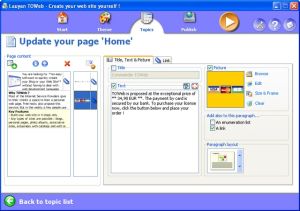 If you are seeking to create a blog or website without any web designing skill, I know something that will make it easy for you; TOWeb. If you are seeking to create a blog or website without any web designing skill, I know something that will make it easy for you; TOWeb.
TOWeb is a software that is very useful for people and organizations wishing to create a blog or a Web site without any Web designing skills. It’s really very useful to use; just enter your texts, add your pictures, and create your graphical theme using the random theme generator features.
Using TOWeb you can add any kind of Web page to your website; you can also enhance your pictures with frames and effects. What you will appreciate about this software is that it lets you protect any sensitive content with passwords, emails are automatically protected from spam, and click a single button to publish your Web site to your Web space using the provided list of hosts.
The latest version, TOWeb 1.71 has these changes:
- Bug fix : catalog item names were not displayed in the index pages when the item paragraphs are indented
- Improvement: the target of a link in a paragraph can now be specified. Default is the automatic mode but you may choose to open a link in the same web page or in a new web browser window
- Bug fix : the topic group presentation with just an image was also displaying the title and the “More…” link
- Bug fix : the option “Do not truncate texts and do not show the ‘More…’ links” located in the “Advanced topic settings” was not working for topic groups
- Correction : links to catalog item pages inside the shopping cart may have been pointing to wrong items especially on catalogs containing more than 10 items
Want to check it out! CLICK HERE! Or go to http://www.lauyan.com/en/tw-home/index.html
Posted in Business, Commercial, Developer, Internet, Main, Programming, Windows | 1 Comment »
|
|
|




