Archive for the 'Internet' Category
Tuesday, December 5th, 2006
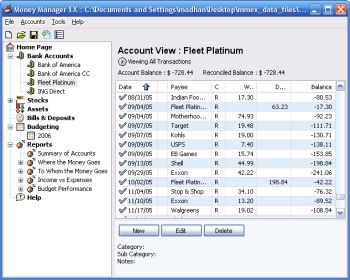 Money Manager Ex is a free open-source money managing and budgeting program. Money Manager Ex is a free open-source money managing and budgeting program.
Usually you gotta pay for decent personal finance software, so if you’re tryin’ to manage your money, you’ll appreciate that this ones free.
But how good is it? Pretty good! – You can manage multiple accounts and checking, savings, credit card, or loan accounts. You can even create your own categories and easily organise where your money goes into these. You can also track your bills and deposits and be reminded of upcoming bills and deposits so you won’t forget and lose track of them.You can import files from excel, microsoft money, and quicken, and also export to excel format. It also supports printing with inbuilt print preview.
Other useful features include viewing spending by category over a date range or by single category over time and viewing income versus expenses and how you’re doing on a budget.
Overall this is definitely worth checking out for anyone trying to budget and manage their finances better, its even free, which helps!
You can get more info and download it by clicking the homepage here.
Posted in Business, Commercial, Developer, Freeware, Internet, Main, Shareware, Social Software, Utilities, Windows | No Comments »
Tuesday, December 5th, 2006
 Can someone please explain to me why this Line Rider game is so addictive? I can’t figure it out, all you do it draw a line and let some little sled rider loose on the curves you draw. Can someone please explain to me why this Line Rider game is so addictive? I can’t figure it out, all you do it draw a line and let some little sled rider loose on the curves you draw.
At first you draw lines which are impossible for him to slide down without either wiping out, smashing himself or his sled, losing the sled altogether, or worse still just sliding to a stop somewhere and not falling anywhere. You become devious, a student of the correct way to draw the perfect slope, but almost always something comes along to scupper the little chap’s chances.
Great festive fun.
Posted in Freeware, Fun, Games, Internet, Main | No Comments »
Tuesday, December 5th, 2006
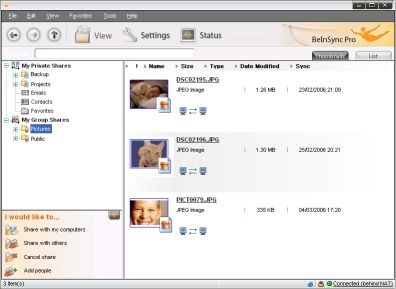 Checking my email on Yahoo! not too long ago I came across an advert of this wonderful software that helps you keep your files and emails in sync between your PCs. If you have multiple systems in different places like work, home and your laptop you will find this software useful. It’s called BeInSync and like the name suggests it helps you to always be in sync with all necessary info from anywhere. Checking my email on Yahoo! not too long ago I came across an advert of this wonderful software that helps you keep your files and emails in sync between your PCs. If you have multiple systems in different places like work, home and your laptop you will find this software useful. It’s called BeInSync and like the name suggests it helps you to always be in sync with all necessary info from anywhere.
BeInSync seamlessly and securely keeps your files and emails in sync between your PCs, making them available where and when you need them. It ‘s a great alternative to remote access products. Unlike GoToMyPC, you don’t have to long into that computer to send a file to yourself. BeInSync runs quietly in the background.
Beinsync makes it possible for you to
- Have your data in sync at home work and on the move
- Travel light and get to your data using remote Web Access
- Share any size files with colleagues, partners and friends.
Want to check it out? Click here!
Posted in Business, Developer, E-mail, Freeware, Internet, Main, Open Source, Shareware | No Comments »
Monday, December 4th, 2006
 If you are a musician, specially a keyboard player, there’s an emphasis these days on “the gear”; having the newest gear, what’s the new gear like, what does it give you? You would think from the way people talk in music technology magazines that the instruments play themselves. I think most people believe that. If you are a musician, specially a keyboard player, there’s an emphasis these days on “the gear”; having the newest gear, what’s the new gear like, what does it give you? You would think from the way people talk in music technology magazines that the instruments play themselves. I think most people believe that.
To get a real perspective you should visit this really wonderful web resource, a kind of electronic music wakeup call. 120 Years of Electronic Music covers the years 1870 to 1990 and shows you lush pictures and gives you a detailed history of every worthwhile cutting edge instrument made in the last 120 years. Makes you wonder why people don’t just play them rather than looking for new stuff all the time.
Well, okay maybe that’s too simple. Perhaps you should remind your muso friends that people who don’t know history are doomed to repeat it. If they don’t get that then maybe you should get smarter friends.
Posted in Developer, Fun, Internet, Main, Music | No Comments »
Monday, December 4th, 2006
 If you’ve had it with spam and you are looking for the final solution, you might want to check out Spam Blocker. If you’ve had it with spam and you are looking for the final solution, you might want to check out Spam Blocker.
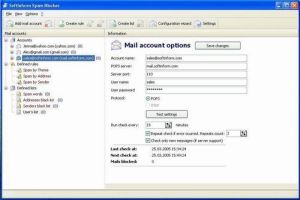
Spam Blocker is an application for filtering incoming correspondence. This is a very simple, convenient and fast protection tool for prior analysis, blocking and deleting incoming advertising letters (spam) immediately on mail servers.
What really makes this a cool tool is that it helps to get rid of annoying email advertising by analyzing correspondence before it is loaded from server. Spam Blocker checks all mail and receives the headings of all messages from the user’s mailbox (email addresses, addressee names, message subject, etc.) and analyzes the messages for spam content.
One other thing that I love about this tool is that you, the user, get to define the criteria it which it will sort your message, thus eliminating the risk of losing important mails that you are expecting.
Want to check it out? Click Here!
Posted in Business, Commercial, E-mail, Internet, Main, Shareware, Utilities | No Comments »
Sunday, December 3rd, 2006
Ever thought those ASCII artpictures from the Internet’s history were really cool? You know, those pictures that hackers typed painstakingly into computer terminals? Photocopy the picture onto graph paper, then type it it pixel by pixel, each letter or number given a different shade rating… tedious and long work, but the results were stunning. If you printed it out and stood back you could see the original picture rendered in TEXT! Amazing.
So amazing in fact that ASCII art is still alive and people still think it’s a pretty neat idea. Well it is. But TEXT-IMAGE.com have taken all the hard work out of it and made it fun. On this site you can make original ASCII art, really cool 21st Century HTML colour ASCII art, or ACSII art made with Matrix text. That’s not just cool that’s SUPER cool. And no tedious typing.
Posted in Developer, Freeware, Fun, Internet, Main | No Comments »
Sunday, December 3rd, 2006
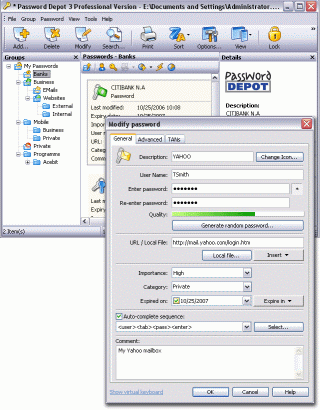 In one of my recent posts I told you about a software that can help you manage your passwords effectively, but in case you are not satisfied with that for any reason, you might consider checking this out! Password Depot. In one of my recent posts I told you about a software that can help you manage your passwords effectively, but in case you are not satisfied with that for any reason, you might consider checking this out! Password Depot.
Password Depot is a powerful and extremely user-friendly tool for the management of all your passwords. It offers rock-solid protection of your data due to double encryption with Rijndael 256. Your password list is protected twice: with the master password and with an internal key. Password Depot really stands out from the pack.
Some its great features include:
- User-friendly interface for convenient management of your passwords and access details: for the Internet, online banking (TANs), online shopping etc.
- Generate uncrackable passwords using the integrated Password Generator
- Maximum protection of your sensitive data thanks to the security algorithm Rijndael 256-Bit
- Protection from keyloggers and spyware: Password Depot protects your passwords even if your computer is infected with spyware and keyloggers
- Password Depot 3 runs on every Windows PC. Optionally, it also runs on USB flash drives
- Network compatible – allows shared use on a local network
- Store password lists on FTP servers for worldwide access to your data etc.
Though it’s not a freeware, you can try it out for free for 30 days.
CLICK HERE for more info and download!
Posted in Business, Commercial, Developer, Information Management, Internet, Main, Security, Shareware, Social Software, Utilities | No Comments »
Thursday, November 30th, 2006
Ze Frank is something of an Internet phenomenon. Not only is he a great video blogger, one of the best ever taking the thing to a place near art, he’s also on the quiet a bit of a fancy coder. He’s produced a number of cool art toys, and my very favourite one is The Scribbler.
You draw a really simple drawing, and with the tool available simple is sort of Etch-A-Sketch level, and then let The Scribbler scribble along and around the lines of your drawing. The results are almost always extraordinary.
Posted in Design, Freeware, Fun, Internet, Main | 1 Comment »
Thursday, November 30th, 2006
 Ever get the urge to go back in time, a simpler when everything, including interpersonal communication was more elegant, had a little more style? Why not? They haven’t stopped doing telegrams yet, but it’s only a matter of time. There’s something about a telegram, a certain old world class, which emails still can’t equal with all their sassy speed and efficiency. Ever get the urge to go back in time, a simpler when everything, including interpersonal communication was more elegant, had a little more style? Why not? They haven’t stopped doing telegrams yet, but it’s only a matter of time. There’s something about a telegram, a certain old world class, which emails still can’t equal with all their sassy speed and efficiency.
Retrograms aims to stop all that. Choose from a range of excellent retro looking telegrams and have them shipped to your friends either as e-cards over the Internet, or as real live telegrams delivered through the mail. Okay, so they don’t travel as fast as real telegrams but boy oh boy do they ever look the part.
For all the retro telegram sending fun you can handle, go to Retro Gram.
Posted in Commercial, E-mail, Freeware, Fun, Internet, Main | 1 Comment »
Thursday, November 30th, 2006
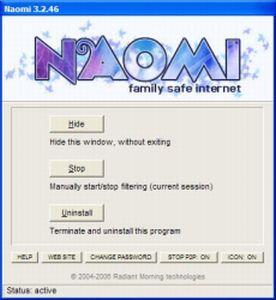
 Naomi is a free Internet parental control filter to help prevent your kids from viewing inappropriate material while online. Naomi is a free Internet parental control filter to help prevent your kids from viewing inappropriate material while online.
Naomi doesn’t rely on a simple list of banned sites like a lot of similiar programs do. Instead it examines in real time, all the data being transmitted and received through the Internet application, such as web browsers and chat programs. Monitoring is not limited to web sites, but covers the whole local Internet traffic. It also allows blocking of file-sharing applications and the whole thing can be password-protected. It’s also got some useful plug ins that may be of use, such as one to block Myspace access and one to hide the tray icon.
All in all its worth checking out if you’ve been looking for a free way of protecting your kids when they’re online! You can get more info and the free download from here.
Posted in Developer, Freeware, Internet, Main, Security, Utilities, Windows | 2 Comments »
|
|
|