Archive for the 'Main' Category
Sunday, December 3rd, 2006
 No longer is it just talk-talk-talk! The first phase of the release of Windows Vista and Microsoft Office 2007 has just been implemented. At an event held on Thursday, Microsoft’s Steve Balmer announced the business availability of Windows Vista, Microsoft 2007 and over 30 other applications that are targeted for the business world. No longer is it just talk-talk-talk! The first phase of the release of Windows Vista and Microsoft Office 2007 has just been implemented. At an event held on Thursday, Microsoft’s Steve Balmer announced the business availability of Windows Vista, Microsoft 2007 and over 30 other applications that are targeted for the business world.
The event was held at the NASDAQ Marketsite in New York City. 11 years ago Microsoft pulled this kind of double release stunt [Windows 95 and Office 95] and had a record breaking success. Will history repeat itself for Vista and Office 2007? Let’s wait and see.
Microsoft said it plans to spend “hundreds of millions” of dollars to market the Windows upgrade. The marketing budget will eclipse the $500 million Microsoft spent to market Windows XP, the predecessor to Windows Vista.
Now that Microsoft has stayed true to their promise of releasing the first version for businesses, we can rest assured that we all will be able to get the “everybody version” [consumer version] early next year as promised.
Click here for the full gist of the launch.
Click here for more info on Office 2007 and free test drive of Office 2007.
Posted in Business, Commercial, Information Management, Main, Multimedia, News, Office, OS Updates, Programming, Security, Shareware, Social Software, Windows | No Comments »
Sunday, December 3rd, 2006
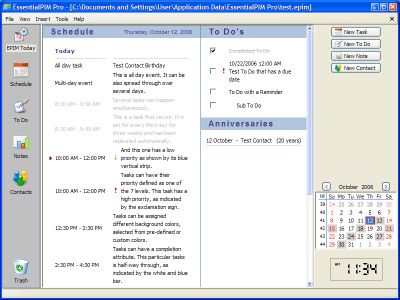 EssentialPIM is another PIM program (Personal Information Manager in case you were confused!) These things are very useful for not having to remember 100 different things such as birthdays, meetings, appointments, to-do lists etc. You can easily make a note of something you have to do in two months time that you might otherwise forget by then. It has color coded day, week, and month schedules. EssentialPIM is another PIM program (Personal Information Manager in case you were confused!) These things are very useful for not having to remember 100 different things such as birthdays, meetings, appointments, to-do lists etc. You can easily make a note of something you have to do in two months time that you might otherwise forget by then. It has color coded day, week, and month schedules.
You can import (and export) from a whole bunch of other software such as Outlook, Outlook Express, and Google Calendar. You can even sync it with Windows Mobile Pocket PC and Smartphone devices, if your lucky enough to have one of those!
It’s pretty detailed and feature packed with an easy to follow layout and some useful features such as to-do list, contacts manager etc. I’d recommend checking it out to anyone who wants to be more productive or simply has a bad memory!
There’s a free version and a paid version. What’s the difference? Click here to find out or go to the main homepage here for more info.
Posted in Browsers, Business, Information Management, Main, Shareware, Social Software | No Comments »
Sunday, December 3rd, 2006
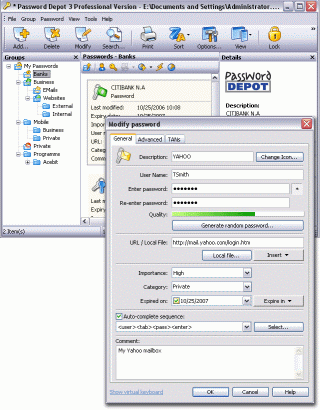 In one of my recent posts I told you about a software that can help you manage your passwords effectively, but in case you are not satisfied with that for any reason, you might consider checking this out! Password Depot. In one of my recent posts I told you about a software that can help you manage your passwords effectively, but in case you are not satisfied with that for any reason, you might consider checking this out! Password Depot.
Password Depot is a powerful and extremely user-friendly tool for the management of all your passwords. It offers rock-solid protection of your data due to double encryption with Rijndael 256. Your password list is protected twice: with the master password and with an internal key. Password Depot really stands out from the pack.
Some its great features include:
- User-friendly interface for convenient management of your passwords and access details: for the Internet, online banking (TANs), online shopping etc.
- Generate uncrackable passwords using the integrated Password Generator
- Maximum protection of your sensitive data thanks to the security algorithm Rijndael 256-Bit
- Protection from keyloggers and spyware: Password Depot protects your passwords even if your computer is infected with spyware and keyloggers
- Password Depot 3 runs on every Windows PC. Optionally, it also runs on USB flash drives
- Network compatible – allows shared use on a local network
- Store password lists on FTP servers for worldwide access to your data etc.
Though it’s not a freeware, you can try it out for free for 30 days.
CLICK HERE for more info and download!
Posted in Business, Commercial, Developer, Information Management, Internet, Main, Security, Shareware, Social Software, Utilities | No Comments »
Thursday, November 30th, 2006
Ze Frank is something of an Internet phenomenon. Not only is he a great video blogger, one of the best ever taking the thing to a place near art, he’s also on the quiet a bit of a fancy coder. He’s produced a number of cool art toys, and my very favourite one is The Scribbler.
You draw a really simple drawing, and with the tool available simple is sort of Etch-A-Sketch level, and then let The Scribbler scribble along and around the lines of your drawing. The results are almost always extraordinary.
Posted in Design, Freeware, Fun, Internet, Main | 1 Comment »
Thursday, November 30th, 2006
 AT&T have some really wonderful speech synthesis software, and in a feat of precedented generousness they are sharing it with you! Yes you,because if you go over to AT&T and type in a coherent phrase or even a disjointed string of garbage, the AT&T software speech robot will dutifully speak it. AT&T have some really wonderful speech synthesis software, and in a feat of precedented generousness they are sharing it with you! Yes you,because if you go over to AT&T and type in a coherent phrase or even a disjointed string of garbage, the AT&T software speech robot will dutifully speak it.
The really cool part is that unlike a lot of other online speech synths, you can speak your words in a variety of ethnicities. You have US and UK English, Spanish, French, Canadian French, German and Indian English. Wow. Makes you want to type all kinds of stuff just to hear them say it, doesn’t it? Yes it does. And you will, believe me.
Posted in Audio, Developer, Freeware, Fun, Main | 4 Comments »
Thursday, November 30th, 2006
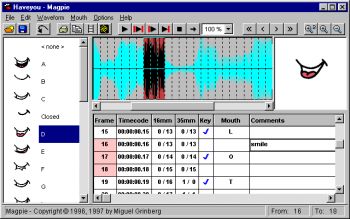 Magpie and Magpie Pro are very specialist software. What they do is allow animators to figure out what mouth shapes to animate when adding visuals to avoice. It’s called lip sync. Actors record voices, and animators hear those words and draw or fashion from clay,the expressions and mouth shapes of the characters. Sounds simple, but it’s really not. Magpie and Magpie Pro are very specialist software. What they do is allow animators to figure out what mouth shapes to animate when adding visuals to avoice. It’s called lip sync. Actors record voices, and animators hear those words and draw or fashion from clay,the expressions and mouth shapes of the characters. Sounds simple, but it’s really not.
Magpie and it’s big brother Magpie Pro make this easy by loading the sound file up and breaking it down into frame sized pieces. Then you can assign a mouth shape to the syllables you hear, frame by frame. Then you can play the sound and watch the mouth. If it matches and looks good, you’re done, if not it’s back to the old drawing board. Magpie makes it simple.
Find all the details and demo download at Third Wish Software.
Posted in Audio, Commercial, Design, Main, Multimedia, Shareware, Utilities, Video | 1 Comment »
Thursday, November 30th, 2006
 Ever get the urge to go back in time, a simpler when everything, including interpersonal communication was more elegant, had a little more style? Why not? They haven’t stopped doing telegrams yet, but it’s only a matter of time. There’s something about a telegram, a certain old world class, which emails still can’t equal with all their sassy speed and efficiency. Ever get the urge to go back in time, a simpler when everything, including interpersonal communication was more elegant, had a little more style? Why not? They haven’t stopped doing telegrams yet, but it’s only a matter of time. There’s something about a telegram, a certain old world class, which emails still can’t equal with all their sassy speed and efficiency.
Retrograms aims to stop all that. Choose from a range of excellent retro looking telegrams and have them shipped to your friends either as e-cards over the Internet, or as real live telegrams delivered through the mail. Okay, so they don’t travel as fast as real telegrams but boy oh boy do they ever look the part.
For all the retro telegram sending fun you can handle, go to Retro Gram.
Posted in Commercial, E-mail, Freeware, Fun, Internet, Main | 1 Comment »
Thursday, November 30th, 2006
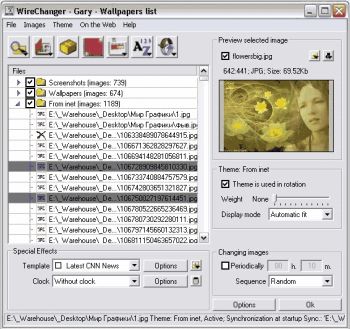
 Don’t you think it’s high time you changed the look on your desktop? If you do, you might want to use Wirechanger. Don’t you think it’s high time you changed the look on your desktop? If you do, you might want to use Wirechanger.
WireChanger is a Wallpaper manager that includes built-in utilities, templates, calendar and the option to add active clocks to your desktop. WireChanger offers you total and complete solution to manage your own desktop wallpapers, especially If you want to see something fresh every time you minimize your applications.
WireChanger will put customizable sticky notes on your desktop. To add a new note you just double-click your wallpaper in a free area and type the note’s text. I love the fact that your wallpaper can be colored and altered with special templates. Templates overlay your desktop background with useful information such as a calendar, the weather forecast, or famous quotations.
The calendar template transforms part or all of your background into a handy desktop calendar for two weeks or a current month with interactive day-by-day post-it notes. It can add an analog or digital desktop clock from the ColClocks collection to your wallpaper. You can also download a small utility called Desktop FlashGen to create an interactive desktop from your favorite flash file.
Want to check it out? Visit http://www.wiredplane.com/en/wirechanger/about.php
Posted in Design, Developer, Main, Shareware, Shell and Desktop, Themes, Utilities, Windows | 2 Comments »
Thursday, November 30th, 2006
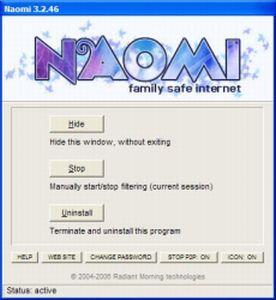
 Naomi is a free Internet parental control filter to help prevent your kids from viewing inappropriate material while online. Naomi is a free Internet parental control filter to help prevent your kids from viewing inappropriate material while online.
Naomi doesn’t rely on a simple list of banned sites like a lot of similiar programs do. Instead it examines in real time, all the data being transmitted and received through the Internet application, such as web browsers and chat programs. Monitoring is not limited to web sites, but covers the whole local Internet traffic. It also allows blocking of file-sharing applications and the whole thing can be password-protected. It’s also got some useful plug ins that may be of use, such as one to block Myspace access and one to hide the tray icon.
All in all its worth checking out if you’ve been looking for a free way of protecting your kids when they’re online! You can get more info and the free download from here.
Posted in Developer, Freeware, Internet, Main, Security, Utilities, Windows | 2 Comments »
Wednesday, November 29th, 2006
 This is a free open-source MSN Messenger clone called aMSN. If for any reason you want to use MSN messenger but without using the official MSN messenger client, then maybe its time to check this out. This is a free open-source MSN Messenger clone called aMSN. If for any reason you want to use MSN messenger but without using the official MSN messenger client, then maybe its time to check this out.
It does just about everything the official MSN messenger program does, plus some more, such as being able to sign into more than one account at a time. It supports display pictures, custom emoticons, file transfer, even webcam support.
When you read the list of features, you’ll see its virtually identical to the official client in every way, but one potentially useful thing is that you can download plug-ins from the site, as well as this, its also skinnable.
You can check out all the features in full and download it by going here.
Posted in Commercial, Developer, Internet, Main, Open Source, Shareware, Shell and Desktop, Social Software, Utilities, Windows | No Comments »
|
|
|