Archive for the 'Shareware' Category
Friday, August 24th, 2007
 The boom of the internet has been good in a lot of different ways, but it has also been bad in a lot of different ways. One of the most infamous aspects of the internet boom has been the development and subsequent dispersal of spyware, viruses and malware through internet channels and many people have had really bad things happen to their computers as a result of build-up of these specific types of programs. The boom of the internet has been good in a lot of different ways, but it has also been bad in a lot of different ways. One of the most infamous aspects of the internet boom has been the development and subsequent dispersal of spyware, viruses and malware through internet channels and many people have had really bad things happen to their computers as a result of build-up of these specific types of programs.
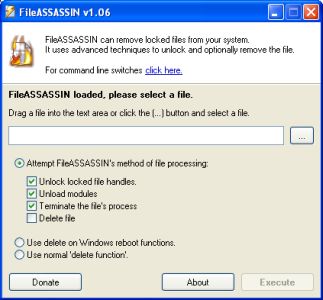
One of the worst types of programs is malware, simply because it is so difficult to remove. Well, the difficulty to remove malware files from your internet without expensive software to do so is now gone because of the introduction to the market of the FileASSASSIN software.
What FileASSASSIN does is it uses the most advanced techniques available to get deep down into the modules of the malware. It then goes ahead and closes any handles in the malware from a remote source as well as terminating processes that you as a user would not be able to terminate yourself. Without any remote handles or harmful processes, removing the malware becomes a piece of cake.
More information about FileASSASSIN 1.06 can be found directly at http://www.malwarebytes.org/fileassassin.php
Posted in Developer, Information Management, Internet, Main, Security, Shareware, Windows | No Comments »
Wednesday, August 22nd, 2007
There are a lot of ways to manipulate the information that passes on your computer screen and indeed one of the ways that information can be manipulated is through the use of hotkeys. People that love to use their keyboard know exactly what hotkeys are, but for people that don’t a hotkey is simply some combination of keys that you use in order to make a specific command happen.
For example, if you are typing in Microsoft Word and you want to save your file, you can use the hotkey combination of CTRL + S in order to activate the save command option.
One thing that a lot of people that use hotkeys don’t realize is that hotkeys for many programs can actually be configured. So, if you want to change the CTRL + S for some reason, you actually can. However, some types of hotkey combinations are absolutely not allowed by certain programs and if you tend to use a lot of hotkeys, this can sometimes become quite a drag.
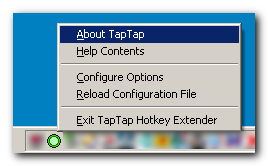
However, with the TapTap Hotkey Extender, you can circumvent the problem by using the program to simulate different hotkeys. In other words, you can use the forbidden hotkey combination by using this program to make the program think that it is a different combination. It’s like anonymous web surfing, but applied to the concept of hotkeys.
More information can be found at http://www.donationcoder.com/Software/Mouser/TapTap/
Posted in Browsers, Developer, Main, Shareware, Shell and Desktop, Utilities, Windows | No Comments »
Wednesday, August 22nd, 2007
 Chemistry is a very important part of the education of a number of students both at the high school and university levels in today’s world and of course the center of everything chemistry is the Periodic Table of the Elements. One of the biggest educational struggles in today’s world has been coming up with a Periodic Table study guide that is easy to use, yet comprehensive enough to contain all of the useful information that children are going to need to know in today’s world. Chemistry is a very important part of the education of a number of students both at the high school and university levels in today’s world and of course the center of everything chemistry is the Periodic Table of the Elements. One of the biggest educational struggles in today’s world has been coming up with a Periodic Table study guide that is easy to use, yet comprehensive enough to contain all of the useful information that children are going to need to know in today’s world.
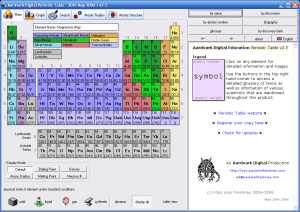
Well, the Periodic Table Standard 3.2 shows that when you decide to bring software into the mix, the sky is truly the limit! This is perhaps the most comprehensive study guide for the Periodic Table ever created, yet at the same time it is a study guide that is extremely easy to use. Clicking on any of the elements will bring up typical information about it like name, symbol, atomic number, atomic weight and all of those other frequently accessed characteristics. In addition to that, you will also get information on the history of the element, the production of it, where it occurs in nature as well as information on alternative names. To cap things off, beautiful real life pictures of each element are also available. It is truly the study aid to end all study aids because of how effective it is.
More information can be found at http://freshney.org/education/pt/
Posted in Design, Developer, Information Management, Main, Shareware, Shell and Desktop, Windows | No Comments »
Tuesday, August 14th, 2007
 Bad at spellings or just started learning a language and do not know the correct spellings? Do not fret! Text Predictive is a solution to all spelling-related problems. This program is not just similar to the T9 or dictionary function available for text messaging on most cell phones and the Autocomplete option provided in most software, but also a lot better. Bad at spellings or just started learning a language and do not know the correct spellings? Do not fret! Text Predictive is a solution to all spelling-related problems. This program is not just similar to the T9 or dictionary function available for text messaging on most cell phones and the Autocomplete option provided in most software, but also a lot better.
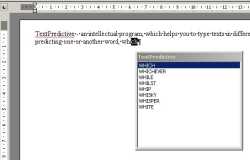
This intellectual program helps the user type text in different languages in an easier and time-saving way by providing options for completing the words as soon as the user types in the first few letters of the word. All one has to do is select the required word from the list in the Text Predictive box and press Enter or simply click on the word.
The main features of this software are its ability to predict words as one types and its ability to adapt to the user’s writing style. The user-style adaptation is done by storing away in its memory the words most frequently used by the user.
The Text Predictive software works almost like a plug-in and is compatible with many text editors and programs, including MS Word, ICQ and Internet Explorer. So, if spellings are a challenge, irrespective of the text editor you are using, say goodbye to all your spelling worries and let Text Predictive do its job. Hence, if you have an idea, typing it out cannot get any easier.
This software would be most useful for people who are prone to making a lot of typos while keying in text but hate to proofread and are lazy to run a spelling check; those for whom spellings have always been a handicap; and for the foreign learners of a language who are either not comfortable or not aware of the spelling variants of the language.
(More info and Download)
Posted in Business, Developer, Shareware, Shell and Desktop, Text | No Comments »
Tuesday, August 14th, 2007
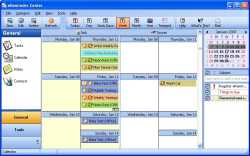 eReminder is an interactive full-featured multi-resource calendar application. At first glance, the software looks very colorful & attractive. The color combination used in this software is truly engaging indeed. This software allows the user to do all the tasks that are connected to a calendar in any way. The tasks include planning, managing & scheduling of important dates & times. It acts as a comprehensive solution to all the tasks that require the use of a calendar. The rich graphical content of the software might give an impression that it might be bulky but it turns out to be exceptionally fast & stable to use. The features are easy to use & navigate. The instructions are lucid & descriptive in nature & even a first time user doesn’t seem to face any problem navigating the menus to perform different tasks. eReminder is an interactive full-featured multi-resource calendar application. At first glance, the software looks very colorful & attractive. The color combination used in this software is truly engaging indeed. This software allows the user to do all the tasks that are connected to a calendar in any way. The tasks include planning, managing & scheduling of important dates & times. It acts as a comprehensive solution to all the tasks that require the use of a calendar. The rich graphical content of the software might give an impression that it might be bulky but it turns out to be exceptionally fast & stable to use. The features are easy to use & navigate. The instructions are lucid & descriptive in nature & even a first time user doesn’t seem to face any problem navigating the menus to perform different tasks.
eReminder also acts as a repository of important dates like birthdays, appointments, anniversaries, important meetings, holidays etc. The software user need not worry about missing any important date since eReminder keeps track of all the important dates while running in the background all the time. This frees up the user from the task of remembering too many birthdays & anniversaries. This software can also be programmed to use a predefined way of reminding the user: it can play music, launch applications, send mails & do a lot of other operations as per the user specifications. eReminder can also keep track of recurring events such as payment of bills or loan installments on time. This way, eReminder takes up a lot of worries from the user & acts as an ultimate reminder tool to keep track of all the important things in life. It also supports multiple views & helps the user to concentrate on the immediate task at hand & leave all the reminders to eReminder.
(More info and Download)
Posted in Business, Commercial, Design, Information Management, Internet, Shareware, Windows | 1 Comment »
Friday, August 10th, 2007
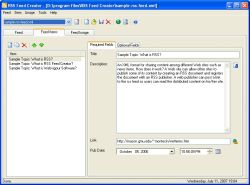 If you wanted the means of creating your own RSS feeds from the convenience of your desktop, then this software may just do the trick for you. For the uninitiated RSS stands in common IT parlance refers really simple syndication; a means for publishing frequently published material. So in case you have a website and wish to update your some section quite frequently; RSS feeds are what you should be looking at. To make things life easier for you this elegant piece of software does most of the hard work for you. Best part is that it is an WYSIWYG tool and even if you do not know the basics of XML, you can still have your RSS feeds up and running on a regular basis. If you wanted the means of creating your own RSS feeds from the convenience of your desktop, then this software may just do the trick for you. For the uninitiated RSS stands in common IT parlance refers really simple syndication; a means for publishing frequently published material. So in case you have a website and wish to update your some section quite frequently; RSS feeds are what you should be looking at. To make things life easier for you this elegant piece of software does most of the hard work for you. Best part is that it is an WYSIWYG tool and even if you do not know the basics of XML, you can still have your RSS feeds up and running on a regular basis.
The software installs itself like breeze and has a neat interface which has a default off light brown background. So what all you need to place to get your RSS feeds out. Not much; just place the title and link info and start typing in the workspace. The tools also allows for insertion of images in your feeds. Once you have created the RSS feed you can actually see a preview how the feed would appear with the help of the preview option. So in case you need make any changes, you need go back and make the necessary editions. Among other functionalities features like upload support via the means of a FTP transfer and seamless conversion of HTML in to RSS feeds add to its reputation.
RSS fee creator 2.4 manages to live up to expectation by allowing seamless RSS feeds to be generated from your desktop with effortless ease. It a tool many webmasters would love using quite often. Even those are running their personal blog or family sites will find great value in this product.
(More info and Download)
Posted in Business, Developer, Information Management, Internet, News, RSS, Shareware, Windows | No Comments »
Friday, August 10th, 2007
 Restorator is an innovative tool from Bome software that essentially allows you to add, modify, and delete resources of all Windows applications. These resources might be text, images, videos, menus, dialogs, icons, or sounds. Restorator is an innovative tool from Bome software that essentially allows you to add, modify, and delete resources of all Windows applications. These resources might be text, images, videos, menus, dialogs, icons, or sounds.
Restorator has a very handy graphical interface. The menu and the toolbar containing commonly used icons is right at the top. The different menus in Restorator are: File, Resources, Viewer, Edit, Tools, and Help. Below the toolbar, you can view all the resources on the left and the resource information and the associated files list on the right. If you want to find an already existing resource on your system, you can click the find icon on the toolbar. When you click a particular resource, for example, a dialog, its preview appears on the right. You can edit its look and feel by clicking the ab icon on the toolbar. You can change each and every field of the dialog box. You can specify different heights and widths, different alignment options, different texts, different styles, and different colors. If you desire, you can also add or remove fields from the dialog. Click the H icon on the toolbar to view the hexadecimal coding of the resource. If you want to perform advanced tasks, you need to use wizards. You can view and edit an icon by clicking the Res icon. You can also edit the icon in other installed image editing applications. Right-clicking any resource opens up a pop-up menu from which you can choose different options to manage resources.
For adding a resource, select the type of resource, provide a resource name, and then select its language. Restorator gives you the facility to create resources in different languages. Whenever you feel lost, you can click the Help menu for an exact solution. Resorator provides you complete flexibility for designing and customizing resources. It is ideal for both novice and expert users.
(More info and Download)
Posted in Developer, Information Management, Programming, Security, Shareware, Windows | No Comments »
Wednesday, August 8th, 2007
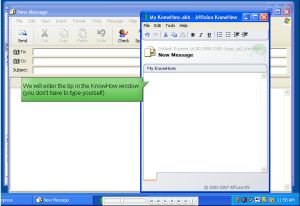 There are many instances when a person forgets something he actually knew about. With the vast complexities of the machine named computer, this problem becomes all the more evident. It may happen many times that you tell to yourself “I just knew exactly how to do stuff on my computer, but have no clue to recall it now.” It becomes very frustrating. You have to start searching again for the little piece of information from the scratch. No one can actually do anything to avoid this; it is bound to happen because there only so much the human mind can remember. No one can remember anything and everything about all the software that we work with these days. It causes loss of precious time and makes the person to frustrate. There are many instances when a person forgets something he actually knew about. With the vast complexities of the machine named computer, this problem becomes all the more evident. It may happen many times that you tell to yourself “I just knew exactly how to do stuff on my computer, but have no clue to recall it now.” It becomes very frustrating. You have to start searching again for the little piece of information from the scratch. No one can actually do anything to avoid this; it is bound to happen because there only so much the human mind can remember. No one can remember anything and everything about all the software that we work with these days. It causes loss of precious time and makes the person to frustrate.
Know how is revolutionary software that helps people manage their information base. Know how enables a person to accumulate every information he needs to know about his computer and the software he uses on it in a way, so that he has to never look for it again. So how actually does it do so? Know how stores information about exactly which applications the user is using and which window he was working on. All this stored information makes sure that you need not look for any other information in case you forget anything. In addition to that it makes your life more organized; it also helps you share information about the applications you use with your friends. No more mistakes and thus no frustration. Everything is there on the memory of your friend, know how. Just clicking on the icons of the software retrieves all the information in the way it ought to be. The software is very useful, yet very easy to download and install. It can be used by anyone and everyone. So no more headaches now, thank to Knowhow.
(More info and Download)
Posted in Business, Developer, Information Management, Internet, Shareware, Utilities, Windows | No Comments »
Wednesday, August 8th, 2007
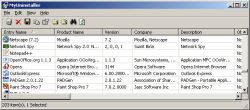 Here is something you will definitely find very useful. MyUninstaller is a good alternative to the standard Add/Remove applet of Windows operating system. It displays the list of all installed application, and allows you to uninstall an application, delete an uninstall entry, and save the list of all installed applications into a text file or HTML file. What makes it different from the standard Add/Remove applet? Here is something you will definitely find very useful. MyUninstaller is a good alternative to the standard Add/Remove applet of Windows operating system. It displays the list of all installed application, and allows you to uninstall an application, delete an uninstall entry, and save the list of all installed applications into a text file or HTML file. What makes it different from the standard Add/Remove applet?
It provides additional information for most installed applications that the standard Add/Remove applet doesn’t display: product name, company, version, uninstall string, installation folder and more.
A new updated version was just recently released, MyUninstaller 1.36 and the major change in this version is that a new feature has been added. Added “Change Software Installation” option, for programs that support installation change
Want to check it out? It’s free, go to http://www.nirsoft.net/utils/myuninst.html
Posted in Developer, Information Management, Main, Programming, Security, Shareware, Utilities, Windows | No Comments »
Tuesday, August 7th, 2007
 Most content and Elearning publishers are frequented with constraints of designing elegant startup screens, launch windows, autorun menus etc for their instructional material. With Visual ELearning Design Studio these issues are seamlessly resolved and a great visual interface can be designed Most content and Elearning publishers are frequented with constraints of designing elegant startup screens, launch windows, autorun menus etc for their instructional material. With Visual ELearning Design Studio these issues are seamlessly resolved and a great visual interface can be designed
The software allows us easily design highly professional Front End screens for instructional content. The software gets installs without much fuss and presents before us a neat appearance. You can choose the components you want to create from the options given in the software. So you have various options from creating Text Labels, 3D labels to video options. Even hotspot areas can be created which can then linked to specific action events. Next you also have multiple options for inserting action properties like what even you would want to occur if some clicks a button. Special multimedia effects can also be easily be inserted. To help you achieve these tasks the software comes with an action wizard that guides with most common tasks that you will normally like to achieve. Just choose option from the extensive drop down list and action property will come into place. It gives intelligent options like having an activation key which becomes a critical function if you are really looking to commercialize your offerings in the public. The software allows you save the interfaces under project names. It also effortlessly creates autoruns and installation procedures if you so desire.
Overall the software does a great deal more that what normally appears on first look. With a little guidance from the help files one can learn all the intricacies of the software and design some of the most practical ends for Elearning solutions. Its a software that is surely going warm the hearts of content providers and make rapid strides in popularity in coming days.
(More info and Download)
Posted in Design, Developer, Information Management, Internet, Programming, Shareware, Windows | 1 Comment »
|
|
|




