Archive for the 'Social Software' Category
Thursday, December 14th, 2006
 We are all interested in getting the best out of our PC. That’s why we try different software to help improve the performance of our system. And that’s why I think you need to give this product a try. We are all interested in getting the best out of our PC. That’s why we try different software to help improve the performance of our system. And that’s why I think you need to give this product a try.
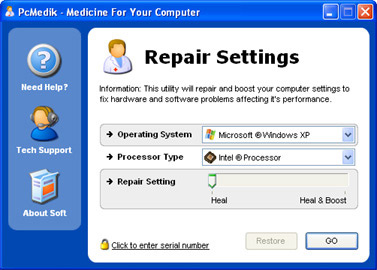
PCMedik enhances PC performance, increasing overall speed and squeezing out every last bit of performance your computer is capable of. But that’s not all it also locates and repairs problems with software and hardware incompatibilities which lead to computer performance issues.
PCMedik’s cool features include:
- Makes direct changes to system registry and system files to enhance memory, screen drawing, animations, refresh rates, CPU threading speeds and security
- Automatically adjusts settings and changes made based on computer specifications, complete fault tolerance system implemented
- Easy and intuitive user interface which performs all setting changes immediately
etc.
If your system is far from fulfilling it’s potential then you need to try it out!
CLICK HERE TO TRY IT!
Posted in Business, Commercial, Developer, Main, Programming, Security, Social Software, Utilities, Windows | No Comments »
Thursday, December 14th, 2006
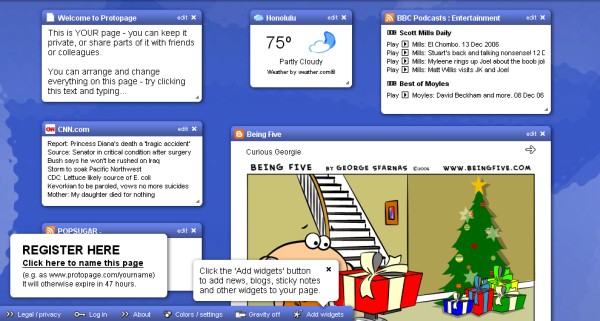
Protopage is just one of the online applications developed using Ajax.
Ajax and Web 2.0 are the new buzz words in the Internet world these days.
Ajax, shorthand for Asynchronous JavaScript and XML, is a web development technique for creating interactive web applications… This is meant to increase the webpages interactivity, speed, and usability. There are some really practical projects going on using Ajax techniques to create online applications and this is just one.
What that translates to, is the existance of more and more web-based interactive tools, some of which are reviewed in this blog.But back to what protopage is all about. It allows you to create your own custom dynamic webpage full of fresh content, your own pictures, notes, links, RSS newsfeeds, etc. All of which can be moved around on the page and resized as you see fit. It’s fun and extremely easy. What makes it even better is that you can access this page (pages actually) from any computer and everything is exactly how you left it. You can even create public pages with stuff you want other’s to see while protecting pages that you don’t want people to see.
It’s very time saving to have all your bookmarks, newsfeeds,weather, notes, widgets etc easily available on one highly customizable and easy to use page or pages. That’s one of the best things i like about it when compared to other similar services, you never run out of space because you can use more than one page.
You can check it out here to get your own free page!
Posted in Design, Freeware, Fun, Internet, Main, Open Source, Social Software, Web services | No Comments »
Wednesday, December 13th, 2006
 Okay this is a Mac only program, but it’s really good so I have to bring it to your attention. If I had to describe it it would be that it’s a sort of offline blogging program. It sorts entries into “journals” and “entries” where a journal is like a book and and entry is like a chapter. The entries are date stamped automatically, but you can also add your own titles. Okay this is a Mac only program, but it’s really good so I have to bring it to your attention. If I had to describe it it would be that it’s a sort of offline blogging program. It sorts entries into “journals” and “entries” where a journal is like a book and and entry is like a chapter. The entries are date stamped automatically, but you can also add your own titles.
There is a certain amount of integration with the main blogging sites and weblications, but as yet I still have problems integrating it with Blogger and our blogs here… that being said, it’s just a configuration nightmare. And I’m keen to solve those problems because this is such smooth and usable software. I use it for writing a lot of the time because it has this really great full screen mode where you can just have words on the screen, like an old fashioned typewriter. Very useful for concentrating on the words and not getting distracted with other things on your desktop. (more…)
Posted in Freeware, Information Management, Internet, Mac Stuff, Main, Open Source, Social Software | No Comments »
Wednesday, December 13th, 2006
  Miranda Instant Messenger is a multi-protocal Instant messenger for Windows. A lot of people like to use one program for all their instant messaging needs rather than have each different one running at once. Miranda Instant Messenger is a multi-protocal Instant messenger for Windows. A lot of people like to use one program for all their instant messaging needs rather than have each different one running at once.
It supports ICQ, AIM, MSN, YAHOO, IRC (Internet Relay Chat), Jabber, Gaddu-Gaddu, Netsend, Tlen, and more. (Whatever those last ones are, yeah i dunno either). The difference with Miranda is that it’s very customizable indeed. You can change almost everything about it. There’s lots of skins available and also you can change the sounds, background images, icons, emoticons, skins, themes, and splash screens. So for anyone who likes to customize, they’re gonna have fun with this.
There’s also a plentiful supply of plug-ins available. It’s smaller and faster than similiar software such as trillian. It’s also open-source, in other words, free and always being developed!
So if all this sounds good to you, you can check out more info from the homepage right here!
Posted in Business, Developer, Freeware, Internet, Main, Open Source, Social Software, Windows | No Comments »
Monday, December 11th, 2006
 Nowadays many people work on the go, logging into different computers at different times, such as the office computer and your PC at home, or cyber cafes. It’s not always easy to use someone else’s computer. For instance, if they’re logged on then you’ll need to use their browser and you’ll leave a browsing trail, personal information and you never know what they have installed on their machine. One way to get around this is to use online services such as webmail, that can be checked from anywhere. Nowadays many people work on the go, logging into different computers at different times, such as the office computer and your PC at home, or cyber cafes. It’s not always easy to use someone else’s computer. For instance, if they’re logged on then you’ll need to use their browser and you’ll leave a browsing trail, personal information and you never know what they have installed on their machine. One way to get around this is to use online services such as webmail, that can be checked from anywhere.
Another way is by using a USB drive, which nowadays are very affordable and have come down in price and up in storage size. Many of the ones available today allow you to carry one or two gigabytes worth of data around with you on your key chain for immediate access from any computer you plug it into!
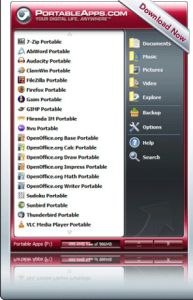
Portable Apps Suite is a selection of useful programs that can be run directly from your USB drive. It includes a browser (Firefox portable), graphics editing (GIMP portable),email (Thunderbird portable), media player (VLC portable) Instant messaging (Gaim portable and Miranda portable) office suite (OpenOffice.org portable) and much more!
They’re all included with an integrated menu,all preconfigured to work ‘out of the box’. You simply need to drag and drop the suite on to your USB device/key and you’re ready to go!
As it uses all open-source software, it’s completely free to download from here. A worthwhile addition to any USB memory owner who works on-the-go!
Posted in Developer, Freeware, Main, Multimedia, Shell and Desktop, Social Software, Utilities | No Comments »
Monday, December 11th, 2006
 Google Pack is a suite of software, some original software and some bundled third party software, all of it designed to enhance your productivity. Google Desktop is billed as a desktop companion, but basically what it is a search facility for all your “stuff”, emails, files on your computer, your web history etc. Oh and by far the best gadget, if you’ll pardon the pun, you also get the facility to add Google Gadgets to customize your desktop and the Google Sidebar. Gadgets are a bit like Widgets on the Mac, and are little programs which do one job that are easy to access from the desktop. Google Pack is a suite of software, some original software and some bundled third party software, all of it designed to enhance your productivity. Google Desktop is billed as a desktop companion, but basically what it is a search facility for all your “stuff”, emails, files on your computer, your web history etc. Oh and by far the best gadget, if you’ll pardon the pun, you also get the facility to add Google Gadgets to customize your desktop and the Google Sidebar. Gadgets are a bit like Widgets on the Mac, and are little programs which do one job that are easy to access from the desktop.
Also as part of the package you get Picasa, Google’s Photo organiser and editor, Google Toolbar for Internet Explorer (for those of us who don’t have Firefox), plus you get the Google pack photo screensaver. For your fix of Google Gadgets, go here for all the details.
Posted in Business, Commercial, Design, Developer, Freeware, Information Management, Internet, Main, Multimedia, Shareware, Social Software, Utilities, Web services | No Comments »
Monday, December 11th, 2006
 HotRecorder for VoIP is a way to record your Skype or other internet phone conversations. This simple program installs easily and works with almost any VOIP or Voice Over IP software on the PC. You can use it with Skype (of course) even the new 3.0 Beta, also Google Talk, AIM, Net2Phone, Yahoo! Messenger, FireFly and many others. Best thing to do is try the download and see if it works before you buy it to run it with some other software. HotRecorder for VoIP is a way to record your Skype or other internet phone conversations. This simple program installs easily and works with almost any VOIP or Voice Over IP software on the PC. You can use it with Skype (of course) even the new 3.0 Beta, also Google Talk, AIM, Net2Phone, Yahoo! Messenger, FireFly and many others. Best thing to do is try the download and see if it works before you buy it to run it with some other software.
The demo version allows 2 minutes of recording, and saves audio in the ELP format which isn’t readable by anything else. If you pay the fee the included Audio Converter Tool converts the ELP format into MP3, WAV or OGG files for storage or editing.
Other extras include what they call Emotisounds, a way to to add humorous sounds to your online conversations. Listen I make enough humorous sounds when I’m on Skype as it is. For more info and a download go to the HotRecorder web site.
Posted in Business, Commercial, Developer, Internet, Main, Programming, Shareware, Social Software, Utilities, Voice, Web services | No Comments »
Sunday, December 10th, 2006
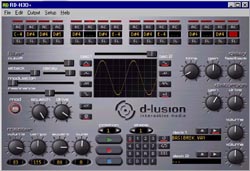 Back in the mists of time when most worthwhile music software was mostly shareware or freeware because nobody could afford the thousands of pounds for the high end stuff, packages like Rubberduck reigned supreme. Back in the mists of time when most worthwhile music software was mostly shareware or freeware because nobody could afford the thousands of pounds for the high end stuff, packages like Rubberduck reigned supreme.
The ultimate bass synthesiser, Rubberduck had a sequencer based loosely on an ancient but still well thought of Roland product called the TB303. This was a great parping old bass synthesiser and was instrumental, if you’ll forgive the expression, in creating a lot of hit beats in the 80s and 90s.
Time passes and these things sound a little bit retro. But still the TB303 manages to fetch high prices on eBay and elswhere. You can’t get them just anywhere, so being able to download Rubberduck for free has got to be a better bet. It still has a lot to recommend it, and even in spite of its age I’d say it’s an essential tool in any computer musician’s arsenal. Get all the rubber you can handle at the new d-Lusion web site.
Posted in Audio, Commercial, Developer, Main, Shareware, Social Software, Utilities, Voice | No Comments »
Sunday, December 10th, 2006
 Mozy is an online remote backup service that gives you up to 2 GB online storage space to store your backups. This is very useful in case something happens that makes your beloved computer die for a while. There’s nothing worse than that happening and losing irreplaceable data such as photos you’ve taken,emails, or your work, or just data that takes a long time to replace such as your mp3 collection or games you have to start all over again, etc. Mozy is an online remote backup service that gives you up to 2 GB online storage space to store your backups. This is very useful in case something happens that makes your beloved computer die for a while. There’s nothing worse than that happening and losing irreplaceable data such as photos you’ve taken,emails, or your work, or just data that takes a long time to replace such as your mp3 collection or games you have to start all over again, etc.
You simply create a user account and then download the small setup program, which should take less than 30 seconds, then you’re good to go! Then you just select the filetypes you want Mozy to take care of, you can also choose whatever directories you want backed up.
You get a full 2 GB for free but you can upgrade to more by paying or through the referal program. It supports block level differential backup so that it only backs up new data.Its fully encrypted so its gonna be safe, it has 128 bit ssl encryption during transfer of data and 448 bit encryption during storage! You can even schedule backups to make things even easier!
That’s all pretty impressive to me anyway for a free service. Like the sound of it too? Go check it out here!
I think you’d be hard pressed to find a better online backup service for free, but if you do, tell me about it : )
Posted in Business, Commercial, Developer, Freeware, Information Management, Internet, Main, Open Source, Social Software, Utilities, Web services | 2 Comments »
Saturday, December 9th, 2006
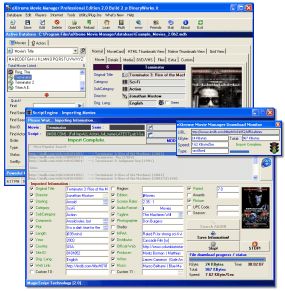 Movie buffs, you are going to love this! eXtreme Movie Manager is a great software to manage your movie collection. The facts that it lets you catalog any video formats such as DivX, XviD, DVD, VHS, SVHS, VCD, DVD-R, or LaserDisc with detailed information makes it a must have for all movie buffs. Movie buffs, you are going to love this! eXtreme Movie Manager is a great software to manage your movie collection. The facts that it lets you catalog any video formats such as DivX, XviD, DVD, VHS, SVHS, VCD, DVD-R, or LaserDisc with detailed information makes it a must have for all movie buffs.
And it is not just a movie/video collection manager, it’s also a movie and actor database and a cover manager. Arguably one of the most advanced Movies/Actors collection manager around. It can catalog movies stored in your Hard Disk and removable devices in seconds with all information about codecs, resolutions etc. automatically. And what I really love about it is that, with the exclusive “MagicScript” Technology, it allows you to retrieve movie information from all online movie databases.
The latest version just released of Dec 7 2006, eXtreme Movie Manager 5.6.2.0 has great changes that makes this software really cool. Here are some of the changes
- Now you can export also TV Shows
- Changed the Startup procedure
- Extended the Cover Manager also to TVShow, Episodes and Actors
- Now you can paste cover from clipboard also in cover manager
- Extended the Feature Field in Edit Window
- The Cover Manager now remember the position and size
- Changed some language definitions
- Added alt-e keystroke to open edit window
- Updated MagicScript Programmer’s guide with Block’s List
etc.
The only downside to this software is the User Interface, it could take a while for you to get the hang of it but once you do, you are going to love it, THAT’S A PROMISE! Try it!
CLICK HERE TO VIEW ALL CHANGES AND GET A TRIAL DOWNLOAD
Posted in Developer, Fun, Information Management, Internet, Main, Movies, Multimedia, Shareware, Social Software, Utilities | No Comments »
|
|
|