Archive for the 'Social Software' Category
Friday, March 16th, 2007
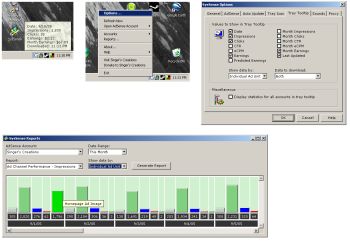 If you are one of those making money off Google’s Adsense program then this software will definitely be useful for you. It’s called SysSense. If you are one of those making money off Google’s Adsense program then this software will definitely be useful for you. It’s called SysSense.
What does it do?
SysSense is your personal desktop Google AdSense monitor. It gives you easy access as it keeps your current Google AdSense information in the Windows system tray.
What do you do?
Simply mouse over the system tray icon to view all of your current Google AdSense data. Easily log into your Google AdSense account from the SysSense system tray icon menu.
The latest Change in the latest version, SysSense 1.3.1 which was released just recently is this:
- FIXED: Made the necessary changes to fix a bug that was introduced by Google’s latest Adsense data changes
Want to check it out? CLICK HERE! (Did I fail to mention that it’s free? Sorry, IT’S FREEEEEE!!!!)
1107525983-1.gif
Visit http://www.singerscreations.com/AboutSysSense.asp for more info and download.
Posted in Business, Commercial, Developer, Freeware, Information Management, Main, Open Source, Social Software, Utilities, Web services | 1 Comment »
Thursday, March 1st, 2007
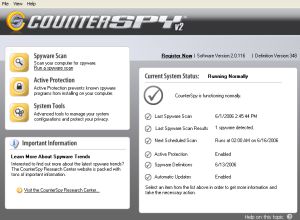 If you’ve been looking for a total solution to your spyware, adware, keyloggers, trojans etc problem, this software should so the trick. It’s called CounterSpy. If you’ve been looking for a total solution to your spyware, adware, keyloggers, trojans etc problem, this software should so the trick. It’s called CounterSpy.
Get rid of any software that might be tracking and reporting your private information to a third party with CounterSpy. Though it’s a shareware, unlike others in it’s category with a free trial of CounterSpy you can scan and remove spyware, adware, keyloggers, trojans and other malware.
What are the things you stand to gain with this software?
- Heavy-duty antispyware protection treads lightly on system resources
- Hybrid design combines antimalware technology with our award-winning spyware detection and removal
- Kernel-level Active Protection™ defends 24-7
- Deep-rooted malware is exterminated at boot time, before Windows loads
- Incremental definition updates greatly reduce update downloading time
- Vista compatible: Integrates seamlessly with theVista Windows Security Center
Want to check it out? CLICK HERE
Posted in Business, Developer, Internet, Main, Security, Shareware, Social Software, Utilities, Windows | No Comments »
Tuesday, February 27th, 2007
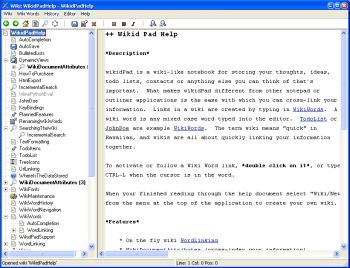 Are you familiar with that popular site, Wikipedia? Well if you are, how about having your own personal wikipedia. That’s what wikidPad aims to do for you. To help structure personal knowledge like Wikipedia helps structure global knowledge. Are you familiar with that popular site, Wikipedia? Well if you are, how about having your own personal wikipedia. That’s what wikidPad aims to do for you. To help structure personal knowledge like Wikipedia helps structure global knowledge.
WikidPad is a wiki-like notebook for storing your thoughts, ideas, to do lists, contacts, or anything else you can think of to write down. The reason why this tool is different from other notepad applications is the ease with which you can cross-link your information.
Yeah it’s so easy to cross link information. Links in a wiki are created by typing in what is called WikiWords. And what is a WikiWord? Any case word (also called CamelCase) typed into the editor e.g. TodoList.
It is worthy of note that wikidPad is not a wikipedia thing; the term wiki means “quick” in Hawaiian. Since wiki means quick, you can rest assured that you are going to enjoy quickly linking your information together.
The latest version, WikidPad 1.9 Beta 2 has these changes:
- Better support for creating new tabs
- Several bug fixes
Want to check it out? CLICK HERE!
Posted in Developer, Information Management, Internet, Main, Shareware, Social Software, Windows | 2 Comments »
Tuesday, February 20th, 2007
 Microsoft released it’s new Virtual PC 2007 to everybody… and it’s totally FREE! Microsoft released it’s new Virtual PC 2007 to everybody… and it’s totally FREE!
This program allows users to run multiple operating systems at once from a single computer. You also can easily switch back and forth between operating systems with just one mouse click.
It supports the following operating systems on the host machine: Windows Server 2003, Windows Vista Business, Windows Vista Enterprise, Windows Vista Ultimate, Windows XP Professional, Windows XP Professional x64, Windows XP Tablet PC Edition. And on the guest machine you can run Windows 98 Second Edition, Windows 2000 Professional, Windows XP Home/Professional/Tablet PC Edition, Windows Vista Enterprise/Business/Ultimate, OS/2 Warp Version 4 Fix Pack 15, OS/2 Warp Convenience Pack 1, OS/2 Warp Convenience Pack 2 and unofficial support for MS DOS 6.22, Windows 95, Windows 98, Windows ME and Windows NT 4.0 Workstation also included.
New features included with the latest release of Microsoft Virtual PC include:
- 64-bit host operating systems
- Hardware-assisted virtualization
- Network-based installation of a guest operating system
- Running virtual machines on multiple monitors
Microsoft Virtual PC 2007 is available as a free download in both 32-bit and 64-bit versions. You can find out more and get your free download right here. (more…)
Posted in Business, Developer, Freeware, Microsoft, Programming, Security, Shell and Desktop, Social Software, Windows | No Comments »
Monday, February 19th, 2007
 Here is a cool software to improve and generally add fun to your chatting experience. It’s called CamTrack. Here is a cool software to improve and generally add fun to your chatting experience. It’s called CamTrack.
CamTrack is a unique webcam software. What’s unique about it? It enhances the way people video chat. With CamTrack you can amuse your friends with funny animations and webcam emoticon; keep your face centered automatically with automatic Face Tracking; use text overlays by writing directly on the webcam video; improve the quality of your webcam picture with noise reduction or share pictures with your friends through your webcam.
It’s really a cool way to video chat. It’s a shareware, go check out the trial version first and see if it’s worth it, I’m guessing you will really love this cool and fun software.
CLICK HERE for more info and trial download.
Or
Visit http://www.digitalpeers.com/
Posted in Chat, Developer, Internet, Main, Shareware, Social Software, Video, Windows | 1 Comment »
Friday, February 16th, 2007
 I don’t know if you tried Google Notebook yet, but it’s REALLY cool. It’s like an online word processor, actually I take that back… it’s more like an online OUTLINE processor. That is to say it allows for a series of notes, which can expand and contract and can be ordered, so you can write first and set the running order of the notes later. I don’t know if you tried Google Notebook yet, but it’s REALLY cool. It’s like an online word processor, actually I take that back… it’s more like an online OUTLINE processor. That is to say it allows for a series of notes, which can expand and contract and can be ordered, so you can write first and set the running order of the notes later.
This makes it very easy to organise ideas and assemble them into a coherent whole. If you are writing documentation, essays, or ebooks, outline processors are the thing you would use to get your ideas started. And being online of course means you can continue working anywhere where there is a web browser and a keyboard.
Go to Google Notebook and try it out. It’s FREE!
Posted in Developer, Freeware, Google, Information Management, Internet, Main, Social Software, Text, Windows | 1 Comment »
Thursday, February 15th, 2007
 Mediamax is another online storage service. But this one is free, yes i know some of them offer a free limited service. But this one offers 25 GB of space for free! Pretty impressive indeed! Some of the features are batch uploading, batch downloading, backup, and file synchronization. Mediamax is another online storage service. But this one is free, yes i know some of them offer a free limited service. But this one offers 25 GB of space for free! Pretty impressive indeed! Some of the features are batch uploading, batch downloading, backup, and file synchronization.
They do also offer a paid service, but you can sign up totally free ( no credit card required or anything) to the free service for your 25GB of space.
Now for the catch! The free space has one catch and that’s that you can only download or share 1GB per month and it has a filesize limit of 25 MB. Still not bad at all, depending on your needs and considering its free. If you want more you’ll have to get your wallet out.
Check it out at the website here.
Posted in Information Management, Internet, Main, Social Software, Web services | No Comments »
Wednesday, February 14th, 2007
 ACDSee has long been known as a very good photo viewing, managing, organizing and enhancing program. This latest version, ACDSee 9, is no exception. ACDSee has long been known as a very good photo viewing, managing, organizing and enhancing program. This latest version, ACDSee 9, is no exception.
New features in this edition include a Shadow/Highlight tool which provides very easy and instant photo correction for poorly exposed photos (photos that are too dark or too bright), without affecting areas of the image that don’t require adjustments, One-click red-eye reduction, private folders, “Auto Categories” to automatically organise your photos when getting them from your camera or storage device, this automatically puts your photos into convenient categories based on EXIF camera information, IPTC data, ACD database information, and file properties. Using that info it becomes easier to search for photos later on, all without having to rename or sort a single photo on your own. Plus some more features were added, mainly to make things categorized easier and easy to find by category and date.
Of course it still includes many other features such as full-screen quick viewing tools, time-saving print layouts for easy photo printing,powerful email options, slide shows, CD/DVD burning, and web album tools for easily creating albums for websites,color cast removal, exposure adjustments, and the Photo Repair tool.
Download the trial here.
Posted in Developer, Main, Multimedia, Photo, Social Software, Windows | No Comments »
Tuesday, February 13th, 2007
 So you’re wondering what Pamela for Skype is? Well, its a digital personal assistant for Skype. For example when you start a call on Skype it asks if you want to record the call. It then says “this call is not being recorded”, but that message can also be heard by the person you are talking too! So be careful! So you’re wondering what Pamela for Skype is? Well, its a digital personal assistant for Skype. For example when you start a call on Skype it asks if you want to record the call. It then says “this call is not being recorded”, but that message can also be heard by the person you are talking too! So be careful!
It’s relatively easy to navigate, with a simple to understand interface. The message center is great as it allows you to see at a glance how many voicemails, skype voice mails, skype recordings, custom recordings or birthday notifications you have. It’s available in 4 versions, each with its own set of unique features, one version even supports Skype video.
Some of the features it adds to Skype include:
- Call Recording
- Video Recording
- Answering Machine
- VideoMail
- Emotion Sounds
- Auto Chat Reply
- Birthday Reminders
- Skype Status Change
- Chat Recording
- Email Forwarding
- Contact Personalization
- Auto Start Applications
- Skype Blogging
- Skype Podcasting
Compare the free and paid versions and download it.
Posted in Browsers, Developer, Information Management, Internet, Main, Programming, Shareware, Skype, Social Software, Utilities, Video, Voice, Windows | 1 Comment »
Tuesday, February 13th, 2007
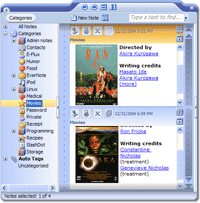 EverNote is note taking software, it’s also capable of recognizing digital ink (handwritten notes on a tablet) and multiple other formats, as well as images, emails, html, and supports custom templates. EverNote is note taking software, it’s also capable of recognizing digital ink (handwritten notes on a tablet) and multiple other formats, as well as images, emails, html, and supports custom templates.
It stores your notes, handwritten memos, ideas, brainstorms, etc. It stores them in chronological order and you can also create categories to help you better organise things. As well as this, it also has a powerful search function.
A cool, useful little feature I like is the ability to download a Firefox extension or Internet Explorer button at the homepage, so you can instantly select webpage text and “add to evernote”. It can also encrypt your notes for added security and peace of mind.
For the full list of features, which is pretty impressive for this neat little program,(spell checker, synchronisation, support for a wide range of pen tablets, drag and drop support, and more) check out the homepage here where it’s available in both free and pro versions.
Posted in Developer, Information Management, Main, Shareware, Social Software, Text, Utilities, Windows | No Comments »
|
|
|

 If you are one of those making money off Google’s Adsense program then this software will definitely be useful for you. It’s called SysSense.


