Archive for the 'Windows' Category
Wednesday, July 18th, 2007
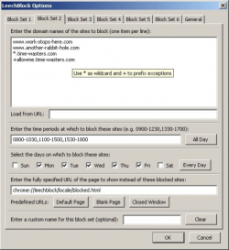 Leechblock is an add-on for Firefox which aims to help you get more out of your time. It does this by allowing you to selectively block access to websites defined by you during certain hours of certain days or everyday if you prefer. Leechblock is an add-on for Firefox which aims to help you get more out of your time. It does this by allowing you to selectively block access to websites defined by you during certain hours of certain days or everyday if you prefer.
So in theory, no longer will you waste too much time on things such as browsing social network sites and other peoples social bookmarks or reading too much of a certain free encyclopedia website. Instead, you can use your time more productively and exclude those time-eating activities to certain hours only or certain days only.
It also allows you to add a password, not to protect it, but to make it more difficult for you to try to by-pass it during moments of weakness! It’s highly customizable and does what it says, (at least until you give in and disable it!)
Check it out at the LeechBlock homepage here.
Posted in Browsers, Business, Design, Developer, FireFox, Freeware, Main, Time Managment, Utilities, Windows | No Comments »
Wednesday, July 18th, 2007
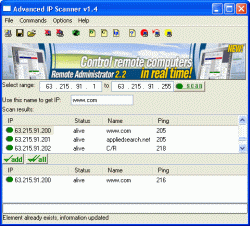 Whether you are looking for a way to get in touch with someone you missed on a chat room or simply just looking for information about some of the local computers on a network, you can used the Advanced IP Scanner 1.5 to get all of the lowdown that you could possibly want. You can actually use its amazing and user friendly interface to do everything in a breeze and when you take a look at the Advanced IP Scanner 1.5 in relation to other stuff that’s out there, it really becomes a no brainer as to which software type is better. Whether you are looking for a way to get in touch with someone you missed on a chat room or simply just looking for information about some of the local computers on a network, you can used the Advanced IP Scanner 1.5 to get all of the lowdown that you could possibly want. You can actually use its amazing and user friendly interface to do everything in a breeze and when you take a look at the Advanced IP Scanner 1.5 in relation to other stuff that’s out there, it really becomes a no brainer as to which software type is better.
The 1.5 version comes with an updated interface, more online help functions, improved scanning ability, optimized speed and a lot of odds and ends fixed up here and there. You can actually use the scanner with one-click methodology as a lot of its more important functions are actually accessible through one click. It is a very impressive piece of software that people have been using to help themselves for a very long time now and it only gets more impressive with each new release.
More information about it can be found at http://www.radmin.com/radmin/utility
Posted in Business, Developer, Freeware, Internet, Main, Utilities, Windows | 2 Comments »
Tuesday, July 17th, 2007
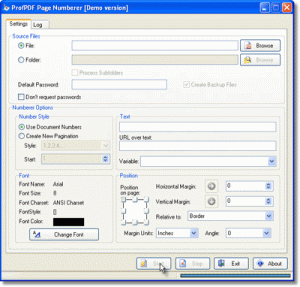 The Sybrex SpeedPDF numberer is a useful utility for people who do not have the Adobe Acrobat writer software. In case you want to insert a new pagination scheme in your document or want to make batch numbers while getting your PDF documents printed then this software can come in handy. Also if you wish to send some document over to a colleague, you can use this tool to place certain taglines in the PDF document. The Sybrex SpeedPDF numberer is a useful utility for people who do not have the Adobe Acrobat writer software. In case you want to insert a new pagination scheme in your document or want to make batch numbers while getting your PDF documents printed then this software can come in handy. Also if you wish to send some document over to a colleague, you can use this tool to place certain taglines in the PDF document.
The software has an easy installation process and a neat interface. It works easily on all contemporary versions of Windows. It has facility for giving passwords and also creating backup files. The font options are suitable for any normal use. You can choose your preferred font size along with font color. A number of pagination styles are available. Depending upon your requirement you can choose the pagination style from the drop down list. There is a graphical control to set position on the page through margin units. You can select the horizontal as well as vertical margins and even the angles. Once you select the options and press on start button, the pagination process starts. Small PDF documents are instantly paginated. It works effortlessly on even large PDF documents with equal ease. You can also inset URL links on the pages if you so desire. The software also maintains a log of all documents that it has paginated including the destination drive.
On the downside the software is quite basic to hold the imagination of any professional user. Since it does not give any tangible text editing options, the software falls short of expectations of many users. It also lacks any help instructions that may be required by novice users. It is recommended in case you do not have Adobe Acrobat writer software and are frequent user of PDF documents.
(More Info and Download)
Posted in Business, Design, Developer, Multimedia, Shareware, Utilities, Windows | No Comments »
Tuesday, July 17th, 2007
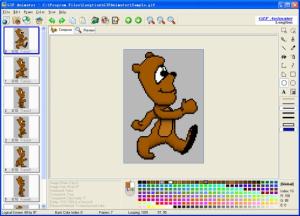 If you are a web designer looking for creating those stunning animated images for your website then you should definitely try out the Longtion Gif Animator. Loaded with interesting features this piece of creative software allows you create seamless animations for your website with effortless ease. It provides support for multiple file types and achieves a high degree of compression while creating the images; thus reducing files sizes and making your web pages load faster. If you are a web designer looking for creating those stunning animated images for your website then you should definitely try out the Longtion Gif Animator. Loaded with interesting features this piece of creative software allows you create seamless animations for your website with effortless ease. It provides support for multiple file types and achieves a high degree of compression while creating the images; thus reducing files sizes and making your web pages load faster.
The software is a breeze to install and the navigation menu is quite neat. The software has an attractive look and feel. With easy controls even an average user can create professional looking animations. You can make Slide Show style Gifs or even Text Style Gifs. One just needs to click on the New Gif tab and then select the frame sizes. Next just use the Add frame options to add all the pictures that you wish to put into different frames. In few moments your basic animated Gif file is ready. Now for getting the professional touch, the software has tabs like Frame property and competent image editing tools. You can easily set the frame properties including transparency options. It also has the options for placing time intervals between two successive frames used in the animation. Next with image editing tools you can crop images, draw lines and make host of other changes as required. The tool has decent features that are required for creating good Gif animations. It also comes in handy for novice users who may want to use it for creating animations for their profile homepages.
The software comes with a Help section which though lacks details. Also the software itself could do well with more animation styles and effects. Overall the software is worth a try if wish to quickly create Gif animations.
(More Info and Download)
Posted in Animation, Design, Developer, Fun, Internet, Photo, Shareware, Windows | No Comments »
Thursday, July 12th, 2007
 KoolIM is a site that allows you instant access to your instant messengers. There’s no extra software to download or anything, you just go to the KoolIM website. It’s perfect for when you’re at an internet cafe computer that doesn’t have your usual IM client installed, or maybe you’re just a neat freak and you don’t really wanna bother installing several IM clients to clutter up your pc. KoolIM is a site that allows you instant access to your instant messengers. There’s no extra software to download or anything, you just go to the KoolIM website. It’s perfect for when you’re at an internet cafe computer that doesn’t have your usual IM client installed, or maybe you’re just a neat freak and you don’t really wanna bother installing several IM clients to clutter up your pc.
You can easily sign on to AIM, MSN Messenger, Yahoo Messenger, Google Talk, and ICQ using your existing screen names and passwords. So if you use different computers a lot and just want to use the regular basic features of instant messaging, its worth checking out.
Go here and see for yourself. It even works from behind firewalls or proxy servers!
Posted in Developer, Information Management, Internet, Main, Security, Social Software, Web services, Windows | No Comments »
Thursday, July 12th, 2007
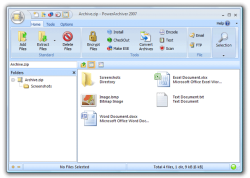 If you’ve been looking for a great archiver that supports most compressed and encoded files, then this is the way to go. PowerArchiver is a great archive utility for Windows and it provides support for most compressed and encoded files, as well as access to many powerful features and tools. The cool thing about this software is that it does all these through an easy to use interface that seamlessly integrates with Windows Explorer. If you’ve been looking for a great archiver that supports most compressed and encoded files, then this is the way to go. PowerArchiver is a great archive utility for Windows and it provides support for most compressed and encoded files, as well as access to many powerful features and tools. The cool thing about this software is that it does all these through an easy to use interface that seamlessly integrates with Windows Explorer.
Incase you are wondering what kind of stuff this tool supports , here you go; PowerArchiver supports ZIP, 7-ZIP, CAB, LHA (LZH), TAR, TAR.GZ, TAR.BZ2, BH, RAR, ARJ, ARC, ACE, ZOO, GZ, BZIP2, XXE, MIME, UUE and yENC file formats. An internal viewer displays TXT, RTF, and more than 18 image formats.
PowerArchiver creates and works with unlimited size ZIP archives with enhanced ZIP format speed and compression.
That’s not all. You will love the Password Manager that helps store your frequently used passwords. You can also encrypt your archives using 5 different methods including 256-bit AES. What about back ups? This software backs up your work with PowerArchiver’s Auto-Backup tool and FTP support. And so much more
If you are not a native English speaker not to worry other editions of this cool software are available in German and French.
In the latest version, PowerArchiver 2007 10.2 Beta 1 the significant changes include:
- New Ribbon Interface;
- Configuration Screen on startup for selecting classic or Ribbon interface.
For more info and trial download go to http://www.powerarchiver.com/
Posted in Archive, Business, Commercial, Developer, FTP, Main, Programming, Utilities, Windows | No Comments »
Wednesday, July 11th, 2007
 Scribd is a very interesting site for anyone who likes to read a lot! So if you are the type of person who spends a lot of time at the library or reading stuff at magazine racks without actually buying anything, this site is something you’ll love spending time at! Scribd is a very interesting site for anyone who likes to read a lot! So if you are the type of person who spends a lot of time at the library or reading stuff at magazine racks without actually buying anything, this site is something you’ll love spending time at!
Scribd enables anyone to upload any kind of document for easy online browsing by visitors to the Scribd site. Multiple document formats are supported. There’s a lot of interesting and random documents to be viewed ranging from photos, ebooks, classic books, serious stuff, humorous stuff and random things of almost any subject you can think of. The site also has several different language versions.
The simplest way to describe it is that it’s like the YouTube of documents. Check it out for yourself, but be warned, you could be there for quite a while once you get stuck into something!
Posted in Business, Catalogue, Developer, Information Management, Internet, Main, Social Software, Web services, Windows | No Comments »
Wednesday, July 11th, 2007
 Here is a really useful tool for opera users, it’s called oSync. Here is a really useful tool for opera users, it’s called oSync.
This cool tool provides a simple and secure way to synchronize Opera bookmarks between computers. You will also love the fact that it can backup your bookmarks or publish them as HTML and clean up bloated bookmark files. And when it comes to the synchronizing, it really delivers in style, it can be completely automated and is aimed to be as transparent as possible for the user.
It is now also available on Opera Mini, meaning you can now use it on your mobile phone since Opera Mini is a free mobile browser.
For free download of o Sync visit http://osync.sourceforge.net/index2.html
Posted in Backup, Browsers, Developer, Freeware, Internet, Main, Utilities, Windows | No Comments »
Tuesday, July 10th, 2007
 “Computerize Your Assets” is home inventory software for making a list of everything you have in your home. Everyone hopes it won’t happen to them, but his could be very useful in an unfortunate event of fire, theft or natural disasters like flooding etc. “Computerize Your Assets” is home inventory software for making a list of everything you have in your home. Everyone hopes it won’t happen to them, but his could be very useful in an unfortunate event of fire, theft or natural disasters like flooding etc.
It can be useful to show police or insurance companies in such situations, also it’s hard to memorize absolutely everything you own anyway! Especially regarding brand, model, serial number and cost. It has a lot of useful features such as unlimited categories,items and locations, encryption, graphs, picture and video support, and much more than I can list right here.
If this sounds like it could save you from a lot of trouble someday for whatever reasons such as your home location, local water levels or weather patterns , etc, Its definitely worth checking out at the site here for much more info.
Posted in Developer, Finance, Information Management, Main, Shareware, Utilities, Windows | 3 Comments »
Monday, July 9th, 2007
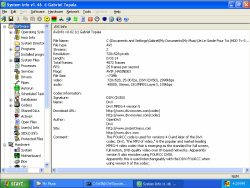 The latest updated version of this cool software is out- SIW 1.69 Build 632. If you don’t know about SIW before let me let you in on the gist: The latest updated version of this cool software is out- SIW 1.69 Build 632. If you don’t know about SIW before let me let you in on the gist:
SIW is a Read-Only / Display-Only System Information tool that gathers detailed information about your system properties and settings.
It is a utility that includes detailed specs for Motherboard, BIOS, CPU, Devices, Memory, Video, Drivers, Ports, and Printers. SIW also displays information about Operating System, Installed Programs, Processes, Services, Serial Numbers, Users, Open Files, System uptime, Users, Network, Network Shares, etc.
With this software you also get real-time monitors for CPU, Memory, Page File usage and network traffic. It also displays currently active network connections, Passwords hidden behind asterisks, installed codecs, and more.
Think it’s worth checking out? Well It’s FREEEEE so it won’t cost you anything but rather give you a lot.
Go check it out at http://www.gtopala.com/index.html
Posted in Developer, Freeware, Information Management, Main, Security, Utilities, Windows | No Comments »
|
|
|




