Archive for the 'Developer' Category
Thursday, March 22nd, 2007
 RocketDock is a Mac-inspired dock for Windows users. For those that don’t know, a dock is fancy toolbar with some effects and added functionality thrown in and is a standard feature on Mac computers. It comes from the same people who made UberIcon, which i recently reviewed and if you also use that, Rocketdock also includes a function to use the same effects as you have chosen in UberIcon. RocketDock is a Mac-inspired dock for Windows users. For those that don’t know, a dock is fancy toolbar with some effects and added functionality thrown in and is a standard feature on Mac computers. It comes from the same people who made UberIcon, which i recently reviewed and if you also use that, Rocketdock also includes a function to use the same effects as you have chosen in UberIcon.
Some of its features include the ability to minimize windows to the dock and real-time window previews in Vista, ObjectDock Docklet support,compatible with MobyDock, ObjectDock, RK Launcher, and Y’z Dock skins, you can use icon sets you find online, and apparently it runs great on slower computers too!
Check the site for the full list of features.
Maybe you are a Mac user and want to have similar functionality on your Windows machine, or even if you just want to liven up your Windows desktop a little, it’s worth checking out this very smooth and very customizable and also very free program. Click here for more info and to download it.
Posted in Design, Developer, Freeware, Information Management, Internet, Mac Stuff, Main, Shell and Desktop, Utilities | 6 Comments »
Thursday, March 22nd, 2007
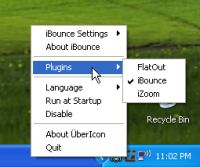 This is a cool little program that adds cool effects when you click on icons in your PC such as folder or program icons. This is a cool little program that adds cool effects when you click on icons in your PC such as folder or program icons.
It has plugin-based effects, so users can create their own effects and it includes 3 pretty cool looking ones as default. Some extra ones can be download from here. You choose which particular effect you want to use by right clicking on the tray icon and clicking “Plugins”.
This program has apparently been made just for fun, so depending on your point of view, you will either think its a cool addition to customizing your computer, or just another thing that doesn’t do much.
Whatever your opinion, it’s free, so to see it in action, go try it out as its easier to see working than it is to try and describe it click here for more info and to download it.
Posted in Design, Developer, Freeware, Fun, Main, Shell and Desktop, Windows | No Comments »
Thursday, March 22nd, 2007
 This is a free online service which enables you to add comic book style captions to photos. You can then send your friends the url of your captioned photo. This is a free online service which enables you to add comic book style captions to photos. You can then send your friends the url of your captioned photo.
It’s simple to use, you simply go to the site and then enter the url of the photo you wish to add a caption to, this can be your own photo, or one you find online, anything at all really. On the next screen you can type your caption in a speech bubble. To position the speech bubble you just click and drag the edge of it.
On the next screen you just click “save scene” and now you can bookmark the url or send it to your friends.
Pretty cool site that’s sure to get some laughs when you add funny captions to your friend’s photos. Check it out here.
Posted in Developer, Fun, Internet, Main, Photo, Shell and Desktop, Web services, Windows | No Comments »
Thursday, March 22nd, 2007
 Here is an arcade-style puzzle game, you might find interesting. It’s called Clickris. Clickris is an arcade-style puzzle game that is designed to give you loads of fun, if you are a puzzle game fan. Here is an arcade-style puzzle game, you might find interesting. It’s called Clickris. Clickris is an arcade-style puzzle game that is designed to give you loads of fun, if you are a puzzle game fan.
How The Game Is Played:
- In Clickris, the goal of the game is very simple, get as many points as you can by removing stones from the game field
- You simply click on groups of stones with the same picture, but not on isolated stones
- Clicking on such a group, the group vanishes and the stones on top of them fall down. New lines appear, every now and then
- If any stone touches the top of field, you are out of luck and out of points, Game Over!!!!
Clickris is not free but you can check out the trial or test version for 15 days, ample time to determine if this is worth spending your money on. The trial version as to be expected does not have the full features but you can still enough of the game to make an informed choice.
Want to try it? CLICK HERE
Posted in Developer, Fun, Games, Main, Shareware, Windows | No Comments »
Thursday, March 22nd, 2007
 Face it, who really reads the EULA’s ( End User License Agreement) in software they install? Most of us just scroll ahead and click “Accept”. But it’s something we all should do because if we don’t, we can eventually wind up with all kinds of spyware on our computers that could lead to serious problems.This program analyses the EULA and picks out suspicious text in it, letting you know if there’s anything you don’t want to agree to, such as installing adware or transmitting personally identifiable information etc. Face it, who really reads the EULA’s ( End User License Agreement) in software they install? Most of us just scroll ahead and click “Accept”. But it’s something we all should do because if we don’t, we can eventually wind up with all kinds of spyware on our computers that could lead to serious problems.This program analyses the EULA and picks out suspicious text in it, letting you know if there’s anything you don’t want to agree to, such as installing adware or transmitting personally identifiable information etc.
A useful tool for anyone who cares about their privacy and doesn’t fancy going to law school in order to figure out what the five minutes of reading an EULA just meant!
Its free, get it here.
Posted in Business, Commercial, Developer, Freeware, Games, Information Management, Main, Security, Shareware, Utilities, Windows | No Comments »
Wednesday, March 21st, 2007
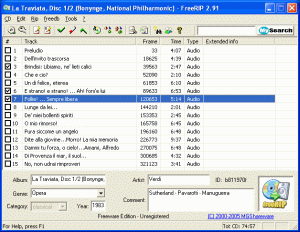 Here is a freeware that can help you get your digital audio tracks recorded quite easily. Here is a freeware that can help you get your digital audio tracks recorded quite easily.
FreeRIP MP3 can record digital audio tracks directly from compact discs, without going through your sound card. You can save tracks as CD-quality WAV files or encode them to Ogg Vorbis or MP3 compressed format.
With FreeRIP, you can convert audio files from one format to another; WMA and Wav files to MP3 or Ogg Vorbis, and vice versa. One very useful feature that comes with this software is the music search bar which helps you search for MP3 and music files on the Internet, or search for CDs in Amazon.com CD catalogue.
Want something in your own language? well this might just be the thing for you, FreeMp3 offers multilingual support as it supports 25 languages.
Though FreeRIP MP3 is supposed to be freeware; the publisher welcomes your support through registration. The truth is registering this program will suppress the splash screen at startup.
Want To See If This Is For You?
Try It Out HERE!
Posted in Audio, Developer, Freeware, Fun, Main, Multimedia, Music, Windows | No Comments »
Wednesday, March 21st, 2007
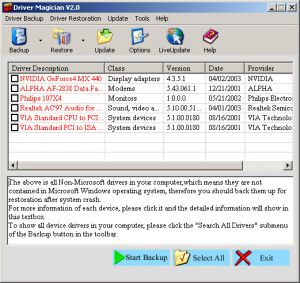 If you ever need a tool to extract and back up your drivers easily and quickly, this software can do the magic. If you ever need a tool to extract and back up your drivers easily and quickly, this software can do the magic.
Driver Magician is an easy-to-use and powerful tool for driver backup and restoration in Windows operation system. It helps you to extract device drivers from your hard disk and back up them to any location you specified.
You will really appreciate how easy this will make your in case of a system crash or something. When you reinstall operation system after system crash, you just select device drivers you want to restore, then it can restore them from driver backup quickly and easily without inserting any driver disk.
The cool thing is all you need is just a system reboot and all your hardware will be back in peak condition.
But that’s not all, it can back up and restore more items such as My Documents folder, Desktop, Registry, Internet Explorer favourite folder, data files of Outlook and Outlook Express.
The latest version, Driver Magician 3.18, which just hit the software market yesterday, March 20th, has these changes:
- Fixed: a bug of memory leak
- Updated: unknown devices database and drivers update database
- Back up drivers of non-present devices
- Some minor tweaks
Still not sure this is for you?
Here is a list of the features you’ll enjoy:
- Back up device drivers of your computer in four modes
- Restore device drivers from backup in one mouse click
- Update device drivers of your PC to improve system performance and stability
- Live Update device identifier database and driver update database
- Detect unknown devices
- Back up more items such as My Documents and Registry
- Restore more items from backup
- Get detailed information of the hardware drivers
- Clone all drivers to an auto-setup package (.EXE), so you can restore drivers without installing Driver Magician
Ready to experience the magic of Driver Magician?
CLICK HERE or visit http://www.drivermagician.com/
Posted in Backup, Developer, Information Management, Main, Security, Shareware, USB, Utilities, Windows | No Comments »
Wednesday, March 21st, 2007
 Do you have a favourite internet radio station you like to listen to online? Wouldn’t it be great if something could save every song from it to your computer automatically? Do you have a favourite internet radio station you like to listen to online? Wouldn’t it be great if something could save every song from it to your computer automatically?
Well that’s what this program does!
It’s very easy to install and very intuitive to use. For each stream that you select, StationRipper creates a separate folder where it saves each of the mp3’s from that streamed as individual files.
Later on, you can simply delete the ones you don’t want and keep the ones you like, for you to listen to any time you want. The new version will download album art for you – saving the album art with the MP3. Pretty cool way to save new music you discover.
Check it out and get more info here.
Posted in Audio, Developer, Fun, Main, Music, Radio, Shareware, Utilities, Windows | No Comments »
Tuesday, March 20th, 2007
 Need help monitoring and recording all activities on your computer? This software may be the help you need. Highly recommended all over the net Advanced Spy is one software that does what it is supposed to do perfectly.What Does It Do? Need help monitoring and recording all activities on your computer? This software may be the help you need. Highly recommended all over the net Advanced Spy is one software that does what it is supposed to do perfectly.What Does It Do?
It records all e-mails sent and received, all AOL, ICQ, Yahoo and MSN chat conversations, all web sites visited, every application executed, all text and images sent to the clipboard, every keystroke pressed, every password typed, and more!
You will love the fact that it can run in Total Stealth mode and send activity logs to your email and/or upload to ftp server. Advanced Spy is perfect for monitoring others who use your computer – children, spouses, employees, or guests!
Advanced Spy is also enhanced with other advanced features like; Email and log delivery, alert window, search in logs, and log exporting.
Want To Check It Out? CLICK HERE
Posted in Business, Developer, FTP, Internet, Main, Security, Shareware, Utilities, Windows | 1 Comment »
Tuesday, March 20th, 2007
Check out this useful tool that will definitely come in handy. It is called Digital Diary.
Digital Diary is a tool to write your diaries every day without needing to write your stuff in text files (Notepad). This cool tool comes with features which helps you to organize your time and minimize your effort.
In the Latest version, Digital Diary 4.0, released just a couple of days ago, on March 15, these changes were made:
Added:
- Send e-mails using Digital Diary Mailer
- Insert bullets, images and emotions to diary pages
- Getting version of the backup file in Digital Diary upgrader
- SMTP sever records can be imported from other Digital Diary account using
- Digital Diary upgrader
- Save your work when selected page or content changes (Options)
- Force to use a specific font (Options)
Fixed:
- Critical bug may appear while creating new user, logging or opening options
- Scrolling in contents list
- RSS dialog sometimes wasn’t show up in the top of other opened Windows
- Minimum window size for Help window
- Icons alpha appearance on Windows Vista
- Saving images in Digital Diary Gallery with names contain apostrophe
And lots more.
Check It Out here http://www.infradrive.com/digitaldiary.php.
Posted in Chat, Design, Developer, Fun, Internet, Main, Open Source, Social Software, Windows | No Comments »
|
|
|




